







Question: Lab 4 Creating Constraints Save screen captures of all SQL statements used to accomplish the following tasks. Save your screen captures in a word document
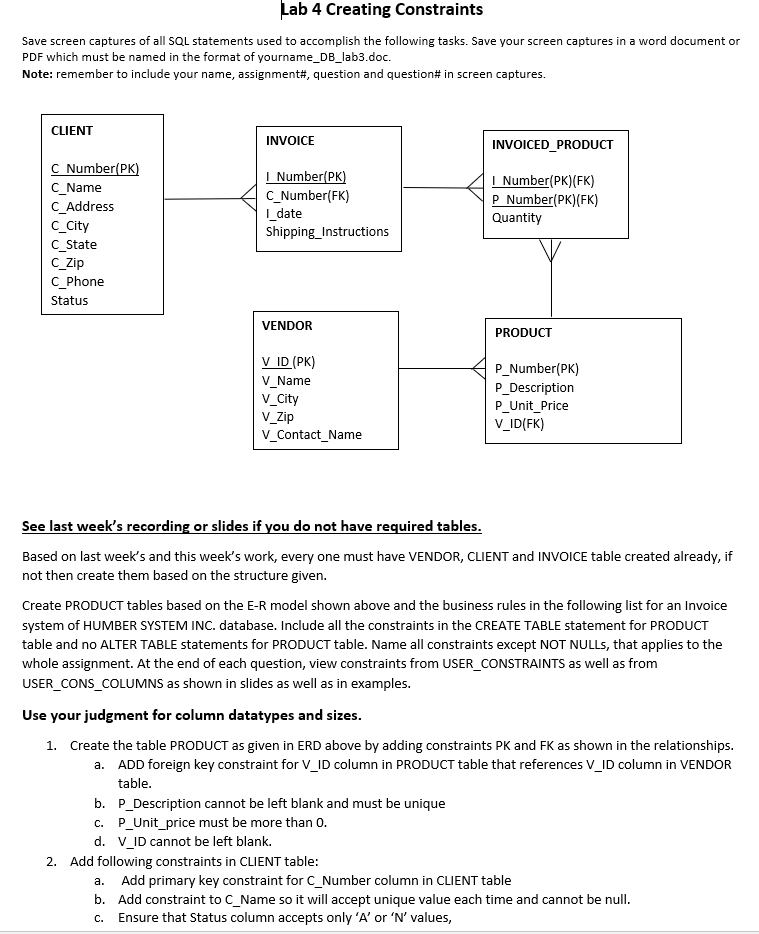
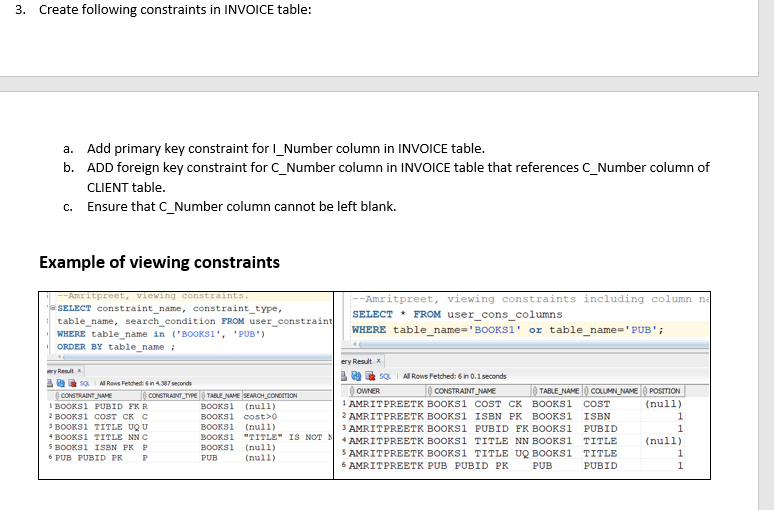
Lab 4 Creating Constraints Save screen captures of all SQL statements used to accomplish the following tasks. Save your screen captures in a word document or PDF which must be named in the format of yourname_DB_lab3.doc. Note: remember to include your name, assignment#, question and question# in screen captures. CLIENT INVOICE INVOICED_PRODUCT C Number(PK) C_Name C_Address C_City C_State C_Zip C_Phone Status I Number(PK) C_Number(FK) |_date Shipping_Instructions I Number(PK)(FK) P Number(PK)(FK) Quantity VENDOR PRODUCT V ID (PK) V_Name V_City V_Zip V_Contact_Name P_Number(PK) P_Description P_Unit_Price V_ID(FK) See last week's recording or slides if you do not have required tables. Based on last week's and this week's work, every one must have VENDOR, CLIENT and INVOICE table created already, if not then create them based on the structure given. Create PRODUCT tables based on the E-R model shown above and the business rules in the following list for an Invoice system of HUMBER SYSTEM INC. database. Include all the constraints in the CREATE TABLE statement for PRODUCT table and no ALTER TABLE statements for PRODUCT table. Name all constraints except NOT NULLs, that applies to the whole assignment. At the end of each question, view constraints from USER_CONSTRAINTS as well as from USER_CONS_COLUMNS as shown in slides as well as in examples. Use your judgment for column datatypes and sizes. 1. Create the table PRODUCT as given in ERD above by adding constraints PK and FK as shown in the relationships. a. ADD foreign key constraint for V_ID column in PRODUCT table that references V_ID column in VENDOR table. b. P_Description cannot be left blank and must be unique C. P_Unit_price must be more than 0. d. V_ID cannot be left blank. 2. Add following constraints in CLIENT table: a. Add primary key constraint for C_Number column in CLIENT table b. Add constraint to C_Name so it will accept unique value each time and cannot be null. Ensure that status column accepts only 'A' or 'N' values, C. 3. Create following constraints in INVOICE table: a. Add primary key constraint for I_Number column in INVOICE table. b. ADD foreign key constraint for C_Number column in INVOICE table that references C_Number column of CLIENT table. Ensure that C_Number column cannot be left blank. C. Example of viewing constraints ery Rest -Amritpreet, viewing constraints. Amritpreet, viewing constraints including column na SELECT constraint_name, constraint_type, table_name, search_condition FROM user_constraint SELECT * FROM user_cons_columns WHERE table_name in ('BOOKSI', 'PUB) WHERE table_name='BOOKS1' or table_name='PUB'; ORDER BY table_name; ery Result B SQL Al Rows Fetched: 6 in 0.1 seconds SOU A Rows Festhet: in 4.387 seconds CONSTRAINT_NAME CONSTRAINT_TYPE TABLE_NAME SEARCH_CONDITION OWNER CONSTRAINT_NAME TABLE_NAME COLUMN_NAME POSITION BOOKS1 PUBID EKR BOOKS1 (null) 1 AMRIT PREETK BOOKS1 COST CK BOOKS1 COST (null) 2 BOOKS1 COST CK C BOOKS cost> 2 AMRIT PREETK BOOKS1 ISBN PK BOOKS1 ISBN 1 3 BOOKS1 TITLE UQU BOOKSI (null) 3 AMRIT PREETK BOOKSI PUBID FK BOOKSI PUBID 1 4 BOC TITLE NNC BO KSI TITLE" IS NOT AMRIT PREETK BOOKS1 TITLE NN BOOKSI TITLE (null) 5 BOOKS1 ISBN PKP BOOKS1 (null) 6 PUB PUBID PK P PUB (null) 5 AMRIT PREETK BOOKS1 TITLE UQ BOOKSI TITLE 1 6 AMRITPREETK PUB PUBID PK PUB PUBID 1
Step by Step Solution
There are 3 Steps involved in it

Get step-by-step solutions from verified subject matter experts
 Study Help