







Question: $ $ Lab Activity - Part 2 (60 pts) For the rest of this lab we will practice writing regular expressions and using the grep
 $ $
$ $
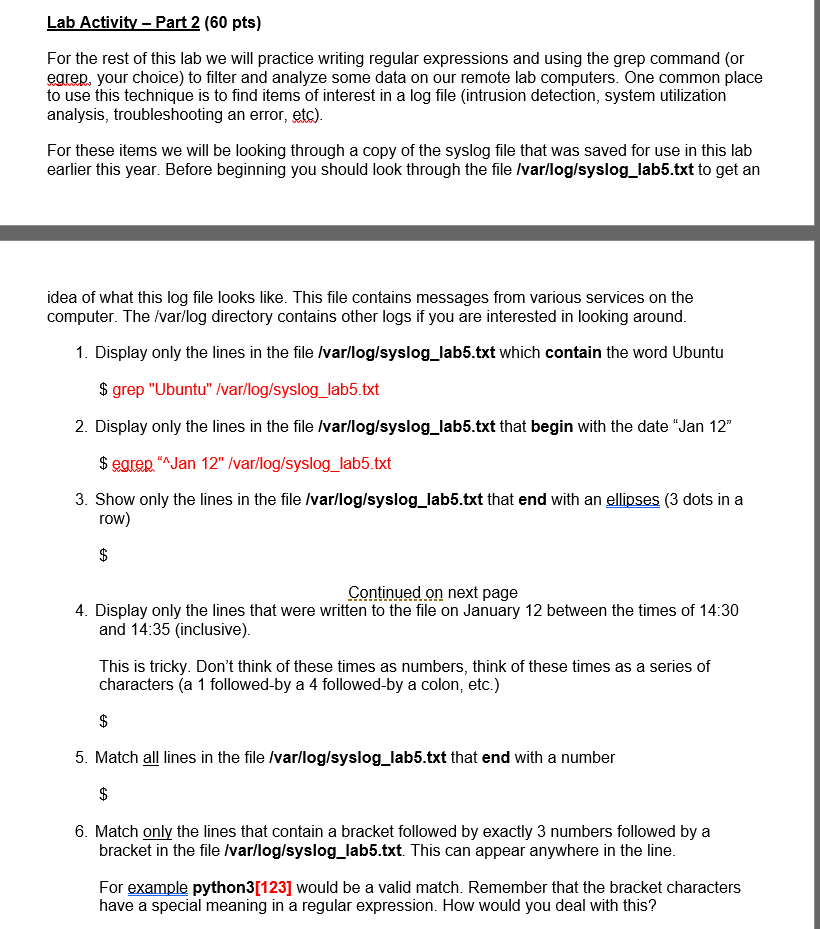
Lab Activity - Part 2 (60 pts) For the rest of this lab we will practice writing regular expressions and using the grep command (or egrep, your choice) to filter and analyze some data on our remote lab computers. One common place to use this technique is to find items of interest in a log file (intrusion detection, system utilization analysis, troubleshooting an error, etc). For these items we will be looking through a copy of the syslog file that was saved for use in this lab earlier this year. Before beginning you should look through the file /var/log/syslog_lab5.txt to get an idea of what this log file looks like. This file contains messages from various services on the computer. The /var/log directory contains other logs if you are interested in looking around. 1. Display only the lines in the file /var/log/syslog_lab5.txt which contain the word Ubuntu $ grep "Ubuntu" /var/log/syslog_lab5.txt 2. Display only the lines in the file /var/log/syslog_lab5.txt that begin with the date "Jan 12" $ egren."Jan 12" /var/log/syslog_lab5.txt 3. Show only the lines in the file /var/log/syslog_lab5.txt that end with an ellipses (3 dots in a row) $ Continued on next page 4. Display only the lines that were written to the file on January 12 between the times of 14:30 and 14:35 (inclusive) This is tricky. Don't think of these times as numbers, think of these times as a series of characters (a 1 followed by a 4 followed-by a colon, etc.) $ 5. Match all lines in the file /var/log/syslog_lab5.txt that end with a number $ 6. Match only the lines that contain a bracket followed by exactly 3 numbers followed by a bracket in the file /var/log/syslog_lab5.txt. This can appear anywhere in the line. For example python3[123] would be a valid match. Remember that the bracket characters have a special meaning in a regular expression. How would you deal with this
Step by Step Solution
There are 3 Steps involved in it

Get step-by-step solutions from verified subject matter experts
 Study Help