







Question: Lab Description: In this lab you will creating a 4 - bit Arithmetic and Logic Unit ( ALU ) . This is the heart of
Lab Description:
In this lab you will creating a bit Arithmetic and Logic Unit ALU This is the heart of a microprocessor and the circuit can start to get very complicated. Take your time, be careful with your connections and busses and test, test, test! As always, the lab manual does an excellent job explaining what you need to know. The lab starts on page of your Lab Manual.
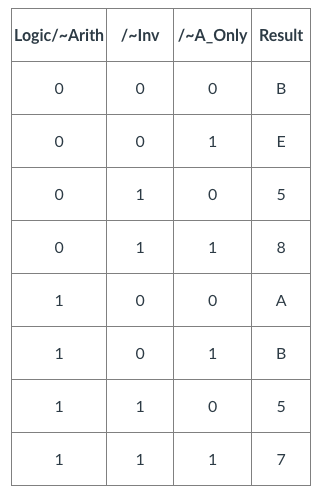
In addition to the normal LogicWorks files you will be turning in listed at the bottom you are also to turn in a file which lists the functions of your ALU. Specifically, fill in the following table. I have provided the possible answers afterwards. You can do this by tracing the logic in your circuit, or by testing. The file can be Word, Excel, Text, PDF or anything else I can read.
You are filling in the last column of the following table with the answers that are listed BELOW this table.
Example: The first row is asking what function do you get when ~AOnly is LOW, Logic~Arith is LOW and ~Invert is LOW? Put another way, what function takes only an A is an Arithmetic operation not a logical one and A is somehow inverted? Of the possible answers, only of them include ONLY an A no B: A A A NOT A Which of these is an arithmetic operation not a LOGICAL operation and involves an inverse? My guess is A It involved arithmetic and an inverse. Now you do the other rows.
~AOnly Logic~Arith ~Invert Function
Possible Functions:
ANOT A OR B A you can use this answer twice A B A OR B B A NOT A
Hint: You are to fill in the last column of the table with the answers that are listed ABOVE. For example, the first row is asking, what function do you get when ~AOnly is LOW, Logic~Arith is LOW and ~Invert is LOW? Put another way, what function takes only an A is an Arithmetic operation and A is somehow inverted? Of the possible answers, only of them include ONLY an A no B: A A A NOT A Which of these is an arithmetic operation not a LOGICAL operation and involves an inverse? My guess is A It involved arithmetic and an inverse. Now you do the other
Notes:
The lab manual talks about writing a lab report. We will not be doing this. Your circuits will speak to your success on this project.
The manual includes a "Lab Report Grade Sheet" and "SelfAssessment Worksheet". These are not needed.
Make sure the file names and components match the required names exactly: Spelling, UpperLowercase Underscores.
Reminder: The best demos will have labeled binary switches or hex keypads on the left side, the circuit or components in the middle and labeled binary probes or hex displays on the right.
If you are interested, check out the spec for Links to an external site.. You cannot use this for your project even though it is in one of the libraries
Your design must use Hex keypads and Hex displays when a bit number is being used. For example:
AddOr.png
Required Activities:
Read through the Lab and perform each of the activities.
What to Submit:
Circuit Files
Addordemo
ALUdemo
Notnegdemo
Library Components in flast.clf
ADDOR
ALU
NOTNEG
Other
Function Table as described above
Testing:
Here is some sample data you can use for testing your circuit.
AddOr
Input:
A
B
Output:
Add B
Add Cin C
OR
Pass Through
NotNeg
Input:
A
Output:
Not A
Neg B
Pass Through
ALU
Input:
A
B
Cin
Output:
Logic~Arith
~Inv
~AOnly
Result
B
E
A
B
RubrictableLogic Arith, Inv, AOnly,ResultBEA
It would almost be nice if you could make a video so I could follow along Im really struggling with this
Step by Step Solution
There are 3 Steps involved in it
1 Expert Approved Answer
Step: 1 Unlock

It seems that the image content was not accessible Ill attempt to analyze it again and ans... View full answer
Question Has Been Solved by an Expert!
Get step-by-step solutions from verified subject matter experts
Step: 2 Unlock
Step: 3 Unlock
 Study Help