







Question: /** * Lab-02_FileIO-OOP * @author (put your name here) * */ // =================================== // Instructions: // 1. Create a Car class and match // up
/** * Lab-02_FileIO-OOP * @author (put your name here) * */ // =================================== // Instructions: // 1. Create a Car class and match // up the fields with the fields // from the text file. // 2. Code an importer and save // Car records in an ArrayList // 3. Follow the instructions below // for the code to build // // ** For your Car class include: // Section breaks // Constructors // Workhorse // String // String array // copy // clone() // equals() // toString() // Getters // Setters // // =================================== public class Tester { // Create an ArrayList
// ======================================== // 2001 Honda Accord $24,200 // 1980 Pontiac Grand Prix $ 500 // 1995 Civic $12,150 // ... } private static void printCarsByMake(String make) { // Prints all cars by the given make // Example output: // // Honda // =========================== // 2001 Accord $24,200 // 1995 Civic $12,150 // ... } private static void printCarsByPriceRange(int lo, int hi) { // Prints all cars that costs from lo to hi // Example output: // // Cars costing $20,400 to $21,300 // ======================================== // Cost Year Car // ------- ---- -------------------------- // $24,200 2001 Honda Accord // $ 500 1980 Pontiac Grand Prix // ... }
}
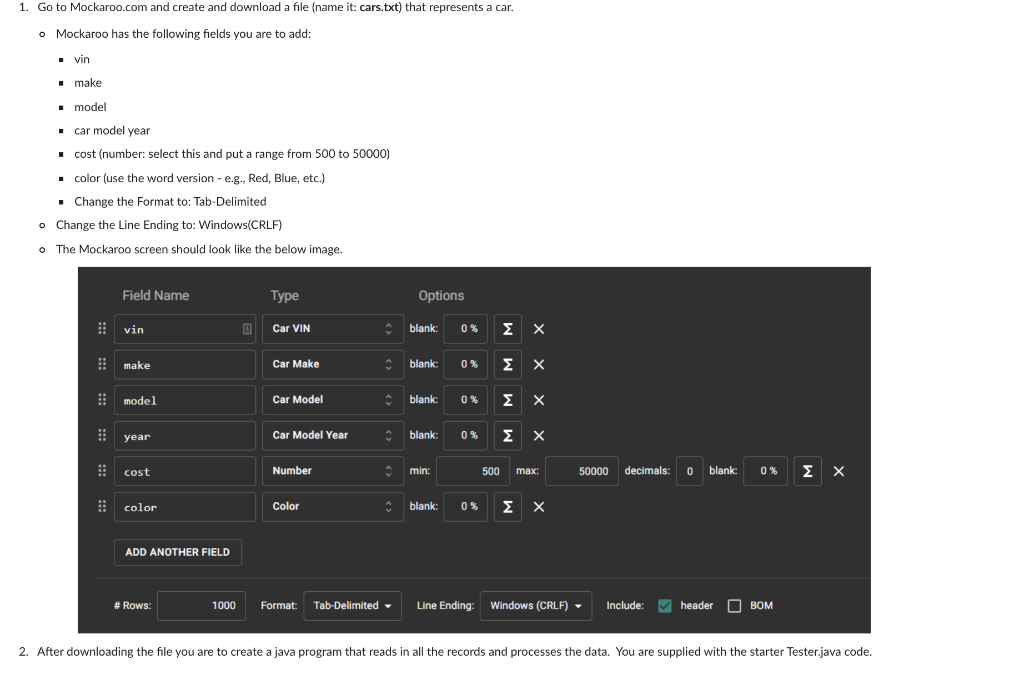
1. Go to Mockaroo.com and create and download a file (name it: cars.txt) that represents a car. o Mockaroo has the following fields you are to add: vin make model . car model year cost (number: select this and put a range from 500 to 50000) color (use the word version - e.g., Red, Blue, etc.) Change the Format to: Tab-Delimited o Change the Line Ending to: Windows(CRLF) o The Mockaroo screen should look like the below image. Field Name Type Options vin D Car VIN blank: 0 % make Car Make blank: 0% 0 model Car Model blank: 0 % year Car Model Year blank: 0 % cost Number min: 500 max: 50000 decimals: o blank: 0% color Color blank: % 0 % X ADD ANOTHER FIELD # : # Rows: 1000 Format: Tab-Delimited - Line Ending: Windows (CRLF) - ) - Include: header O BOM BOM 2. After downloading the file you are to create a java program that reads in all the records and processes the data. You are supplied with the starter Tester.java code
Step by Step Solution
There are 3 Steps involved in it

Get step-by-step solutions from verified subject matter experts
 Study Help