







Question: LABORATORY ACTIVITY Score: Student Name: Student Number: Subject Code / Section: Create a Visual Basic Windows application. The form should be centered on the screen
LABORATORY ACTIVITY
Score:
Student Name:
Student Number:
Subject CodeSection:
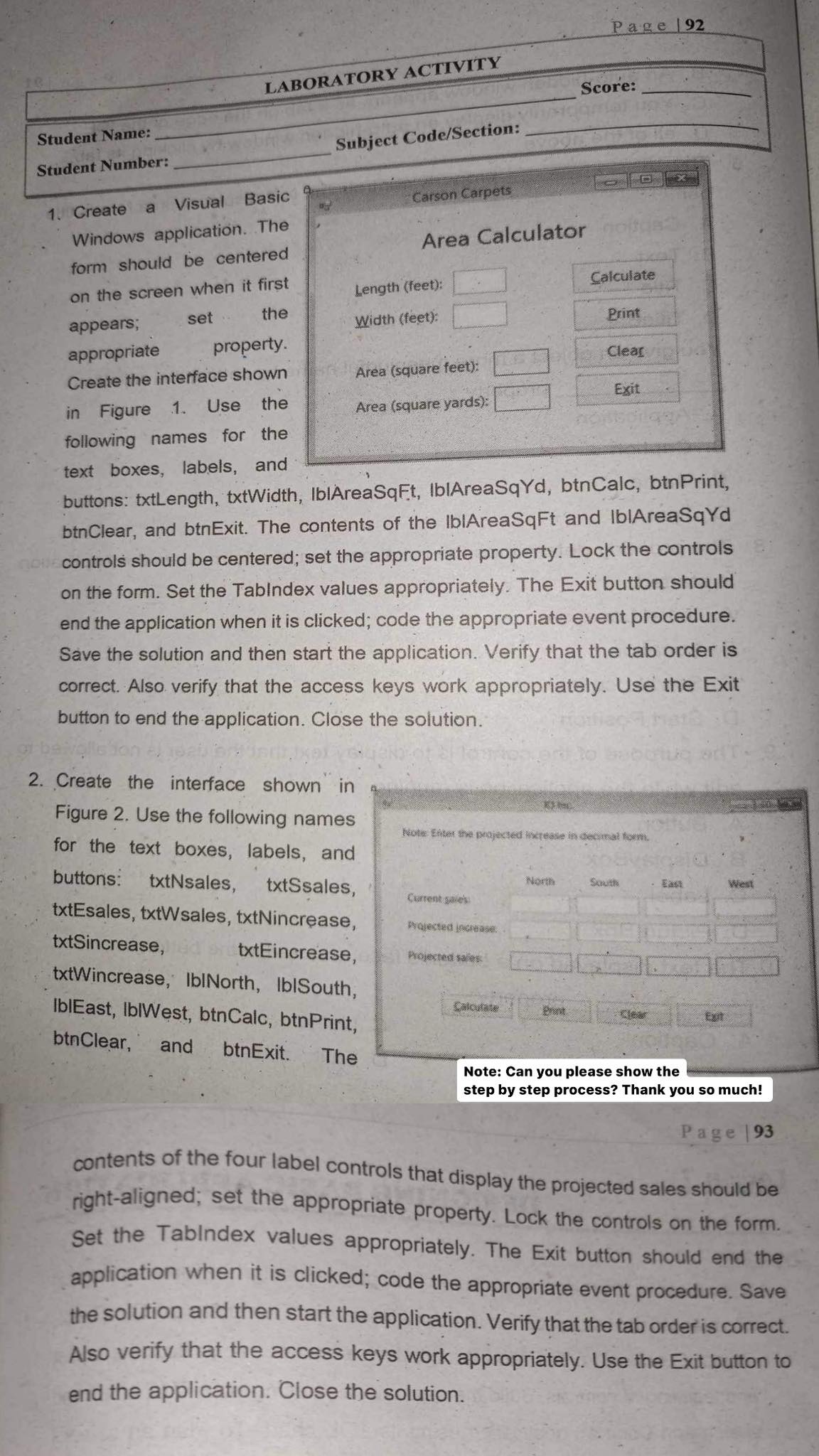
Create a Visual Basic
Windows application. The
form should be centered
on the screen when it first
appears; set the
appropriate property.
Create the interface shown
in Figure Use the
following names for the
text boxes, labels, and
buttons: txtLength, txtWidth, IbAreaSqFt IbIAreaSqYd, btnCalc, btnPrint,
btnClear, and btnExit. The contents of the IbIAreaSqFt and IbAreaSqYd
controls should be centered; set the appropriate property. Lock the controls
on the form. Set the Tablndex values appropriately. The Exit button should
end the application when it is clicked; code the appropriate event procedure.
Save the solution and then start the application. Verify that the tab order is
correct. Also verify that the access keys work appropriately. Use the Exit
button to end the application. Close the solution.
Create the interface shown in
Figure Use the following names
for the text boxes, labels, and
buttons: txtNsales, txtSsales,
txtEsales, txtWsales, txtNincrease,
txtSincrease, txtEincrease,
txtWincrease, IblNorth, IblSouth,
IbIEast, IbIWest, btnCalc, btnPrint,
btnClear, and btnExit. The
Page
contents of the four label controls that display the projected sales should be
rightaligned; set the appropriate property. Lock the controls on the form.
Set the Tabindex values appropriately. The Exit button should end the
application when it is clicked; code the appropriate event procedure. Save
the solution and then start the application. Verify that the tab order is correct.
Also verify that the access keys work appropriately. Use the Exit button to
end the application. Close the solution.
Step by Step Solution
There are 3 Steps involved in it
1 Expert Approved Answer
Step: 1 Unlock

Question Has Been Solved by an Expert!
Get step-by-step solutions from verified subject matter experts
Step: 2 Unlock
Step: 3 Unlock
 Study Help