







Question: LANGUAGE: C# GIVE ME THE ONLY ANSWER PLEASE 15. If you want a user to select several chvices yoe stveld ase A. a ListBox B.
LANGUAGE: C#
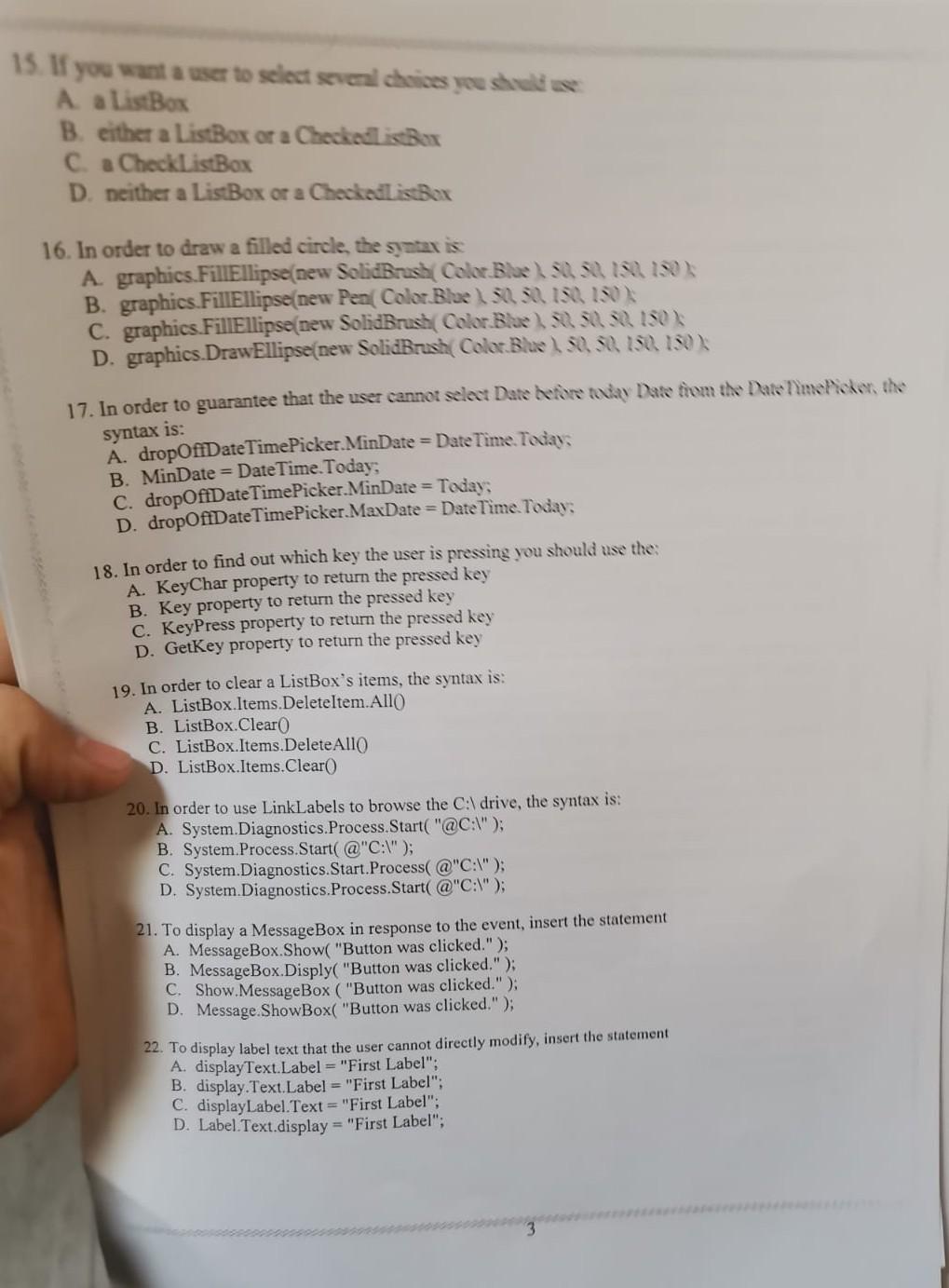
GIVE ME THE ONLY ANSWER PLEASE
15. If you want a user to select several chvices yoe stveld ase A. a ListBox B. either a ListBox or a Checked isbox C. a CheckListBox D. neither a ListBox or a Checkail istbox 16. In order to draw a filled circle, the syntax is: A. graphics. FillEllipse(new SolidBrush Color Blue \ 50,50,150,150 B. graphics. FillEllipse(new Pen(Color Blue ) , 50, 50,150,150)K C. graphics. FillEllipse(new Solidbrush( Color.Blue) , 50,50,50,150K D. graphics. DrawEllipse(new SolidBrash (Color Blue 50,50,150,150 ) I. 17. In order to guarantee that the user cannot select Date Lefore tway Dase fivm the Date nime Pickor, the syntax is: A. dropOffDate TimePicker. MinDate = Date Time. Toviay; B. MinDate = Date Time. Today; C. dropOffDate TimePicker. MinDate = Today; D. dropOffDateTimePicker.MaxDate = DateTime Today; 18. In order to find out which key the user is pressing you should use the: A. KeyChar property to return the pressed key B. Key property to return the pressed key C. KeyPress property to return the pressed key D. GetKey property to return the pressed key 19. In order to clear a ListBox's items, the syntax is: A. ListBox.Items.Deleteltem.Allo B. ListBox.Clear0 C. ListBox.Items.DeleteAllo D. ListBox.Items.Clear() 20. In order to use LinkLabels to browse the C : drive, the syntax is: A. System.Diagnostics.Process.Start( "@C:""); B. System.Process.Start(@"C:I"); C. System.Diagnostics.Start.Process( @"C:I"); D. System.Diagnostics.Process.Start( @"C:I"); 21. To display a Message Box in response to the event, insert the statement A. MessageBox.Show( "Button was clicked." ); B. MessageBox.Disply( "Button was clicked."); C. Show. MessageBox ("Button was clicked." ); D. Message.ShowBox( "Button was clicked."); 22. To display label text that the user cannot directly modify, insert the statement A. displayText.Label = "First Label"; B. display.Text.Label = "First Label"; C. displayLabel. Text = "First Label"; D. Label. Text.display = "First Label
Step by Step Solution
There are 3 Steps involved in it

Get step-by-step solutions from verified subject matter experts
 Study Help