







Question: Language: C Programming (Just need three Files coding: disUtilDriver.c , verifyMIPSInstruction.c , binToDec.c ) Any Confusing let men know. In this project you will complete
Language: C Programming
(Just need three Files coding: disUtilDriver.c, verifyMIPSInstruction.c, binToDec.c)
Any Confusing let men know.
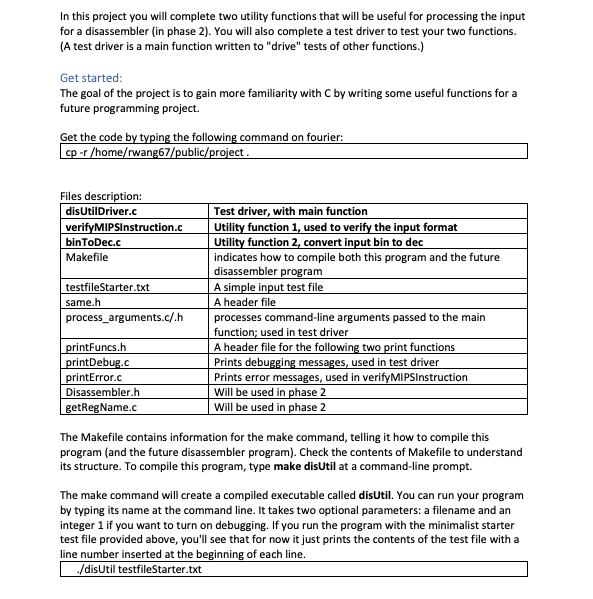
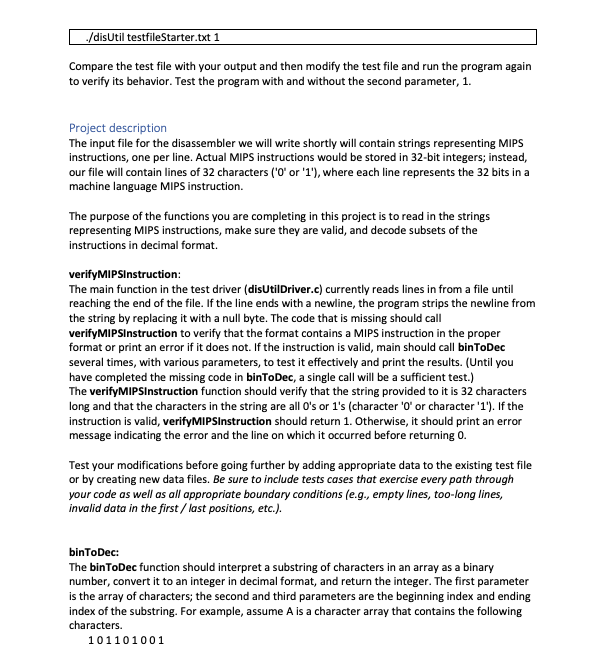
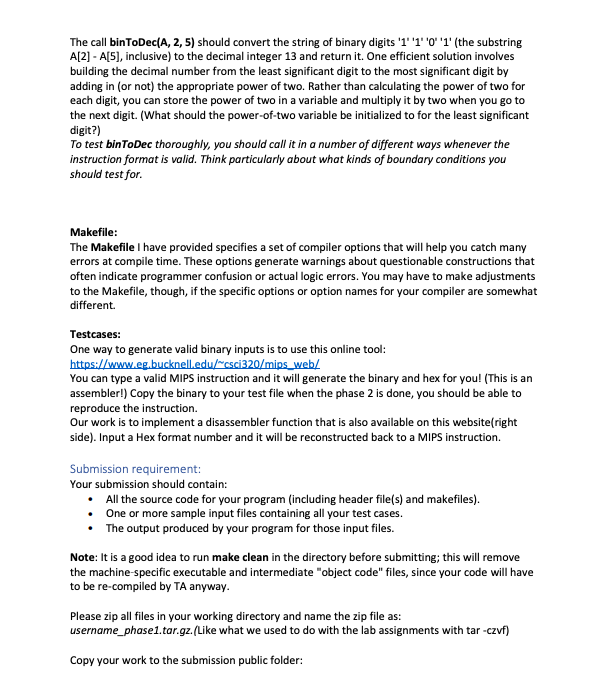

In this project you will complete two utility functions that will be useful for processing the input for a disassembler (in phase 2). You will also complete a test driver to test your two functions (A test driver is a main function written to "drive" tests of other functions.) Get started The goal of the project is to gain more familiarity with C by writing some useful functions for a future programming project. Get the code ing the following command on fourier: rwang67/public/project Files description: disUtilDriver.c verifyMIPSInstruction.c binToDec.c Makefile Test driver, with main function Utility function 1, used to verify the input format Utility function 2, convert input bin to dec indicates how to compile both this program and the future disassembler A simple input test file A header file ram testfileStarter.txt same.h process arguments.c/.h processes command-line arguments passed to the main function; used in test driver A header file for the following two print functions Prints debu Prints error messages, used in verifyMIPSInstruction Will be used in phase 2 Will be used in phase 2 rintFuncs.h rintDebug.c messages, used in test driver printError.c Disassembler.h getRegName.c The Makefile contains information for the make command, telling it how to compile this program (and the future disassembler program). Check the contents of Makefile to understand its structure. To compile this program, type make disUtil at a command-line prompt. The make command will create a compiled executable called disUtil. You can run your program by typing its name at the command line. It takes two optional parameters: a filename and an integer 1 if you want to turn on debugging. If you run the program with the minimalist starter test file provided above, you'll see that for now it just prints the contents of the test file with a line number inserted at the beginning of each line disUtil testfileStarter.txt In this project you will complete two utility functions that will be useful for processing the input for a disassembler (in phase 2). You will also complete a test driver to test your two functions (A test driver is a main function written to "drive" tests of other functions.) Get started The goal of the project is to gain more familiarity with C by writing some useful functions for a future programming project. Get the code ing the following command on fourier: rwang67/public/project Files description: disUtilDriver.c verifyMIPSInstruction.c binToDec.c Makefile Test driver, with main function Utility function 1, used to verify the input format Utility function 2, convert input bin to dec indicates how to compile both this program and the future disassembler A simple input test file A header file ram testfileStarter.txt same.h process arguments.c/.h processes command-line arguments passed to the main function; used in test driver A header file for the following two print functions Prints debu Prints error messages, used in verifyMIPSInstruction Will be used in phase 2 Will be used in phase 2 rintFuncs.h rintDebug.c messages, used in test driver printError.c Disassembler.h getRegName.c The Makefile contains information for the make command, telling it how to compile this program (and the future disassembler program). Check the contents of Makefile to understand its structure. To compile this program, type make disUtil at a command-line prompt. The make command will create a compiled executable called disUtil. You can run your program by typing its name at the command line. It takes two optional parameters: a filename and an integer 1 if you want to turn on debugging. If you run the program with the minimalist starter test file provided above, you'll see that for now it just prints the contents of the test file with a line number inserted at the beginning of each line disUtil testfileStarter.txt
Step by Step Solution
There are 3 Steps involved in it

Get step-by-step solutions from verified subject matter experts
 Study Help