







Question: (Language is visual basic) Create a TOE chart for the case project listed below called Eddy's. The template for the TOE chart is in the
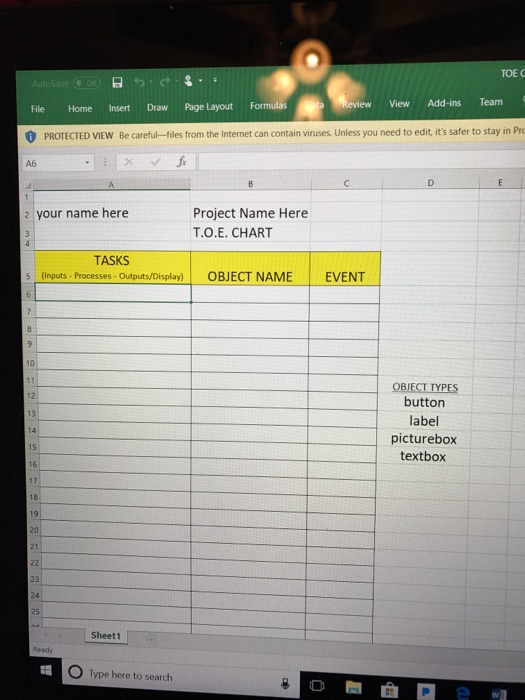
(Language is visual basic) Create a TOE chart for the case project listed below called "Eddy's". The template for the TOE chart is in the second picture below. Then, create the user interface (I need basic step by step instructions on HOW to create the user interface). The interface should look like the first picture. 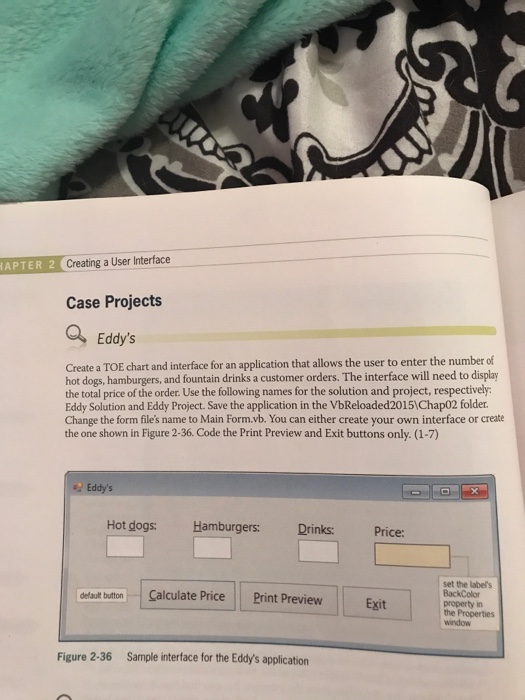
APTER 2 Creating a User Interface Case Projects Eddy's Create a TOE chart and interface for an application that allows the user to enter the number of hot dogs, hamburgers, and fountain drinks a customer orders. The interface will need to disply the total price of the order. Use the following names for the solution and project, respectively Eddy Solution and Eddy Project. Save the application in the VbReloaded20151Chap02 folder. Change the form file's name to Main Form.vb. You can either create your own interface or create the one shown in Figure 2-36. Code the Print Preview and Exit buttons only. (1-7) Eddy's Hot dogs: Hamburgers: Drinks: Price: set the labels BackColor property in the Properties window Calculate PricePrint Preview Exit delault button Figure 2-36 Sample interface for the Eddy's application
Step by Step Solution
There are 3 Steps involved in it

Get step-by-step solutions from verified subject matter experts
 Study Help