







Question: Language my be python thanks! 17.1 PROJECT 1: Time Conversion Calculator Overview In this project you will demonstrate your knowledge of decision making blocks such
Language my be python thanks!
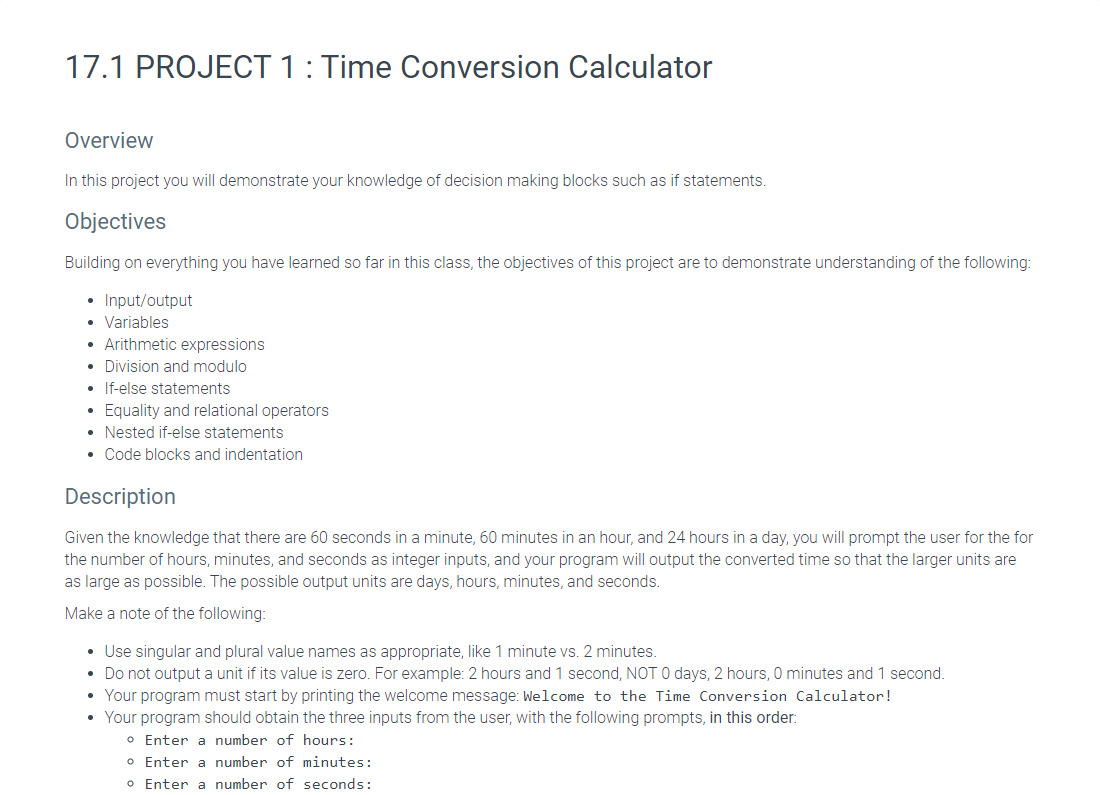
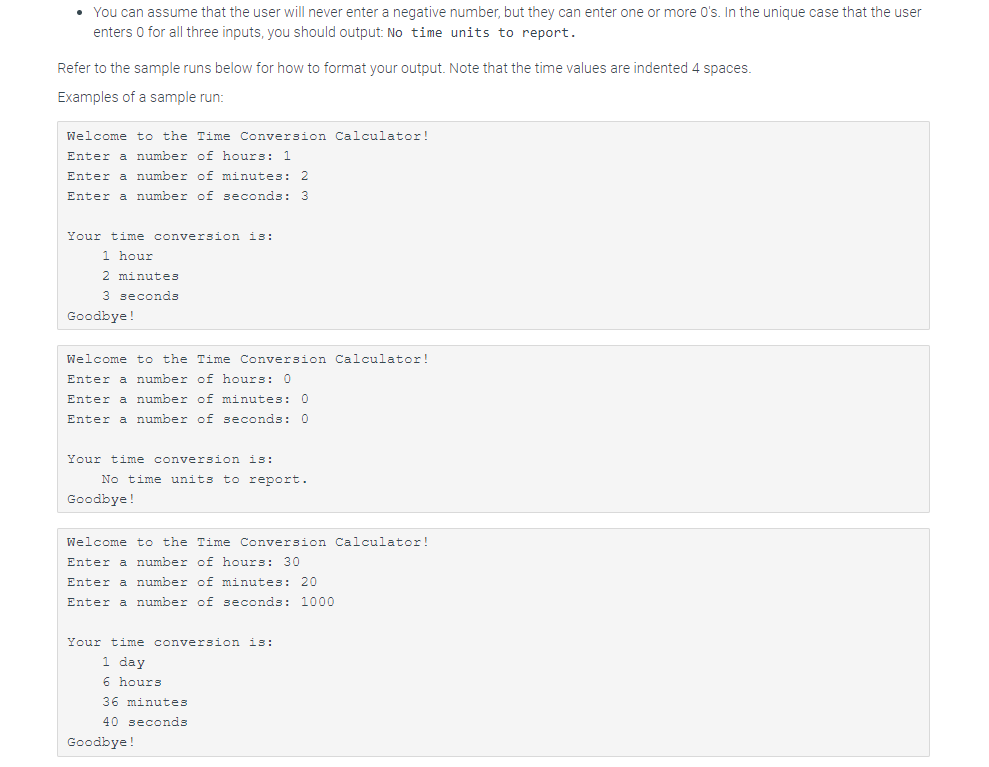
17.1 PROJECT 1: Time Conversion Calculator Overview In this project you will demonstrate your knowledge of decision making blocks such as if statements. Objectives Building on everything you have learned so far in this class, the objectives of this project are to demonstrate understanding of the following: Input/output Variables Arithmetic expressions Division and modulo If-else statements Equality and relational operators Nested if-else statements Code blocks and indentation Description Given the knowledge that there are 60 seconds in a minute, 60 minutes in an hour, and 24 hours in a day, you will prompt the user for the for the number of hours, minutes, and seconds as integer inputs, and your program will output the converted time so that the larger units are as large as possible. The possible output units are days, hours, minutes, and seconds. Make a note of the following: Use singular and plural value names as appropriate, like 1 minute vs. 2 minutes. Do not output a unit if its value is zero. For example: 2 hours and 1 second, NOT 0 days, 2 hours, 0 minutes and 1 second. Your program must start by printing the welcome message: Welcome to the Time Conversion Calculator! Your program should obtain the three inputs from the user, with the following prompts, in this order: Enter a number of hours: o Enter a number of minutes: Enter a number of seconds: You can assume that the user will never enter a negative number, but they can enter one or more O's. In the unique case that the user enters 0 for all three inputs, you should output: No time units to report. Refer to the sample runs below for how to format your output. Note that the time values are indented 4 spaces. Examples of a sample run: Welcome to the Time Conversion Calculator! Enter a number of hours: 1 Enter a number of minutes: 2 Enter a number of seconds: 3 Your time conversion is: 1 hour 2 minutes 3 seconds Goodbye! Welcome to the Time Conversion Calculator! Enter a number of hours: 0 Enter a number of minutes: 0 Enter a number of seconds: 0 Your time conversion is: No time units to report. Goodbye! Welcome to the Time Conversion Calculator! Enter a number of hours: 30 Enter a number of minutes: 20 Enter a number of seconds: 1000 Your time conversion is: 1 day 6 hours 36 minutes 40 seconds Goodbye! 17.1 PROJECT 1: Time Conversion Calculator Overview In this project you will demonstrate your knowledge of decision making blocks such as if statements. Objectives Building on everything you have learned so far in this class, the objectives of this project are to demonstrate understanding of the following: Input/output Variables Arithmetic expressions Division and modulo If-else statements Equality and relational operators Nested if-else statements Code blocks and indentation Description Given the knowledge that there are 60 seconds in a minute, 60 minutes in an hour, and 24 hours in a day, you will prompt the user for the for the number of hours, minutes, and seconds as integer inputs, and your program will output the converted time so that the larger units are as large as possible. The possible output units are days, hours, minutes, and seconds. Make a note of the following: Use singular and plural value names as appropriate, like 1 minute vs. 2 minutes. Do not output a unit if its value is zero. For example: 2 hours and 1 second, NOT 0 days, 2 hours, 0 minutes and 1 second. Your program must start by printing the welcome message: Welcome to the Time Conversion Calculator! Your program should obtain the three inputs from the user, with the following prompts, in this order: Enter a number of hours: o Enter a number of minutes: Enter a number of seconds: You can assume that the user will never enter a negative number, but they can enter one or more O's. In the unique case that the user enters 0 for all three inputs, you should output: No time units to report. Refer to the sample runs below for how to format your output. Note that the time values are indented 4 spaces. Examples of a sample run: Welcome to the Time Conversion Calculator! Enter a number of hours: 1 Enter a number of minutes: 2 Enter a number of seconds: 3 Your time conversion is: 1 hour 2 minutes 3 seconds Goodbye! Welcome to the Time Conversion Calculator! Enter a number of hours: 0 Enter a number of minutes: 0 Enter a number of seconds: 0 Your time conversion is: No time units to report. Goodbye! Welcome to the Time Conversion Calculator! Enter a number of hours: 30 Enter a number of minutes: 20 Enter a number of seconds: 1000 Your time conversion is: 1 day 6 hours 36 minutes 40 seconds Goodbye
Step by Step Solution
There are 3 Steps involved in it

Get step-by-step solutions from verified subject matter experts
 Study Help