







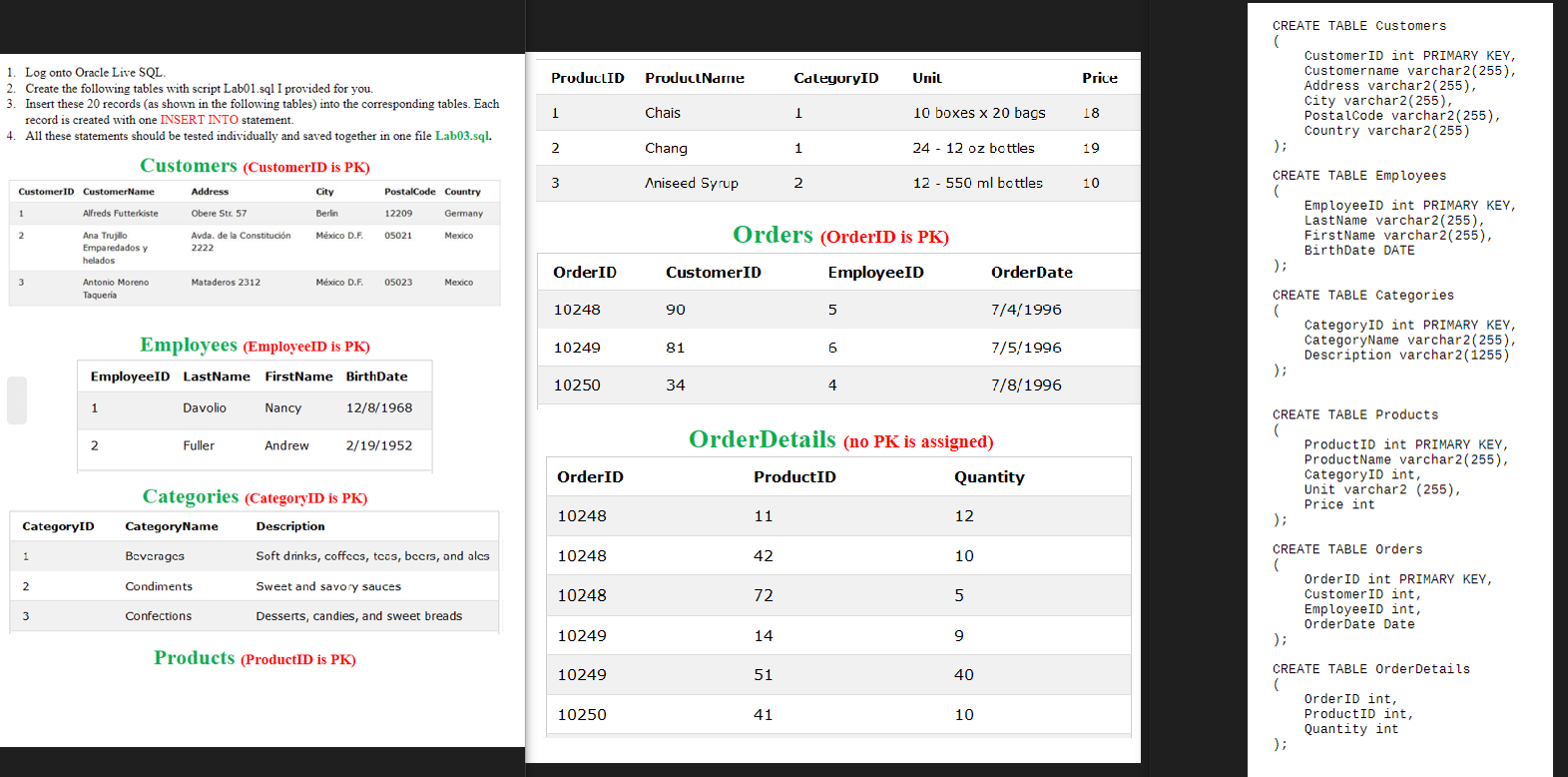
Question: Log onto Oracle Live SQL . Create the following tables with script Lab 0 1 . sql I provided for you. Insert these 2 0
Log onto Oracle Live SQL
Create the following tables with script Labsql I provided for you.
Insert these records as shown in the following tables into the corresponding tables. Each
record is created with one INSERT INTO statement.
All these statements should be tested individually and saved together in one file Labsql
Customers CustomerID is PK
Employees EmployeeID is PK
Categories CategoryID is PK
Products ProductID is PK
CustomerID int PRIMARY KEY,
Customername varchar
Address varchar
City varchar
Postalcode varchar
;
Country varchar
CREATE TABLE Employees
EmployeeID int PRIMARY KEY,
LastName varchar
FirstName varchar
;
BirthDate DATE
CREATE TABLE Categories
CategoryID int PRIMARY KEY,
CategoryName varchar
;
CREATE TABLE Products
OrderDetails no PK is assigned
ProductID int PRIMARY KEY,
ProductName varchar
CategoryID int,
Unit varchar
Price int
;
CREATE TABLE orders
OrderID int PRIMARY KEY,
CustomerID int,
EmployeeID int,
OrderDate Date
CREATE TABLE orderDetails
OrderID int,
ProductID int,
Quantity int
;
Step by Step Solution
There are 3 Steps involved in it
1 Expert Approved Answer
Step: 1 Unlock

Question Has Been Solved by an Expert!
Get step-by-step solutions from verified subject matter experts
Step: 2 Unlock
Step: 3 Unlock
 Study Help