







Question: looking for an expert in an operating system **Use command prompt 1. Create a folder and name it with your student ID. (Example folder name:
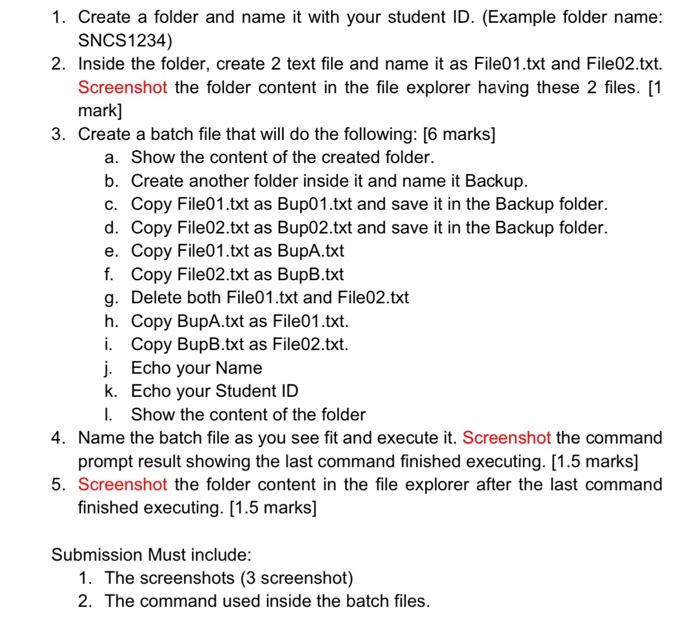
1. Create a folder and name it with your student ID. (Example folder name: SNCS1234) 2. Inside the folder, create 2 text file and name it as File01.txt and File02.txt. Screenshot the folder content in the file explorer having these 2 files. [1 mark] 3. Create a batch file that will do the following: [6 marks] a. Show the content of the created folder. b. Create another folder inside it and name it Backup. c. Copy File01.txt as Bupo 1.txt and save it in the Backup folder. d. Copy File02.txt as Bup02.txt and save it in the Backup folder. e. Copy File01.txt as BupA.txt f. Copy File02.txt as BupB.txt g. Delete both File01.txt and File02.txt h. Copy BupA.txt as File01.txt. i. Copy BupB.txt as File02.txt. j. Echo your Name k. Echo your Student ID 1. Show the content of the folder 4. Name the batch file as you see fit and execute it. Screenshot the command prompt result showing the last command finished executing. [1.5 marks] 5. Screenshot the folder content in the file explorer after the last command finished executing. [1.5 marks) Submission Must include: 1. The screenshots (3 screenshot) 2. The command used inside the batch files
Step by Step Solution
There are 3 Steps involved in it

Get step-by-step solutions from verified subject matter experts
 Study Help