







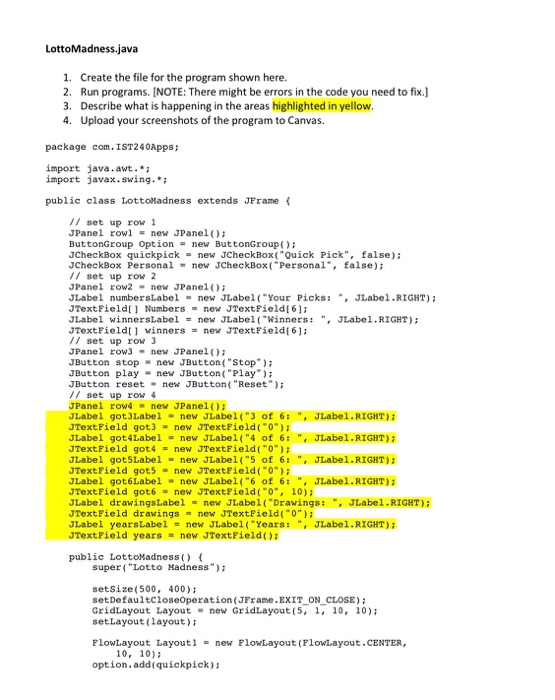
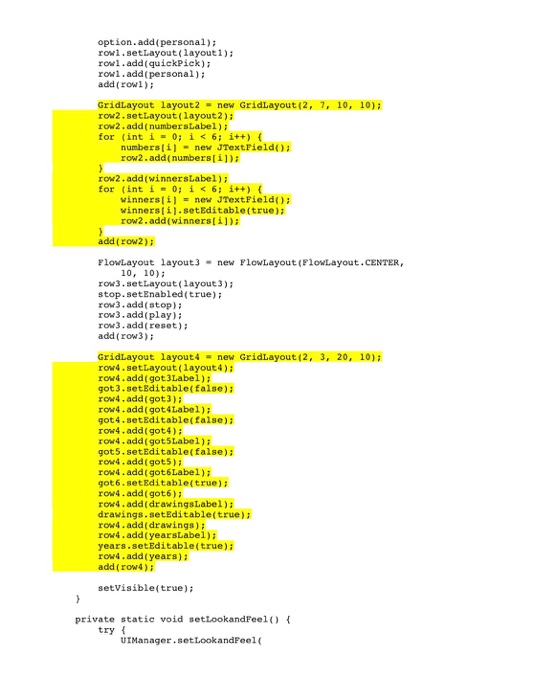
Question: LottoMadness.java 1 Create the file for the program shown here 2. Run programs. [NOTE: There might be errors in the code you need to fix.]
![to fix.] 3. Describe what is happening in the areas highlighted in](https://dsd5zvtm8ll6.cloudfront.net/si.experts.images/questions/2024/09/66f309fe386ff_83766f309fdc316d.jpg)
LottoMadness.java 1 Create the file for the program shown here 2. Run programs. [NOTE: There might be errors in the code you need to fix.] 3. Describe what is happening in the areas highlighted in yellow 4. Upload your screenshots of the program to Canvas. package com.IST240Apps import java.awt. import javax.swing. public class LottoMadness extends JFrame // set up row JPanel rowlnew JPanelo ButtonGroup Optionnew ButtonGroup) JCheckBox quickpick new JCheckBox( "Quick Pick", false); JCheckBox Personal new JCheckBox("Personal Ealse) // set up row 2 JPanel ownew JPanel)i JLabel numbersLabel new JLabel"Your Picks JLabel.RIGHT) JTextField Numbersnew JTextFicld6) JLabel winnersLabel-new JLabel(Winners:JLabel.RIGHT JTextField winnersnew JTextFieldt61: // set up row 3 JPanel ow3new JPanel JButton stopnew JButton( "Stop" JButton play new JButton( "Play JButton resetnew JButton( "Reset) // set up row 4 JPanel row4new JPanel)i JLabel got3Label new JLabel("3 of 6: ,JLabe1.RIGHT) JTextField got3 new JTextField("0) JLabel got4Label = new JLabel( "4 of 6: ", JLabel . RIGHT); JTextField gotA = new JTextField("0"); JLabel got5Label new JLabel( "5 of 6: ", JLabel.RIGHT) JTextField got5 new JTextField(0) JLabel got6Label new JLabel("6 of 6: JLabel.RIGHT) TextField got6 = new JTextField("0", 10); JLabel drawingsLabel new JLabel( "Drawings:JLabel.RIGHT): JTextField drawings new JTextField(0) JLabel yearsLabel new JLabel( "Years: ", JLabel.RIGHT): JTextField years = new JTextField(); public LottoNadness super("Lotto Madness" setsize (500, 400); setDefaultcloseoperation(JFrame.EXIT ON CLOSE) GridLayout Layout new GridLayout (5, 1, 10, 10); setLayout (layout) FlowLayout Layout 1 FlowLayout (FlowLayout "CENTER, = new 10, 10) option.add(quickpick)
Step by Step Solution
There are 3 Steps involved in it

Get step-by-step solutions from verified subject matter experts
 Study Help