







Question: Make javascript and css in its own file. In this exercise, you'll develop a player-vs-computer game that tallies odd and even numbers until there's a
Make javascript and css in its own file.
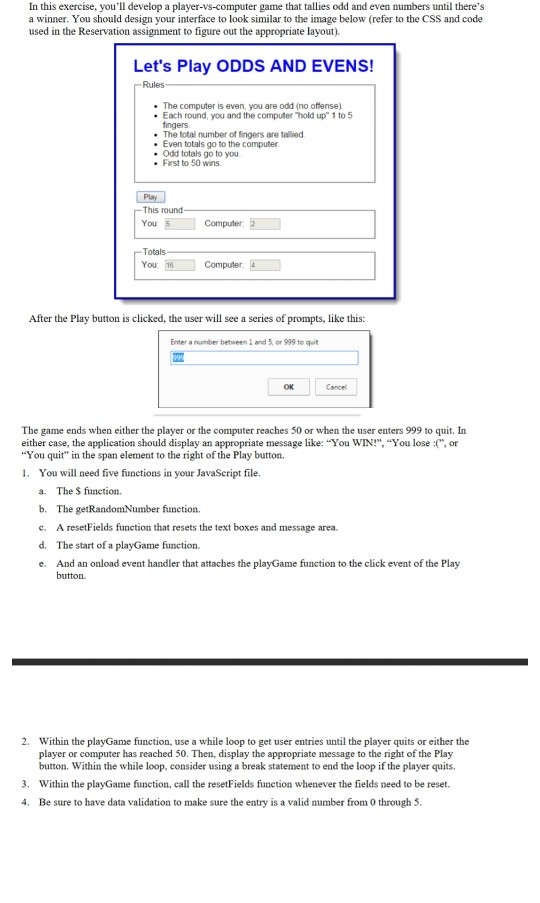
In this exercise, you'll develop a player-vs-computer game that tallies odd and even numbers until there's a winner. You should design your interface to look similar to the image below (refer to the CSS and code used in the Reservation assignment to figure out the appropriate layout). Let's Play ODDS AND EVENS! Rules . The computer is even, you are odd (no offense) . Each round, you and the computer hold up" 1 to 5 fingers The total number of fingers are talled Even totals go to the computer Odd totals go to you . First to 50 wins PL -This round- You Computer -Totals You 16 Computer After the Play button is clicked, the user will see a series of prompts, like this: Enter a number between 1 and 5 or 999 to quit The game ends when either the player or the computer reaches 50 or when the user enters 999 to quit. In either case, the application should display an appropriate message like: "You WIN!", "You lose :(", or "You quit" in the span element to the right of the Play button. 1. You will need five functions in your JavaScript file. a. The $ function. b. The getRandomNumber function, c. A resetFields function that resets the text boxes and message area. d. The start of a playGame function. e. And an onload event handler that attaches the playGame function to the click event of the Play button. 2. Within the playGame function, use a while loop to get user entries until the player quits or either the player or computer has reached 50. Then, display the appropriate message to the right of the Play button. Within the while loop, consider using a break statement to end the loop if the player quits. 3. Within the playGame function, call the resetFields function whenever the fields need to be reset. 4. Be sure to have data validation to make sure the entry is a valid number from 0 through 5
Step by Step Solution
There are 3 Steps involved in it

Get step-by-step solutions from verified subject matter experts
 Study Help