







Question: MANAGE WORKBOOK DATA GETTING STARTED - Open the file IL _ EX 1 9 _ 6 a _ FirstLastName _ 1 . xIsx, available for
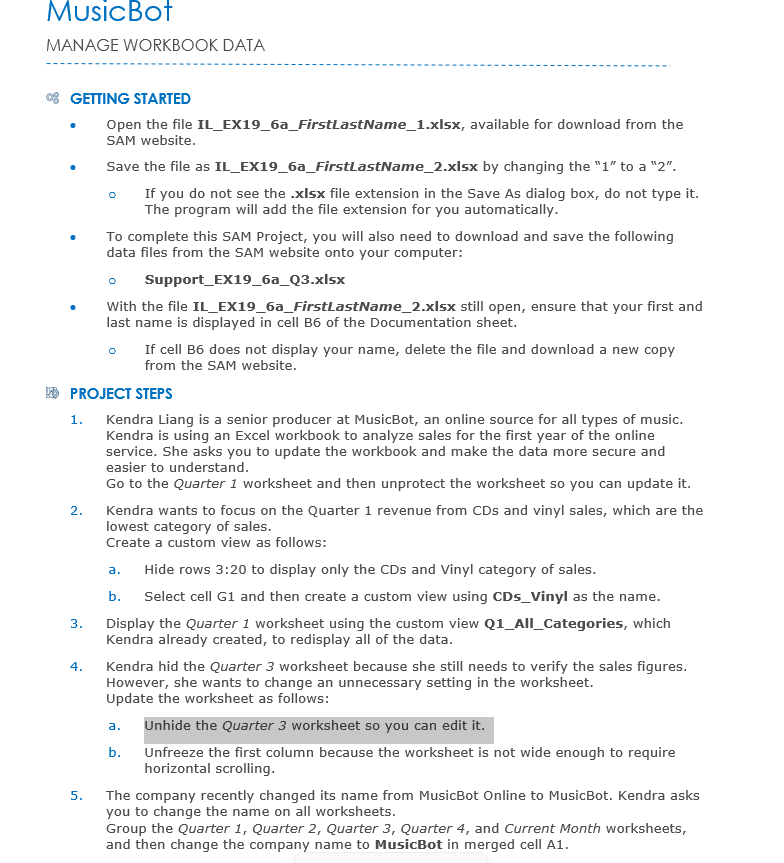
MANAGE WORKBOOK DATA
GETTING STARTED
Open the file ILEXaFirstLastNamexIsx, available for download from the SAM website.
Save the file as ILEXaFirstLastNamexlsx by changing the to a
If you do not see the xlsx file extension in the Save As dialog box, do not type it The program will add the file extension for you automatically.
To complete this SAM Project, you will also need to download and save the following data files from the SAM website onto your computer:
SupportEXaQxlsx
With the file ILEXaFirstLastNamexlsx still open, ensure that your first and last name is displayed in cell B of the Documentation sheet.
If cell B does not display your name, delete the file and download a new copy from the SAM website.
TR PROJECT STEPS
Kendra Liang is a senior producer at MusicBot, an online source for all types of music. Kendra is using an Excel workbook to analyze sales for the first year of the online service. She asks you to update the workbook and make the data more secure and easier to understand.
Go to the Quarter worksheet and then unprotect the worksheet so you can update it
Kendra wants to focus on the Quarter revenue from CDs and vinyl sales, which are the lowest category of sales.
Create a custom view as follows:
a Hide rows : to display only the CDs and Vinyl category of sales.
b Select cell G and then create a custom view using CDsVinyl as the name.
Display the Quarter worksheet using the custom view QAllCategories, which Kendra already created, to redisplay all of the data.
Kendra hid the Quarter worksheet because she still needs to verify the sales figures. However, she wants to change an unnecessary setting in the worksheet. Update the worksheet as follows:
a Unhide the Quarter worksheet so you can edit it
b Unfreeze the first column because the worksheet is not wide enough to require horizontal scrolling.
The company recently changed its name from MusicBot Online to MusicBot. Kendra asks you to change the name on all worksheets.
Group the Quarter Quarter Quarter Quarter and Current Month worksheets, and then change the company name to MusicBot in merged cell A
Step by Step Solution
There are 3 Steps involved in it
1 Expert Approved Answer
Step: 1 Unlock

Question Has Been Solved by an Expert!
Get step-by-step solutions from verified subject matter experts
Step: 2 Unlock
Step: 3 Unlock
 Study Help