







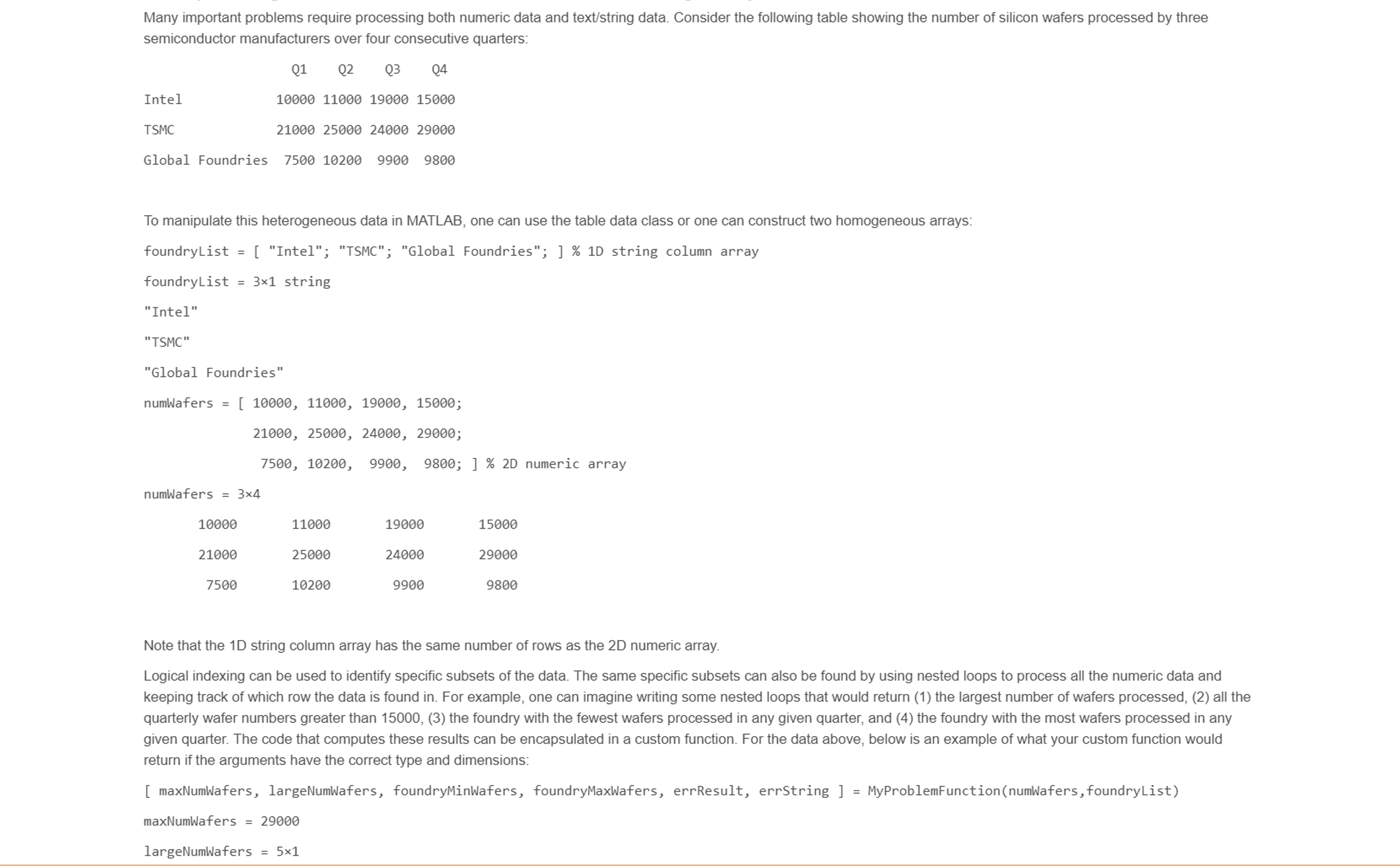
Question: Many important problems require processing both numeric data and text / string data. Consider the following table showing the number of silicon wafers processed by
Many important problems require processing both numeric data and textstring data. Consider the following table showing the number of silicon wafers processed by three
semiconductor manufacturers over four consecutive quarters:
To manipulate this heterogeneous data in MATLAB, one can use the table data class or one can construct two homogeneous arrays:
Note that the string column array has the same number of rows as the numeric array.
Logical indexing can be used to identify specific subsets of the data. The same specific subsets can also be found by using nested loops to process all the numeric data and
keeping track of which row the data is found in For example, one can imagine writing some nested loops that would return the largest number of wafers processed, all the
quarterly wafer numbers greater than the foundry with the fewest wafers processed in any given quarter, and the foundry with the most wafers processed in any
given quarter. The code that computes these results can be encapsulated in a custom function. For the data above, below is an example of what your custom function would
return if the arguments have the correct type and dimensions: maxNumWafers, largeNumWafers, foundryMinWafers, foundryMaxWafers, errResult, errString MyProblemFunctionnumWafersfoundryList
maxNumWafers
largeNumWafers times
foundryMinWafers "Global Foundries"
foundryMaxWafers TSMC
errResult logical
errString
In this miniproject, you will define your own tabular data problem that uses a D numeric array and a D string column array to represent the data, and you will solve that problem with a custom function using the template below. The D numeric array and D string column array are inputs to your function. Your custom function must:
Return seven results: a numeric scalar result based on the data in the D numeric array, a numeric array result based on the data in the D numeric array, and two string scalar results from the input D string column array based on the data in the D numeric array, a logical scalar error result error flag a scalar error string result, and a table constructed from the input D string column array as the first table column and the D numeric array as the remaining table columns.
Perform the following input data checks: check that the input arguments are the correct type, check that the input numeric array is D check that the input numeric array is D check that the input string array is a D column array, and that the number of rows of both input arrays is the same. If any of these checks fail, the function returns the error flag set to true and an error string that describes the error, and also prints the error string to the screen.
Use a for or while loop.
How you choose to compute the two numeric and two string results is up to you, but should be logically related to your problem definition and not arbitrary eg always returning the third column of the input D numeric array is not an acceptable numeric array result since it doesn't depend on the data in the input D numeric array
The specifications for the error string are as follows:
If the first argument is not a D numeric array, the error string and printed error message is "First argument must be a D numeric array."
If the second argument is not a D string column array, the error string and printed error message is "Second argument must be a column string array."
If the two input arguments do not have the same number of rows, the error string and printed message is "The input string array must have the same number of rows as the input numeric array."
Otherwise, the error string is the empty string
Step by Step Solution
There are 3 Steps involved in it
1 Expert Approved Answer
Step: 1 Unlock

Question Has Been Solved by an Expert!
Get step-by-step solutions from verified subject matter experts
Step: 2 Unlock
Step: 3 Unlock
 Study Help