





Question: Match the Excel function to what it does. Returns non-numerical information Uses exact text information for matching purposes 1. Adding an A to the end
Match the Excel function to what it does. Returns

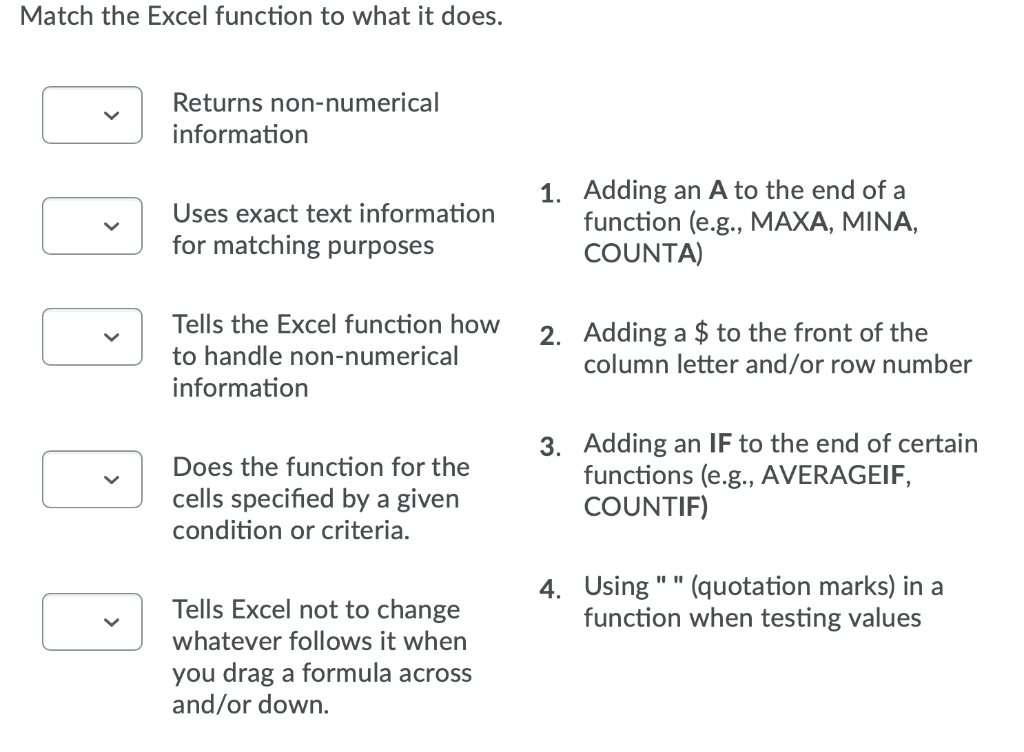
Match the Excel function to what it does. Returns non-numerical information Uses exact text information for matching purposes 1. Adding an A to the end of a function (e.g., MAXA, MINA, COUNTA) Tells the Excel function how to handle non-numerical information 2. Adding a $ to the front of the column letter and/or row number Does the function for the cells specified by a given condition or criteria. 3. Adding an IF to the end of certain functions (e.g., AVERAGEIF, COUNTIF) 4. Using "" (quotation marks) in a function when testing values Tells Excel not to change whatever follows it when you drag a formula across and/or down

Step by Step Solution

There are 3 Steps involved in it

1 Expert Approved Answer
Step: 1 Unlock blur-text-image

Question Has Been Solved by an Expert!

Get step-by-step solutions from verified subject matter experts

Step: 2 Unlock
Step: 3 Unlock

Students Have Also Explored These Related General Management Questions!