







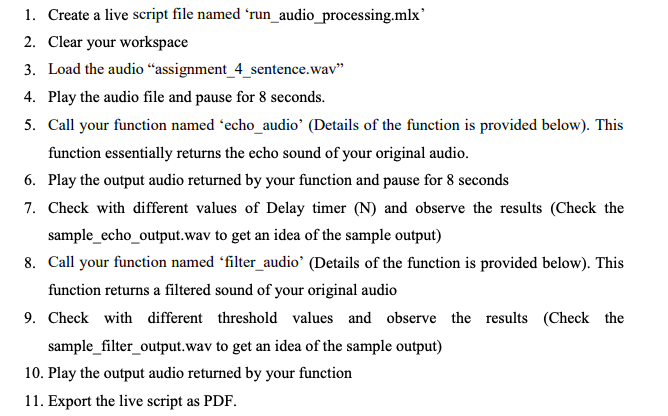
Question: matlab 1. Create a live script file named run_audio_processing.mlx 2. Clear your workspace 3. Load the audio assignment_4_sentence.wav 4. Play the audio file and pause
matlab
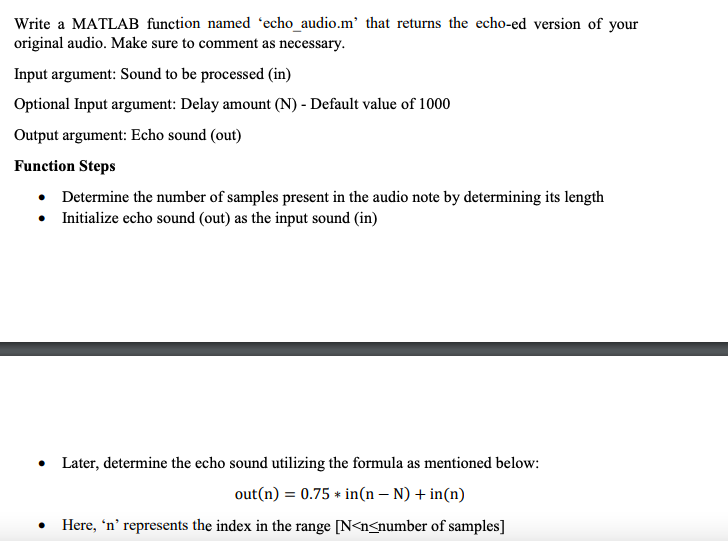
1. Create a live script file named run_audio_processing.mlx 2. Clear your workspace 3. Load the audio assignment_4_sentence.wav 4. Play the audio file and pause for 8 seconds. 5. Call your function named 'echo_audio' (Details of the function is provided below). This function essentially returns the echo sound of your original audio. 6. Play the output audio returned by your function and pause for 8 seconds 7. Check with different values of Delay timer (N) and observe the results (Check the sample_echo_output.wav to get an idea of the sample output) 8. Call your function named 'filter_audio' (Details of the function is provided below). This function returns a filtered sound of your original audio 9. Check with different threshold values and observe the results (Check the sample_filter_output.wav to get an idea of the sample output) 10. Play the output audio returned by your function 11. Export the live script as PDF. Write a MATLAB function named 'echo_audio.m' that returns the echo-ed version of your original audio. Make sure to comment as necessary. Input argument: Sound to be processed (in) Optional Input argument: Delay amount (N) - Default value of 1000 Output argument: Echo sound (out) Function Steps Determine the number of samples present in the audio note by determining its length Initialize echo sound (out) as the input sound (in) Later, determine the echo sound utilizing the formula as mentioned below: out(n) = 0.75 * in(n - N) + in(n) Here, 'n' represents the index in the range [N
Step by Step Solution
There are 3 Steps involved in it

Get step-by-step solutions from verified subject matter experts
 Study Help