



Question: the record sound file: %% Record an audio clear all; close all; clc; % Sampling frequency fs = 8000; % Set up recording object my_sound
the record sound file:
%% Record an audio clear all; close all; clc; % Sampling frequency fs = 8000; % Set up recording object my_sound = audiorecorder(fs,16,1); % pause for user input disp('Press Any Key to Start Recording ....') pause tic % start time % Record for 8 seconds recordblocking(my_sound, 8); toc % end time % Output the acquired data into workspace as double precision array, x my_sound = getaudiodata(my_sound, 'double'); % play recorded sound soundsc(my_sound,fs); % you can save it as a wave file using the syntax below audiowrite('my_sound.wav',my_sound,fs);
Now write a MATLAB code:
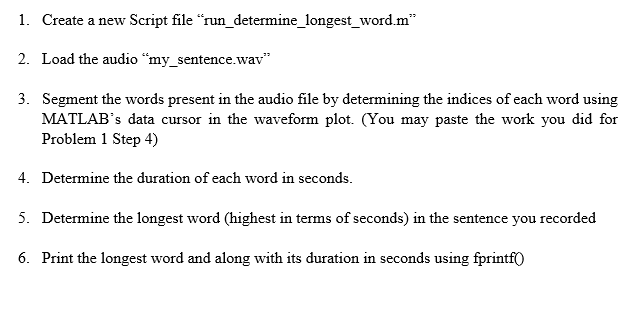
I. Create a new Script file "'run determine longest word m 2. Load the audio "my_sentence.wav" 3. Segment the words present in the audio file by determining the indices of each word using MATLAB's data cursor in the waveform plot. (You may paste the work you did for Problem 1 Step 4) 4. Determine the duration of each word in seconds 5. Determine the longest word (highest in terms of seconds) in the sentence you recorded 6 Print the longest word and along with its duration in seconds using fprint I. Create a new Script file "'run determine longest word m 2. Load the audio "my_sentence.wav" 3. Segment the words present in the audio file by determining the indices of each word using MATLAB's data cursor in the waveform plot. (You may paste the work you did for Problem 1 Step 4) 4. Determine the duration of each word in seconds 5. Determine the longest word (highest in terms of seconds) in the sentence you recorded 6 Print the longest word and along with its duration in seconds using fprint
Step by Step Solution
There are 3 Steps involved in it

Get step-by-step solutions from verified subject matter experts