







Question: matlab application lesson Q4. (30 p.) Create a script file to import the data from the FinalExamData xlxs file, Data 1 sheet. Use importdata function.
matlab application lesson
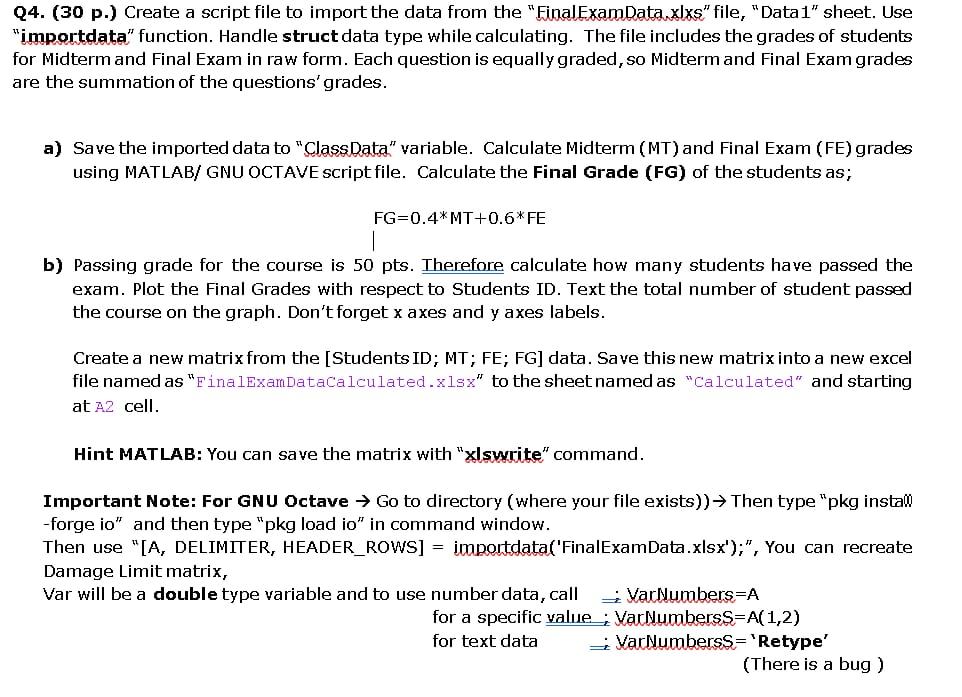
Q4. (30 p.) Create a script file to import the data from the "FinalExamData xlxs" file, "Data 1" sheet. Use "importdata" function. Handle struct data type while calculating. The file includes the grades of students for Midterm and Final Exam in raw form. Each question is equally graded, so Midterm and Final Exam grades are the summation of the questions' grades. a) Save the imported data to "ClassData" variable. Calculate Midterm (MT) and Final Exam (FE) grades using MATLAB/ GNU OCTAVE script file. Calculate the Final Grade (FG) of the students as; FG=0.4*MT+0.6*FE b) Passing grade for the course is 50 pts. Therefore calculate how many students have passed the exam. Plot the Final Grades with respect to Students ID. Text the total number of student passed the course on the graph. Don't forget x axes and y axes labels. Create a new matrix from the [Students ID; MT; FE; FG] data. Save this new matrix into a new excel file named as "FinalExamDataCalculated.xlsx" to the sheet named as "Calculated" and starting at A2 cell. Hint MATLAB: You can save the matrix with "xlswrite" command. Important Note: For GNU Octave Go to directory (where your file exists)) Then type "pkg install -forge io" and then type "pkg load io" in command window. Then use "[A, DELIMITER, HEADER_ROWS] = importdata("FinalExamData.xlsx');", You can recreate Damage Limit matrix, Var will be a double type variable and to use number data, call VarNumbers=A for a specific value, VarNumbersS=A(1,2) for text data VarNumbersS='Retype' (There is a bug ) Q4. (30 p.) Create a script file to import the data from the "FinalExamData xlxs" file, "Data 1" sheet. Use "importdata" function. Handle struct data type while calculating. The file includes the grades of students for Midterm and Final Exam in raw form. Each question is equally graded, so Midterm and Final Exam grades are the summation of the questions' grades. a) Save the imported data to "ClassData" variable. Calculate Midterm (MT) and Final Exam (FE) grades using MATLAB/ GNU OCTAVE script file. Calculate the Final Grade (FG) of the students as; FG=0.4*MT+0.6*FE b) Passing grade for the course is 50 pts. Therefore calculate how many students have passed the exam. Plot the Final Grades with respect to Students ID. Text the total number of student passed the course on the graph. Don't forget x axes and y axes labels. Create a new matrix from the [Students ID; MT; FE; FG] data. Save this new matrix into a new excel file named as "FinalExamDataCalculated.xlsx" to the sheet named as "Calculated" and starting at A2 cell. Hint MATLAB: You can save the matrix with "xlswrite" command. Important Note: For GNU Octave Go to directory (where your file exists)) Then type "pkg install -forge io" and then type "pkg load io" in command window. Then use "[A, DELIMITER, HEADER_ROWS] = importdata("FinalExamData.xlsx');", You can recreate Damage Limit matrix, Var will be a double type variable and to use number data, call VarNumbers=A for a specific value, VarNumbersS=A(1,2) for text data VarNumbersS='Retype' (There is a bug )
Step by Step Solution
There are 3 Steps involved in it

Get step-by-step solutions from verified subject matter experts
 Study Help