







Question: MATLAB HELP!! Below is the ticTacToe.m provided: function varargout = ticTacToe(varargin) % This code sets up your GUI - DO NOT EDIT gui_Singleton = 1;
MATLAB HELP!!
Below is the ticTacToe.m provided:
function varargout = ticTacToe(varargin)
% This code sets up your GUI - DO NOT EDIT gui_Singleton = 1; gui_State = struct('gui_Name', mfilename, ... 'gui_Singleton', gui_Singleton, ... 'gui_OpeningFcn', @ticTacToe_OpeningFcn, ... 'gui_OutputFcn', @ticTacToe_OutputFcn, ... 'gui_LayoutFcn', [] , ... 'gui_Callback', []); if nargin && ischar(varargin{1}) gui_State.gui_Callback = str2func(varargin{1}); end
if nargout [varargout{1:nargout}] = gui_mainfcn(gui_State, varargin{:}); else gui_mainfcn(gui_State, varargin{:}); end % End initialization code - DO NOT EDIT
% --- This code sets up initial conditions of your GUI function ticTacToe_OpeningFcn(hObject, eventdata, handles, varargin)
% Choose default command line output for ticTacToe handles.output = hObject;
%I've created the following code to do a few things. The first is to create %two handles properties (rows and cols) to correspond with the tic tac toe %squares, and how they are named: % % A1 A2 A3 % B1 B2 B3 % C1 C2 C3 % %Characters correspoinding to these rows and columns are stored in Cell %Arrays. Cell Arrays are a data type that can store "arrays" where each %element can be ANY data type. In this case, I am using them to store %strings.
handles.rows = {'A', 'B', 'C'}; handles.cols = {'1', '2', '3'};
%The nested loops are performing a few task. The first is to make the %buttons evenly spaced. Note that it's hard to drag and drop buttons in the %guide interface such that they are evenly spaced. The variables x, y, wd, %and ht corresponde to the positions, heights, and widths of each button. %The loops go through all of the buttons, and place each button in evenly %spaced locations, with uniform height and width.
y = 20; wd = 13.2; ht = 5; for i = 1:3 x = 20; for j = 1:3 % Inside the loops, I am using the counting variables to index the % two cell arrays that define the grid system for my pushbuttons. I % can then create a string that matches the name of each button % using the following code: % %[handles.rows{i} handles.cols{j}] % %Note that the square brackets conctenate (join together) the two %strings located inside of the cell arrays at index i and j. For %example, if i was 2 and j was 3, [handles.rows{i} handles.cols{j}] %will produce the string 'B3'. This is the name of the button in %the second row, third column of the tic tac toe game! handles.([handles.rows{i} handles.cols{j}]).Position = [x y wd ht]; %Once we have a string with the name of a button (or any other %property of any structure in MATLAB) we can use that string to %access the button but putting that string inside of parentheses %within the usual syntax that we use for strucutrs. In the code in %this loop, you can see that I write handles.(button).Proprty, %where "button" is replaced with the code that generates a string %with the name of a button, and Proprty is replaced by the property %I am editting. The code above changes the position of the button. %The code below places a blank space as the string of eahc button, %and sets the font size of eac button to 14. handles.([handles.rows{i} handles.cols{j}]).String = ' '; handles.([handles.rows{i} handles.cols{j}]).FontSize = 14; x = x + wd; end y = y - ht; end %The handles structure can also be used to store any data you want. Here I %create a variable that you can use to keep track of how many turns have %passed. handles.turnNumber = 1; %Any time you add new variables to the handles structure, you have to use %the following code to tell MATLAB to make that new proprty permenant. This %is only necessary when the property did NOT already exist, but if you %aren't sure, it can't hurt to include this code. guidata(hObject, handles);
%This function would help your GUI output someting. You will not add %anything to it in this assignment. function varargout = ticTacToe_OutputFcn(hObject, eventdata, handles) varargout{1} = handles.output;
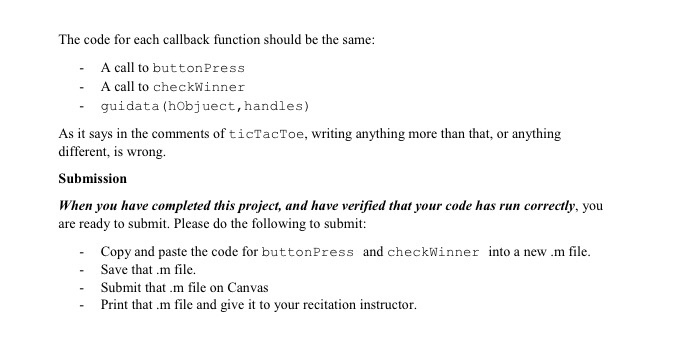
%IMPORTANT NOTE - The Tic Tac Toe grid pushbuttons should all have callback %functions that doe the following: % %- Call the function buttonPress %- Call the function checkWinner % %IF YOU WRITE DIFFERENT CODE INSIDE OF EACH OF THE FOLLOWING CALLBACK %FUNCTIONS YOU ARE DOING IT WRONG!
% --- Executes on button press in A1. function A1_Callback(hObject, eventdata, handles)
% --- Executes on button press in B1. function B1_Callback(hObject, eventdata, handles)
% --- Executes on button press in C1. function C1_Callback(hObject, eventdata, handles)
% --- Executes on button press in A2. function A2_Callback(hObject, eventdata, handles)
% --- Executes on button press in B2. function B2_Callback(hObject, eventdata, handles)
% --- Executes on button press in C2. function C2_Callback(hObject, eventdata, handles)
% --- Executes on button press in A3. function A3_Callback(hObject, eventdata, handles)
% --- Executes on button press in B3. function B3_Callback(hObject, eventdata, handles)
% --- Executes on button press in C3. function C3_Callback(hObject, eventdata, handles)
% --- Executes on button press in newGame. function newGame_Callback(hObject, eventdata, handles) %This is the last bit of code I have written for you. It initializes a new %game when the user presses the "New Game" button. handles.turnNumber = 1; for i = 1:3 for j = 1:3 handles.([handles.rows{i} handles.cols{j}]).String = ' '; end end
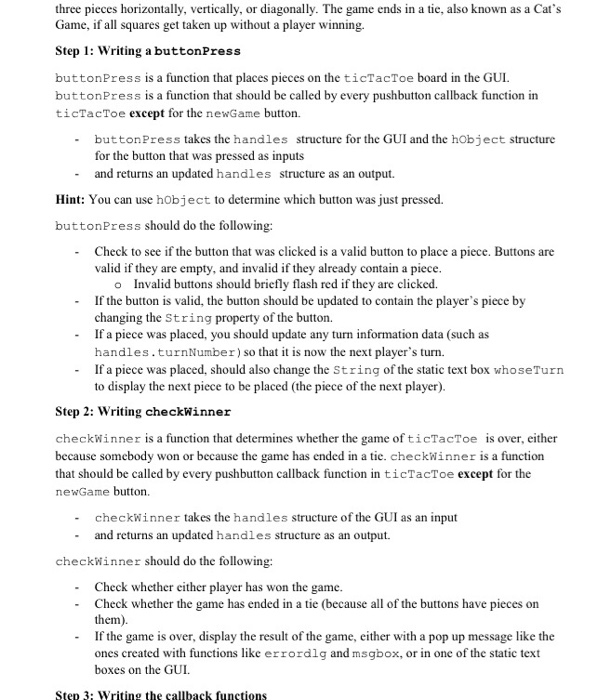
%THESE ARE THE TWO FUNCTIONS YOU HAVE TO WRITE. WHEN YOU SUBMIT THIS MINI %PROJECT, ONLY SUBMIT THE CODE FOR THESE TWO FUNCTIONS, NOT ANY OF THE %ABOVE CODE. MAKE SURE YOU COMMENT YOUR CODE, AND USE GOOD STYLE. function handles = buttonPress(hObject,handles)
function handles = checkWinner(handles)
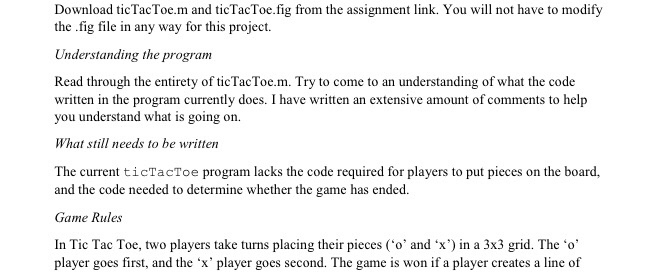
Download ticTacToe.m and ticTacToe.fig from the assignment link. You will not have to modify the fig file in any way for this project. Understanding the program Read through the entirety of ticTacToe.?. Try to come to an understanding of what the code written in the program currently does. I have written an extensive amount of comments to help you understand what is going orn What still needs to be written The current ticTacToe program lacks the code required for players to put pieces on the board, and the code needed to determine whether the game has ended Game Rules In Tic Tac Toe, two players take turns placing their pieces ('o' and x') in a 3x3 grid. The o' player goes first, and the 'x' player goes second. The game is won if a player creates a line of
Step by Step Solution
There are 3 Steps involved in it
To complete the tictactoe project you need to implement the buttonPress and checkWinner functions Heres a guide on how to do that Step 1 buttonPress F... View full answer

Get step-by-step solutions from verified subject matter experts
 Study Help