







Question: Using MATLAB function varargout = pplane1(varargin) % PPLANE1 MATLAB code for pplane1.fig % PPLANE1, by itself, creates a new PPLANE1 or raises the existing %
Using MATLAB 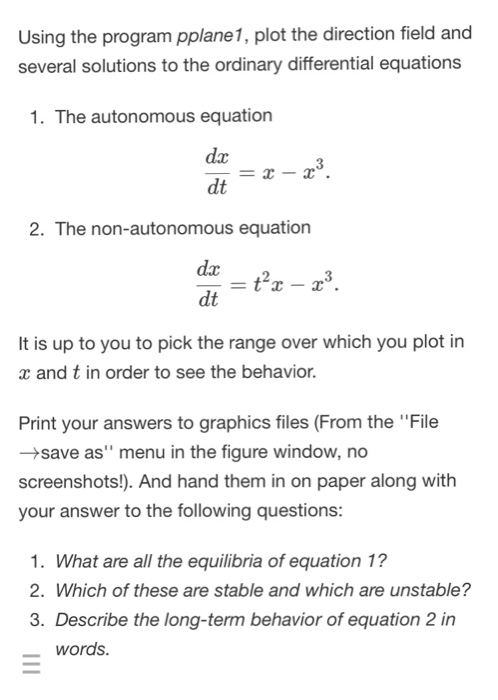
function varargout = pplane1(varargin) % PPLANE1 MATLAB code for pplane1.fig % PPLANE1, by itself, creates a new PPLANE1 or raises the existing % singleton*. % % H = PPLANE1 returns the handle to a new PPLANE1 or the handle to % the existing singleton*. % % PPLANE1('CALLBACK',hObject,eventData,handles,...) calls the local % function named CALLBACK in PPLANE1.M with the given input arguments. % % PPLANE1('Property','Value',...) creates a new PPLANE1 or raises the % existing singleton*. Starting from the left, property value pairs are % applied to the GUI before pplane1_OpeningFcn gets called. An % unrecognized property name or invalid value makes property application % stop. All inputs are passed to pplane1_OpeningFcn via varargin. % % *See GUI Options on GUIDE's Tools menu. Choose "GUI allows only one % instance to run (singleton)". % % See also: GUIDE, GUIDATA, GUIHANDLES % Edit the above text to modify the response to help pplane1 % Last Modified by GUIDE v2.5 31-Mar-2017 14:46:38 % Begin initialization code - DO NOT EDIT gui_Singleton = 1; gui_State = struct('gui_Name', mfilename, ... 'gui_Singleton', gui_Singleton, ... 'gui_OpeningFcn', @pplane1_OpeningFcn, ... 'gui_OutputFcn', @pplane1_OutputFcn, ... 'gui_LayoutFcn', [] , ... 'gui_Callback', []); if nargin && ischar(varargin{1}) gui_State.gui_Callback = str2func(varargin{1}); end if nargout [varargout{1:nargout}] = gui_mainfcn(gui_State, varargin{:}); else gui_mainfcn(gui_State, varargin{:}); end % End initialization code - DO NOT EDIT % --- Executes just before pplane1 is made visible. function pplane1_OpeningFcn(hObject, eventdata, handles, varargin) % This function has no output args, see OutputFcn. % hObject handle to figure % eventdata reserved - to be defined in a future version of MATLAB % handles structure with handles and user data (see GUIDATA) % varargin command line arguments to pplane1 (see VARARGIN) % Choose default command line output for pplane1 handles.output = hObject; % Update handles structure guidata(hObject, handles); % UIWAIT makes pplane1 wait for user response (see UIRESUME) % uiwait(handles.figure1); % --- Outputs from this function are returned to the command line. function varargout = pplane1_OutputFcn(hObject, eventdata, handles) % varargout cell array for returning output args (see VARARGOUT); % hObject handle to figure % eventdata reserved - to be defined in a future version of MATLAB % handles structure with handles and user data (see GUIDATA) % Get default command line output from handles structure varargout{1} = handles.output; function txt_xdot_Callback(hObject, eventdata, handles) % hObject handle to txt_xdot (see GCBO) % eventdata reserved - to be defined in a future version of MATLAB % handles structure with handles and user data (see GUIDATA) % Hints: get(hObject,'String') returns contents of txt_xdot as text % str2double(get(hObject,'String')) returns contents of txt_xdot as a double % --- Executes during object creation, after setting all properties. function txt_xdot_CreateFcn(hObject, eventdata, handles) % hObject handle to txt_xdot (see GCBO) % eventdata reserved - to be defined in a future version of MATLAB % handles empty - handles not created until after all CreateFcns called % Hint: edit controls usually have a white background on Windows. % See ISPC and COMPUTER. if ispc && isequal(get(hObject,'BackgroundColor'), get(0,'defaultUicontrolBackgroundColor')) set(hObject,'BackgroundColor','white'); end function txt_ydot_Callback(hObject, eventdata, handles) % hObject handle to txt_ydot (see GCBO) % eventdata reserved - to be defined in a future version of MATLAB % handles structure with handles and user data (see GUIDATA) % Hints: get(hObject,'String') returns contents of txt_ydot as text % str2double(get(hObject,'String')) returns contents of txt_ydot as a double % --- Executes during object creation, after setting all properties. function txt_ydot_CreateFcn(hObject, eventdata, handles) % hObject handle to txt_ydot (see GCBO) % eventdata reserved - to be defined in a future version of MATLAB % handles empty - handles not created until after all CreateFcns called % Hint: edit controls usually have a white background on Windows. % See ISPC and COMPUTER. if ispc && isequal(get(hObject,'BackgroundColor'), get(0,'defaultUicontrolBackgroundColor')) set(hObject,'BackgroundColor','white'); end function txt_minx_Callback(hObject, eventdata, handles) % hObject handle to txt_minx (see GCBO) % eventdata reserved - to be defined in a future version of MATLAB % handles structure with handles and user data (see GUIDATA) % Hints: get(hObject,'String') returns contents of txt_minx as text % str2double(get(hObject,'String')) returns contents of txt_minx as a double % --- Executes during object creation, after setting all properties. function txt_minx_CreateFcn(hObject, eventdata, handles) % hObject handle to txt_minx (see GCBO) % eventdata reserved - to be defined in a future version of MATLAB % handles empty - handles not created until after all CreateFcns called % Hint: edit controls usually have a white background on Windows. % See ISPC and COMPUTER. if ispc && isequal(get(hObject,'BackgroundColor'), get(0,'defaultUicontrolBackgroundColor')) set(hObject,'BackgroundColor','white'); end function txt_maxx_Callback(hObject, eventdata, handles) % hObject handle to txt_maxx (see GCBO) % eventdata reserved - to be defined in a future version of MATLAB % handles structure with handles and user data (see GUIDATA) % Hints: get(hObject,'String') returns contents of txt_maxx as text % str2double(get(hObject,'String')) returns contents of txt_maxx as a double % --- Executes during object creation, after setting all properties. function txt_maxx_CreateFcn(hObject, eventdata, handles) % hObject handle to txt_maxx (see GCBO) % eventdata reserved - to be defined in a future version of MATLAB % handles empty - handles not created until after all CreateFcns called % Hint: edit controls usually have a white background on Windows. % See ISPC and COMPUTER. if ispc && isequal(get(hObject,'BackgroundColor'), get(0,'defaultUicontrolBackgroundColor')) set(hObject,'BackgroundColor','white'); end function txt_miny_Callback(hObject, eventdata, handles) % hObject handle to txt_miny (see GCBO) % eventdata reserved - to be defined in a future version of MATLAB % handles structure with handles and user data (see GUIDATA) % Hints: get(hObject,'String') returns contents of txt_miny as text % str2double(get(hObject,'String')) returns contents of txt_miny as a double % --- Executes during object creation, after setting all properties. function txt_miny_CreateFcn(hObject, eventdata, handles) % hObject handle to txt_miny (see GCBO) % eventdata reserved - to be defined in a future version of MATLAB % handles empty - handles not created until after all CreateFcns called % Hint: edit controls usually have a white background on Windows. % See ISPC and COMPUTER. if ispc && isequal(get(hObject,'BackgroundColor'), get(0,'defaultUicontrolBackgroundColor')) set(hObject,'BackgroundColor','white'); end function txt_maxy_Callback(hObject, eventdata, handles) % hObject handle to txt_maxy (see GCBO) % eventdata reserved - to be defined in a future version of MATLAB % handles structure with handles and user data (see GUIDATA) % Hints: get(hObject,'String') returns contents of txt_maxy as text % str2double(get(hObject,'String')) returns contents of txt_maxy as a double % --- Executes during object creation, after setting all properties. function txt_maxy_CreateFcn(hObject, eventdata, handles) % hObject handle to txt_maxy (see GCBO) % eventdata reserved - to be defined in a future version of MATLAB % handles empty - handles not created until after all CreateFcns called % Hint: edit controls usually have a white background on Windows. % See ISPC and COMPUTER. if ispc && isequal(get(hObject,'BackgroundColor'), get(0,'defaultUicontrolBackgroundColor')) set(hObject,'BackgroundColor','white'); end % --- Executes on button press in btn_graph_phase_plane. function btn_graph_phase_plane_Callback(hObject, eventdata, handles) % hObject handle to btn_graph_phase_plane (see GCBO) % eventdata reserved - to be defined in a future version of MATLAB % handles structure with handles and user data (see GUIDATA) global equ_xdot; equ_xdot = get(handles.txt_xdot, 'String'); xmin = str2double(get(handles.txt_minx, 'String')); xmax = str2double(get(handles.txt_maxx, 'String')); simtime = str2double(get(handles.txt_simtime, 'String')); resolution = [str2double(get(handles.txt_resolutionh, 'String')) ... str2double(get(handles.txt_resolutionv, 'String'))]; phase_plot_1_interactive(@f, [xmin xmax], simtime, ... strcat('$\dot{x}=', equ_xdot, '$'), ... resolution, 0.4); function txt_simtime_Callback(hObject, eventdata, handles) % hObject handle to txt_simtime (see GCBO) % eventdata reserved - to be defined in a future version of MATLAB % handles structure with handles and user data (see GUIDATA) % Hints: get(hObject,'String') returns contents of txt_simtime as text % str2double(get(hObject,'String')) returns contents of txt_simtime as a double % --- Executes during object creation, after setting all properties. function txt_simtime_CreateFcn(hObject, eventdata, handles) % hObject handle to txt_simtime (see GCBO) % eventdata reserved - to be defined in a future version of MATLAB % handles empty - handles not created until after all CreateFcns called % Hint: edit controls usually have a white background on Windows. % See ISPC and COMPUTER. if ispc && isequal(get(hObject,'BackgroundColor'), get(0,'defaultUicontrolBackgroundColor')) set(hObject,'BackgroundColor','white'); end % --- Callback function of the ODE function xdot = f(t, x) global equ_xdot; xdot = eval(equ_xdot); function txt_resolutionh_Callback(hObject, eventdata, handles) % hObject handle to txt_resolutionh (see GCBO) % eventdata reserved - to be defined in a future version of MATLAB % handles structure with handles and user data (see GUIDATA) % Hints: get(hObject,'String') returns contents of txt_resolutionh as text % str2double(get(hObject,'String')) returns contents of txt_resolutionh as a double % --- Executes during object creation, after setting all properties. function txt_resolutionh_CreateFcn(hObject, eventdata, handles) % hObject handle to txt_resolutionh (see GCBO) % eventdata reserved - to be defined in a future version of MATLAB % handles empty - handles not created until after all CreateFcns called % Hint: edit controls usually have a white background on Windows. % See ISPC and COMPUTER. if ispc && isequal(get(hObject,'BackgroundColor'), get(0,'defaultUicontrolBackgroundColor')) set(hObject,'BackgroundColor','white'); end function txt_resolutionv_Callback(hObject, eventdata, handles) % hObject handle to txt_resolutionv (see GCBO) % eventdata reserved - to be defined in a future version of MATLAB % handles structure with handles and user data (see GUIDATA) % Hints: get(hObject,'String') returns contents of txt_resolutionv as text % str2double(get(hObject,'String')) returns contents of txt_resolutionv as a double % --- Executes during object creation, after setting all properties. function txt_resolutionv_CreateFcn(hObject, eventdata, handles) % hObject handle to txt_resolutionv (see GCBO) % eventdata reserved - to be defined in a future version of MATLAB % handles empty - handles not created until after all CreateFcns called % Hint: edit controls usually have a white background on Windows. % See ISPC and COMPUTER. if ispc && isequal(get(hObject,'BackgroundColor'), get(0,'defaultUicontrolBackgroundColor')) set(hObject,'BackgroundColor','white'); end % -------------------------------------------------------------------- function mnu_file_Callback(hObject, eventdata, handles) % hObject handle to mnu_file (see GCBO) % eventdata reserved - to be defined in a future version of MATLAB % handles structure with handles and user data (see GUIDATA) % -------------------------------------------------------------------- function mnu_load_Callback(hObject, eventdata, handles) % hObject handle to mnu_load (see GCBO) % eventdata reserved - to be defined in a future version of MATLAB % handles structure with handles and user data (see GUIDATA) [file, path] = uigetfile('*.dat', 'Select file'); if file ~= 0 T = readtable(strcat(path, file)); data = table2cell(T); set(handles.txt_xdot, 'String', data{1, :}); set(handles.txt_minx, 'String', data{2, :}); set(handles.txt_maxx, 'String', data{3, :}); set(handles.txt_simtime, 'String', data{4, :}); set(handles.txt_resolutionh, 'String', data{5, :}) set(handles.txt_resolutionv, 'String', data{6, :}); end % -------------------------------------------------------------------- function mnu_save_Callback(hObject, eventdata, handles) % hObject handle to mnu_save (see GCBO) % eventdata reserved - to be defined in a future version of MATLAB % handles structure with handles and user data (see GUIDATA) ode1storder = {get(handles.txt_xdot, 'String'); ... get(handles.txt_minx, 'String'); ... get(handles.txt_maxx, 'String'); ... get(handles.txt_simtime, 'String'); ... get(handles.txt_resolutionh, 'String');... get(handles.txt_resolutionv, 'String')}; [file, path] = uiputfile('myode.dat', 'Save file name'); if file ~= 0 T = cell2table(ode1storder); writetable(T, strcat(path, file)); end % -------------------------------------------------------------------- function mnu_help_Callback(hObject, eventdata, handles) % hObject handle to mnu_help (see GCBO) % eventdata reserved - to be defined in a future version of MATLAB % handles structure with handles and user data (see GUIDATA) % -------------------------------------------------------------------- function mnu_instruction_Callback(hObject, eventdata, handles) % hObject handle to mnu_instruction (see GCBO) % eventdata reserved - to be defined in a future version of MATLAB % handles structure with handles and user data (see GUIDATA) msgbox({'Please try the provided examples (.dat files).'}, 'Instruction'); % -------------------------------------------------------------------- function mnu_about_Callback(hObject, eventdata, handles) % hObject handle to mnu_about (see GCBO) % eventdata reserved - to be defined in a future version of MATLAB % handles structure with handles and user data (see GUIDATA) msgbox({'manurunga@yandex.com'; 'http://kataauralius.com/'}, 'About', 'modal');
Using the program pplane1, plot the direction field and several solutions to the ordinary differential equations 1. The autonomous equation da dt 2. The non-autonomous equation dx dt It is up to you to pick the range over which you plot in r and t in order to see the behavior. Print your answers to graphics files (From the "File save as" menu in the figure window, no screenshots!). And hand them in on paper along with your answer to the following questions: 1. What are all the equilibria of equation 1? 2. Which of these are stable and which are unstable? 3. Describe the long-term behavior of equation 2 in -words
Step by Step Solution
There are 3 Steps involved in it

Get step-by-step solutions from verified subject matter experts
 Study Help