







Question: MATLAB ONLY Follow the Matlab GUI Tutorial document to create 5 different GUIS myAdder mySlider myPopUp myPlot myButton . Finally, use the info from the
MATLAB ONLY
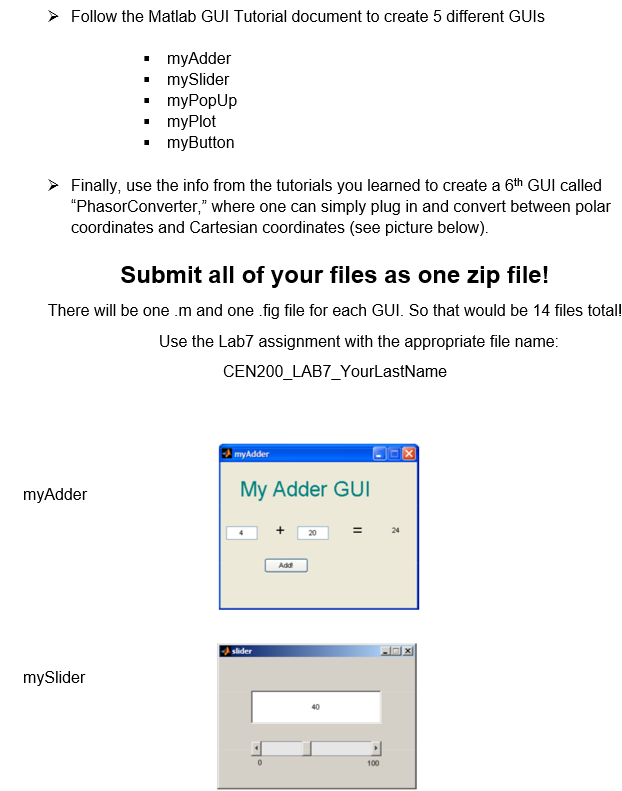
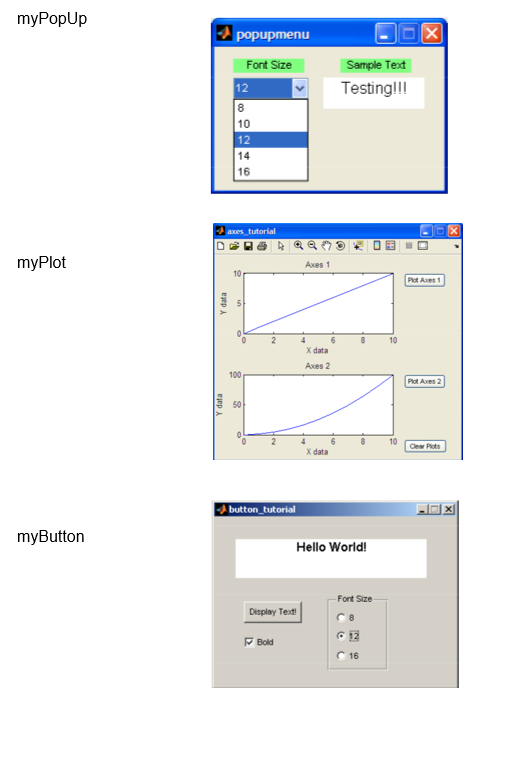
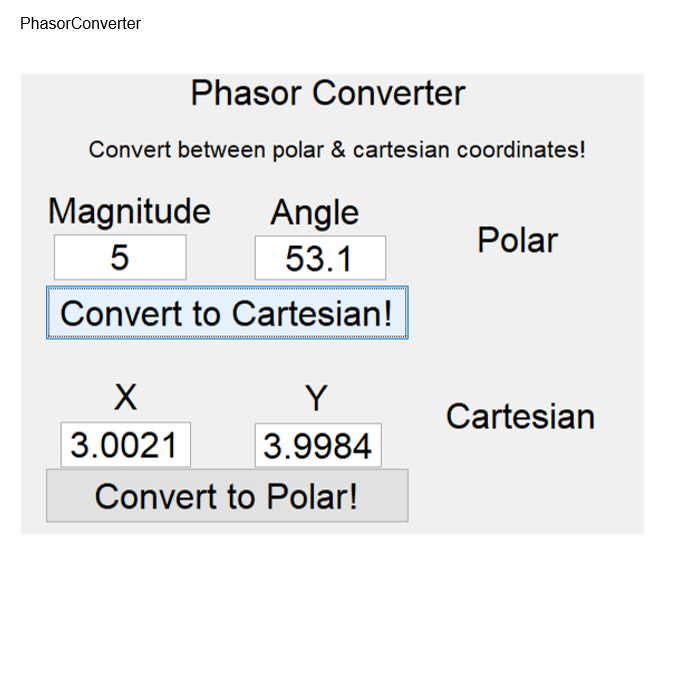
Follow the Matlab GUI Tutorial document to create 5 different GUIS myAdder mySlider myPopUp myPlot myButton . Finally, use the info from the tutorials you learned to create a 6th GUI called "PhasorConverter," where one can simply plug in and convert between polar coordinates and Cartesian coordinates (see picture below). Submit all of your files as one zip file! There will be one .m and one fig file for each GUI. So that would be 14 files total! Use the Lab7 assignment with the appropriate file name: CEN200_LAB7_YourLastName my Adder myAdder My Adder GUI Add slider mySlider 100 myPopUp popupmenu x Font Size Sample Text Testing!!! 12 8 10 12 14 16 axes tutorial 15 a myPlot Axes 1 10 Plot Axes 1 Y data 3 10 O 4 X data Axes 2 100 Plot Axes 2 Y data 50 NA 10 Clear Plots X data button_tutorial myButton Hello World! Font Size Display Testi Bold C 16 PhasorConverter Phasor Converter Convert between polar & cartesian coordinates! Polar Magnitude Angle 5 53.1 Convert to Cartesian! Cartesian Y 3.0021 3.9984 Convert to Polar! Follow the Matlab GUI Tutorial document to create 5 different GUIS myAdder mySlider myPopUp myPlot myButton . Finally, use the info from the tutorials you learned to create a 6th GUI called "PhasorConverter," where one can simply plug in and convert between polar coordinates and Cartesian coordinates (see picture below). Submit all of your files as one zip file! There will be one .m and one fig file for each GUI. So that would be 14 files total! Use the Lab7 assignment with the appropriate file name: CEN200_LAB7_YourLastName my Adder myAdder My Adder GUI Add slider mySlider 100 myPopUp popupmenu x Font Size Sample Text Testing!!! 12 8 10 12 14 16 axes tutorial 15 a myPlot Axes 1 10 Plot Axes 1 Y data 3 10 O 4 X data Axes 2 100 Plot Axes 2 Y data 50 NA 10 Clear Plots X data button_tutorial myButton Hello World! Font Size Display Testi Bold C 16 PhasorConverter Phasor Converter Convert between polar & cartesian coordinates! Polar Magnitude Angle 5 53.1 Convert to Cartesian! Cartesian Y 3.0021 3.9984 Convert to Polar
Step by Step Solution
There are 3 Steps involved in it

Get step-by-step solutions from verified subject matter experts
 Study Help