







Question: (MATLAB ONLY) (MATLAB ONLY) (MATLAB ONLY) (MATLAB ONLY) (MATLAB ONLY) (MATLAB ONLY) (MATLAB ONLY) (MATLAB ONLY) (MATLAB ONLY) The force to overcome the drag on
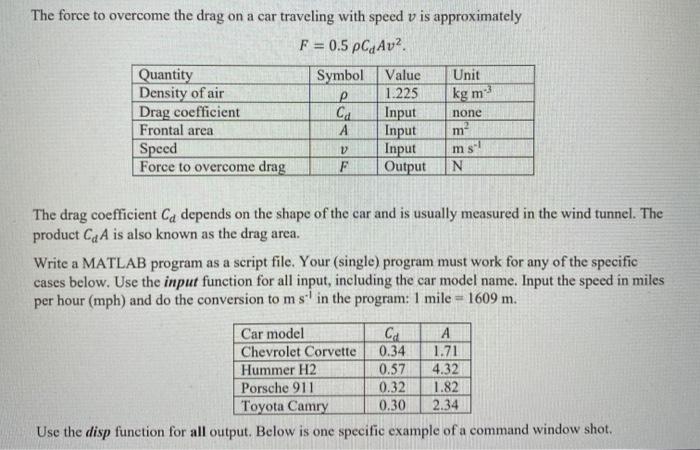
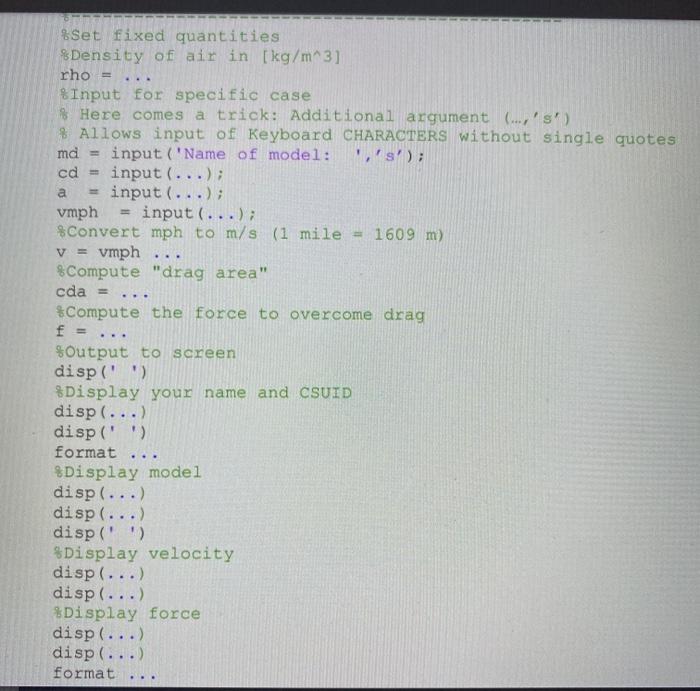
The force to overcome the drag on a car traveling with speed v is approximately F = 0.5 pCjAv2 Quantity Symbol Value Unit Density of air 1.225 kg m Drag coefficient Ca Input none Frontal area A Input Speed Input Force to overcome drag F Output N V ms. The drag coefficient Ca depends on the shape of the car and is usually measured in the wind tunnel. The product C, A is also known as the drag area. Write a MATLAB program as a script file. Your (single) program must work for any of the specific cases below. Use the input function for all input, including the car model name. Input the speed in miles per hour (mph) and do the conversion to ms in the program: 1 mile = 1609 m. Car model Ca A Chevrolet Corvette 0.34 1.71 Hummer H2 0.57 4.32 Porsche 911 0.32 1.82 Toyota Camry 0.30 2.34 Use the disp function for all output. Below is one specific example of a command window shot. & Set fixed quantities Density of air in [kg/m^3] rho = Input for specific case Here comes a trick: Additional argument (...,'s') # Allows input of Keyboard CHARACTERS without single quotes md input('Name of model: i's'); cd = input (...); input (...); vmph input (...); Convert mph to m/s (1 mile = 1609 m) v = vmph % Compute "drag area" cda = *Compute the force to overcome drag a %Output to screen disp('') %Display your name and CSUID disp(...) disp(' ') format %Display model disp(...) disp(...) disp(' ') %Display velocity disp(...) disp(...) * Display force disp (...) disp (...) format
Step by Step Solution
There are 3 Steps involved in it

Get step-by-step solutions from verified subject matter experts
 Study Help