







Question: please do your best to complete both activities in separate codes not together. i attached some of the syntax guides hope it helps thanks GOALS:
 please do your best to complete both activities in separate codes not together. i attached some of the syntax guides hope it helps thanks
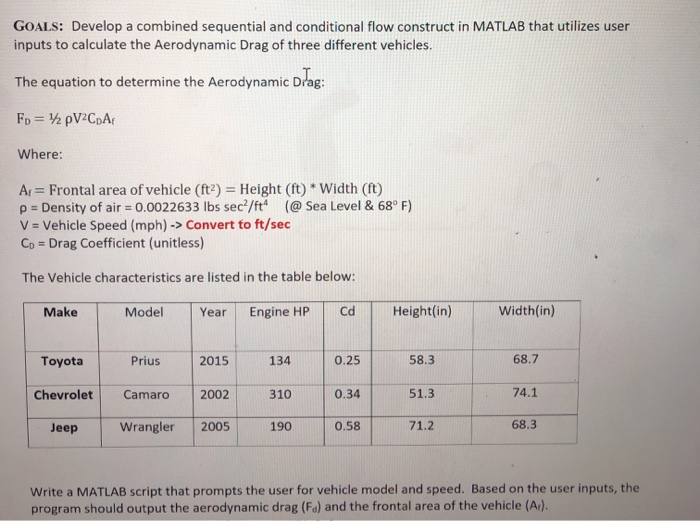
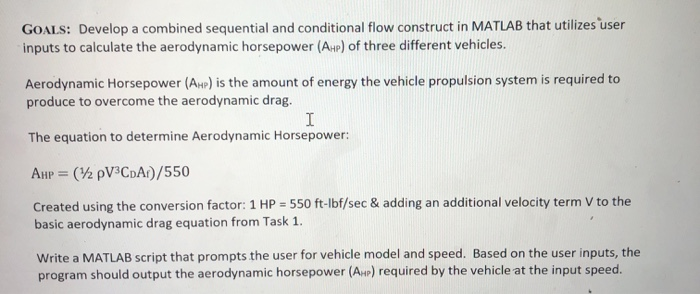
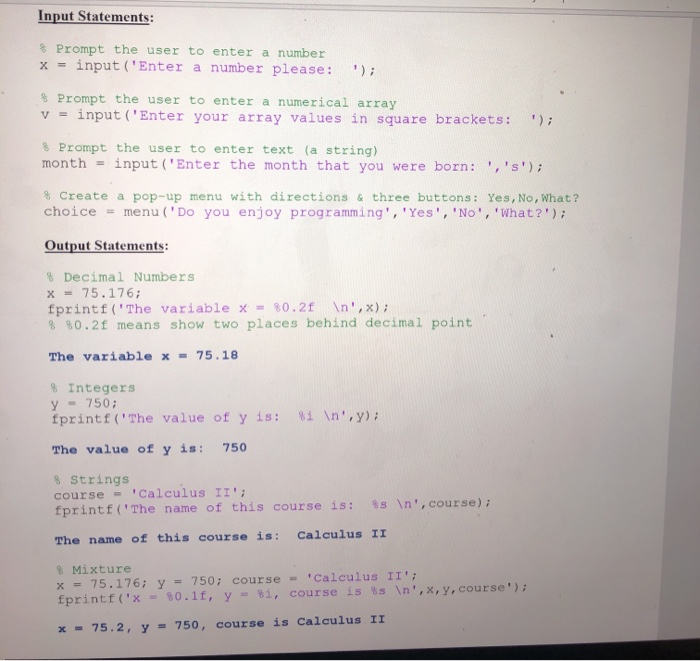
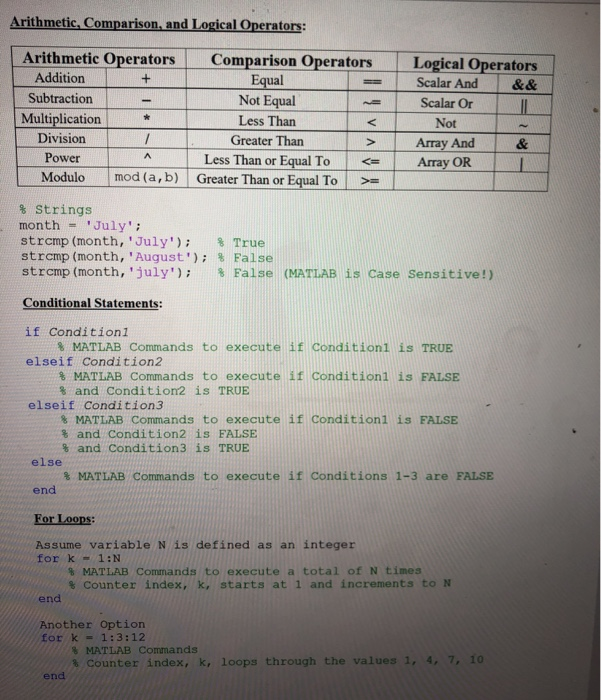
 GOALS: Develop a combined sequential and conditional flow construct in MATLAB that utilizes user inputs to calculate the Aerodynamic Drag of three different vehicles. The equation to determine the Aerodynamic Drag: Fp = 1 pV2CpA Where: Ar = Frontal area of vehicle (ft) = Height (ft) * Width (ft) p = Density of air -0.0022633 lbs sec/ft" (@Sea Level & 68F) V = Vehicle Speed (mph) -> Convert to ft/sec Cp = Drag Coefficient (unitless) The Vehicle characteristics are listed in the table below: Make Model Year Engine HP Cd Height(in) Width(in) Toyota Prius 2015 134 0.25 58.3 68.7 Chevrolet Camaro 2002 310 0.34 51.3 74.1 Jeep Wrangler 2005 190 0.58 71.2 68.3 Write a MATLAB script that prompts the user for vehicle model and speed. Based on the user inputs, the program should output the aerodynamic drag (Fa) and the frontal area of the vehicle (Ar). GOALS: Develop a combined sequential and conditional flow construct in MATLAB that utilizes user inputs to calculate the aerodynamic horsepower (AHp) of three different vehicles. Aerodynamic Horsepower (AHp) is the amount of energy the vehicle propulsion system is required to produce to overcome the aerodynamic drag. The equation to determine Aerodynamic Horsepower: AHp = (12 pVCDA)/550 Created using the conversion factor: 1 HP = 550 ft-lbf/sec & adding an additional velocity term V to the basic aerodynamic drag equation from Task 1. Write a MATLAB script that prompts the user for vehicle model and speed. Based on the user inputs, the program should output the aerodynamic horsepower (AP) required by the vehicle at the input speed. Input Statements: Prompt the user to enter a number x = input('Enter a number please: "); Prompt the user to enter a numerical array V = input('Enter your array values in square brackets: '); Prompt the user to enter text (a string) month = input ("Enter the month that you were born: ','S'); Create a pop-up menu with directions & three buttons: Yes, No, What? choice = menu ('Do you enjoy programming', 'Yes', 'No', 'What?'); Output Statements: % Decimal Numbers X = 75.176; fprintf('The variable x = 80.2f ',x); 8 80.2f means show two places behind decimal point The variable x = 75.18 8 Integers Y - 750; fprintf('The value of y is: The value of y is: 750 8 ',y); $ Strings course - Calculus II'; fprintf('The name of this course is: 8 The name of this course is: Calculus II ', course); % Mixture x = 75.176; y = 750; course - Calculus II'; fprintf('x - 30.11, y = $i, course is ', X, Y, course"); x - 75.2, y = 750, course is calculus II Arithmetic, Comparison, and Logical Operators: Equal Arithmetic Operators Comparison Operators Addition + Subtraction Not Equal Multiplication Less Than Division 1 Greater Than Power Less Than or Equal To Modulo mod (a, b) Greater Than or Equal To Logical Operators Scalar And & & Scalar Or Not Array And Array OR % Strings month = 'July'; strcmp (month, 'July'); $ True strcmp (month, 'August'); $False strcmp(month, 'july'); $False (MATLAB is Case Sensitive!) Conditional Statements: if Conditioni % MATLAB Commands to execute if Conditioni is TRUE elseif Condition2 % MATLAB Commands to execute if Conditionl is FALSE % and Condition is TRUE elseif Condition 3 MATLAB Commands to execute if Conditioni is FALSE % and Condition2 is FALSE % and Condition3 is TRUE else * MATLAB Commands to execute if Conditions 1-3 are FALSE end For Loops Assume variable N is defined as an integer fork - 1:N MATLAB Commands to execute a total of Ntimes Counter index, k, starts at 1 and increments to N end Another Option fork - 1:3:12 MATLAB Commands Counter index, k, loops through the values 1, 4, 7, 10 end
Step by Step Solution
There are 3 Steps involved in it

Get step-by-step solutions from verified subject matter experts
 Study Help