







Question: MATLAB ONLY MATLAB ONLY NO FPRINT NO WHILE ONLY FOR AND IFMATLAB ONLY MATLAB ONLY NO FPRINT NO WHILE ONLY FOR AND IFMATLAB ONLY MATLAB
MATLAB ONLY MATLAB ONLY NO FPRINT NO WHILE ONLY FOR AND IFMATLAB ONLY MATLAB ONLY NO FPRINT NO WHILE ONLY FOR AND IFMATLAB ONLY MATLAB ONLY NO FPRINT NO WHILE ONLY FOR AND IFMATLAB ONLY MATLAB ONLY NO FPRINT NO WHILE ONLY FOR AND IFMATLAB ONLY MATLAB ONLY NO FPRINT NO WHILE ONLY FOR AND IFMATLAB ONLY MATLAB ONLY NO FPRINT NO WHILE ONLY FOR AND IFMATLAB ONLY MATLAB ONLY NO FPRINT NO WHILE ONLY FOR AND IF
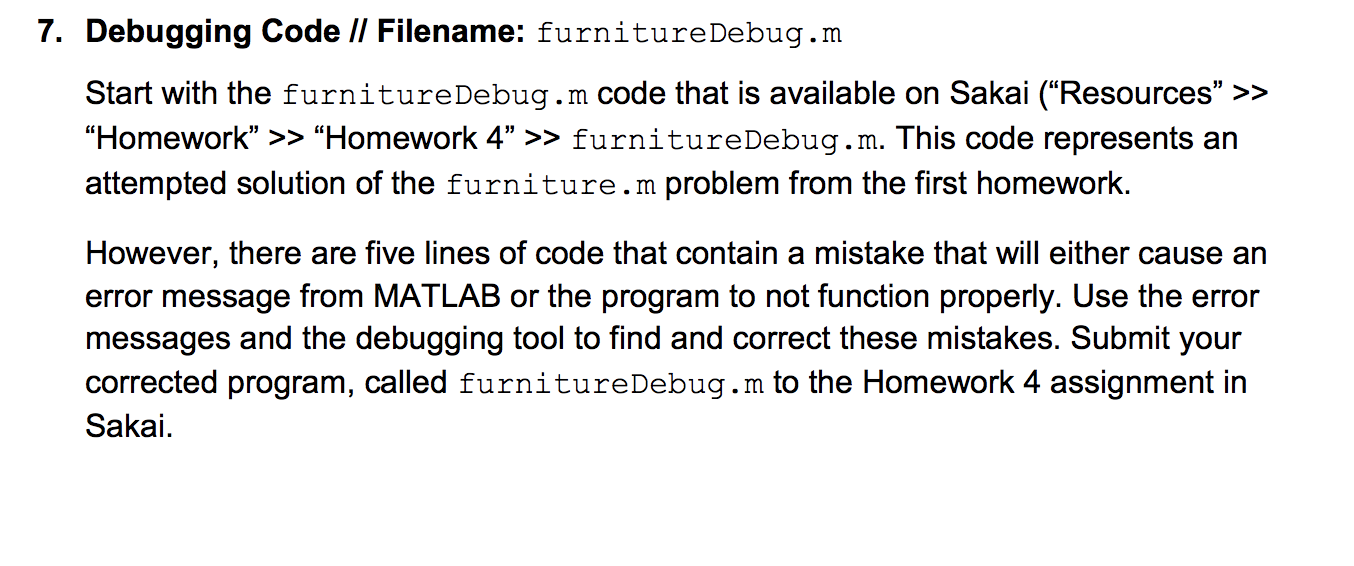
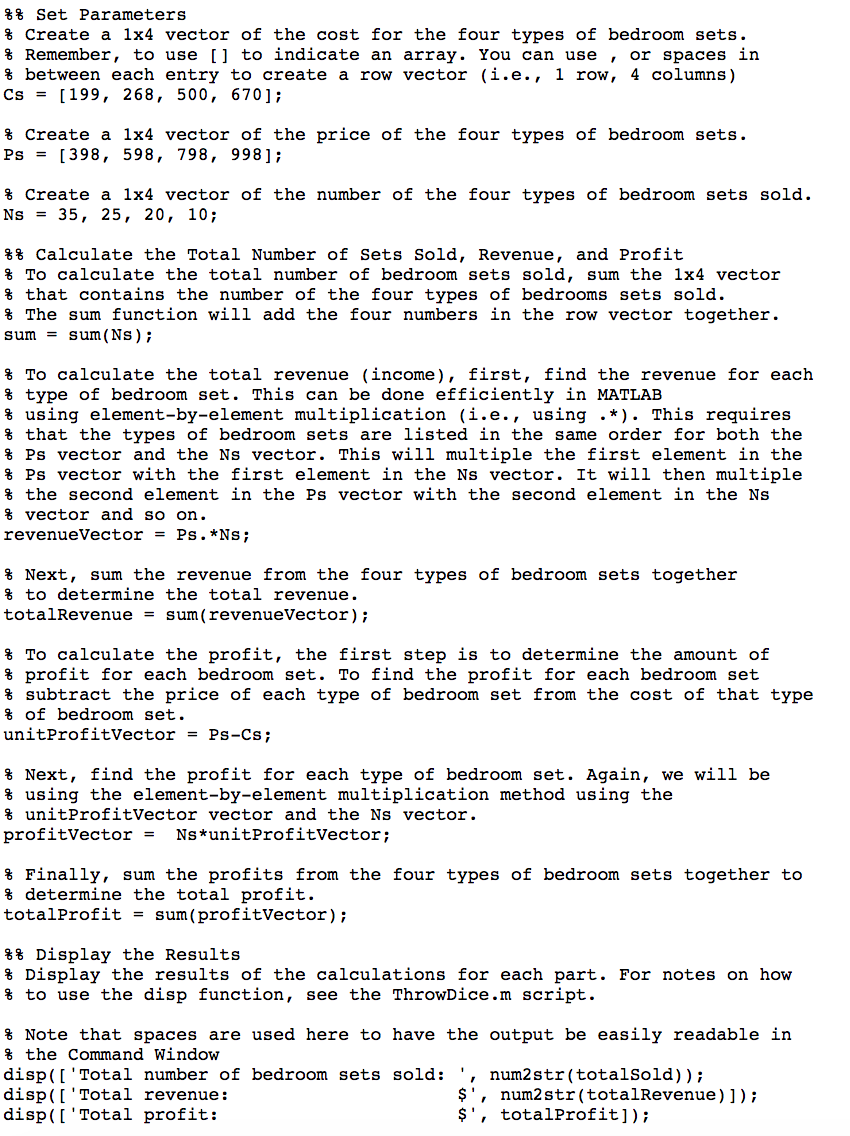
7. Debugging Code // Filename: furniture Debug.m Start with the furnitureDebug.m code that is available on Sakai ("Resources" >> "Homework >> Homework 4 >> furnitureDebug.m. This code represents an attempted solution of the furniture.m problem from the first homework. However, there are five lines of code that contain a mistake that will either cause an error message from MATLAB or the program to not function properly. Use the error messages and the debugging tool to find and correct these mistakes. Submit your corrected program, called furnitureDebug.m to the Homework 4 assignment in Sakai. %% Set Parameters $ Create a 1x4 vector of the cost for the four types of bedroom sets. % Remember, to use [] to indicate an array. You can use, or spaces in % between each entry to create a row vector (i.e., 1 row, 4 columns) Cs = 199, 268, 500, 670]; $ Create a 1x4 vector of the price of the four types of bedroom sets. Ps = [398, 598, 798, 998]; $ Create a 1x4 vector of the number of the four types of bedroom sets sold. Ns = 35, 25, 20, 10; %% Calculate the Total Number of Sets Sold, Revenue, and Profit $ To calculate the total number of bedroom sets sold, sum the 1x4 vector % that contains the number of the four types of bedrooms sets sold. $ The sum function will add the four numbers in the row vector together. sum = sum(NS); $ To calculate the total revenue (income), first, find the revenue for each % type of bedroom set. This can be done efficiently in MATLAB % using element-by-element multiplication (i.e., using .*). This requires % that the types of bedroom sets are listed in the same order for both the % Ps vector and the Ns vector. This will multiple the first element in the % Ps vector with the first element in the Ns vector. It will then multiple $ the second element in the Ps vector with the second element in the Ns % vector and so on. revenueVector = Ps. *NS; $ Next, sum the revenue from the four types of bedroom sets together % to determine the total revenue. total Revenue = sum(revenueVector); To calculate the profit, the first step is to determine the amount of % profit for each bedroom set. To find the profit for each bedroom set % subtract the price of each type of bedroom set from the cost of that type % of bedroom set. unitProfitVector = Ps-Cs; $ Next, find the profit for each type of bedroom set. Again, we will be % using the element-by-element multiplication method using the % unitProfitVector vector and the Ns vector. profitVector = NS*unitProfitVector; % Finally, sum the profits from the four types of bedroom sets together to $ determine the total profit. totalProfit = sum(profitVector); %% Display the Results % Display the results of the calculations for each part. For notes on how % to use the disp function, see the ThrowDice.m script. % Note that spaces are used here to have the output be easily readable in $ the Command Window disp(['Total number of bedroom sets sold: ', num2 str(totalsold)); disp(['Total revenue: $', num2 str(totalRevenue)]); disp(['Total profit: $', totalProfit])
Step by Step Solution
There are 3 Steps involved in it

Get step-by-step solutions from verified subject matter experts
 Study Help