







Question: *** Matlab only My code so far, stuck in for loop. clear, clc, close all figure(9) title('Wind Turbine') hold on pole = [ -2, 2,
*** Matlab only
My code so far, stuck in for loop.
clear, clc, close all figure(9) title('Wind Turbine') hold on pole = [ -2, 2, 1, -1; -50 -50, 0, 0]; x = pole(1, :); y = pole(2, :); fill(x, y, [0.5, 0.5, 0.5]); % dark grey
blade1 = [0, 5, 20, 20, 5, 0; -1, -2, -1, 1, 2, 1; 1, 1, 1, 1, 1, 1]; x = blade1(1, :); y = blade1(2, :); h1 = fill(x, y, "blue");
hold on blade2 = rotate(120)* blade1; % rotate blade1 by 120 degrees to create blade2. Draw it! x= blade2(1,:); y=blade2(2,:); h2= fill(x,y, 'blue');
hold on blade3= rotate(120)* blade2; x=blade3(1,:); y=blade3(2,:); h3= fill (x,y, 'blue')
% rotate blade2 by 120 degrees to create blade3. Draw it! circle(0, 0, 2) % draw the hub axis equal axis([-25, 25, -50, 25]) grid on set(gca, 'fontsize', 20)
N = 10 % ten complete revolutions delta = 5; % degrees for k = 1 : 72*N delete(h1) delete(h2) delete(h3)
new_blade1= rotate(delta)*blade1; x=new_blade1(1,:); y=new_blade1(2,:); h1=fill(x, y, 'pink'); hub = circle(0, 0, 2); pause(0.025) end
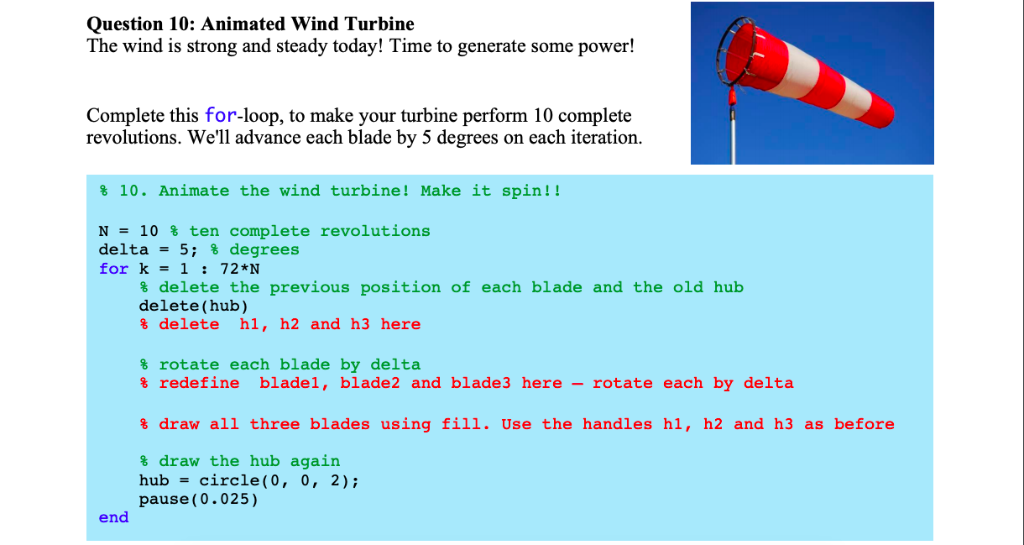
Question 10: Animated Wind Turbine The wind is strong and steady today! Time to generate some power! Complete this for-loop, to make your turbine perform 10 complete revolutions. We'll advance each blade by 5 degrees on each iteration % 10. Animate the wind turbine! Make it spin!! N- 10 % ten complete revolutions delta- 5; % degrees for k1: 72*N % delete the previous position of each blade and the old hub delete(hub) % delete h1, h2 and h3 here % rotate each blade by delta redefine blade 1, blade2 and blade3 here-rotate each by delta % draw all three blades using fill. Use the handles h1, h2 and h3 as before % draw the hub again hub-circle(0, 0, 2) pause(0.025) end
Step by Step Solution
There are 3 Steps involved in it

Get step-by-step solutions from verified subject matter experts
 Study Help