







Question: Matlab only please read question LAB ACTIVITY 23.39.1: Remove the vowels (Strings) This tool is provided by a third party. Your activity is always recorded,
Matlab only please read question
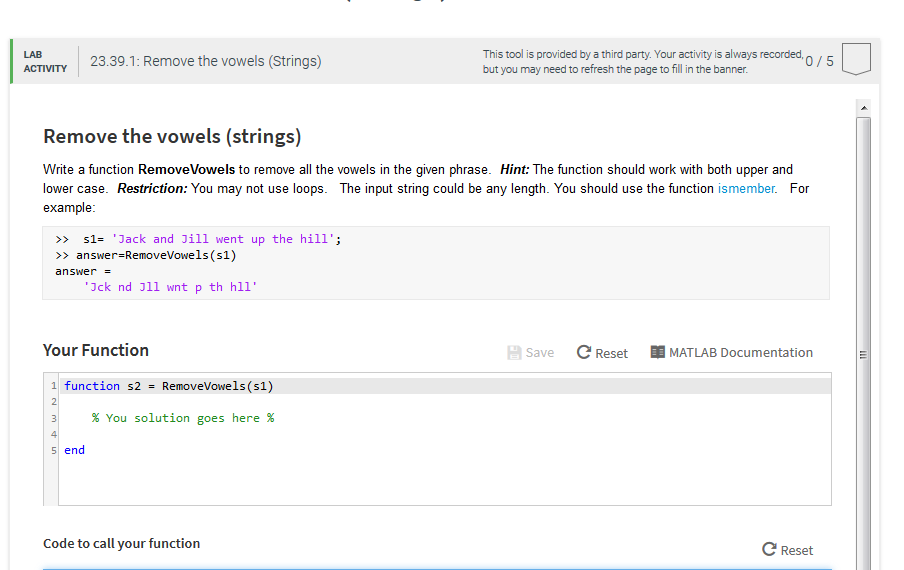
LAB ACTIVITY 23.39.1: Remove the vowels (Strings) This tool is provided by a third party. Your activity is always recorded, but you may need to refresh the page to fill in the banner. 0/5 Remove the vowels (strings) Write a function RemoveVowels to remove all the vowels in the given phrase. Hint: The function should work with both upper and lower case. Restriction: You may not use loops. The input string could be any length. You should use the function ismember. For example Jack and Jill went up the hill' >> answer-RemoveVowels (s1) answer = Jck nd 311 wnt p th hll Your Function Save Reset MATLAB Documentation 1 function s2 = RemoveVowels(s1) % You solution goes here % 5 end Code to call your function C Reset
Step by Step Solution
There are 3 Steps involved in it

Get step-by-step solutions from verified subject matter experts
 Study Help