







Question: MATLAB Please do not use any tools that do not come in the basic student MATLAB package Write a function [slope, R2] = mySlope Finder
MATLAB
![the basic student MATLAB package Write a function [slope, R2] = mySlope](https://dsd5zvtm8ll6.cloudfront.net/si.experts.images/questions/2024/09/66f3cb76266e0_36566f3cb759cb54.jpg)
Please do not use any tools that do not come in the basic student MATLAB package
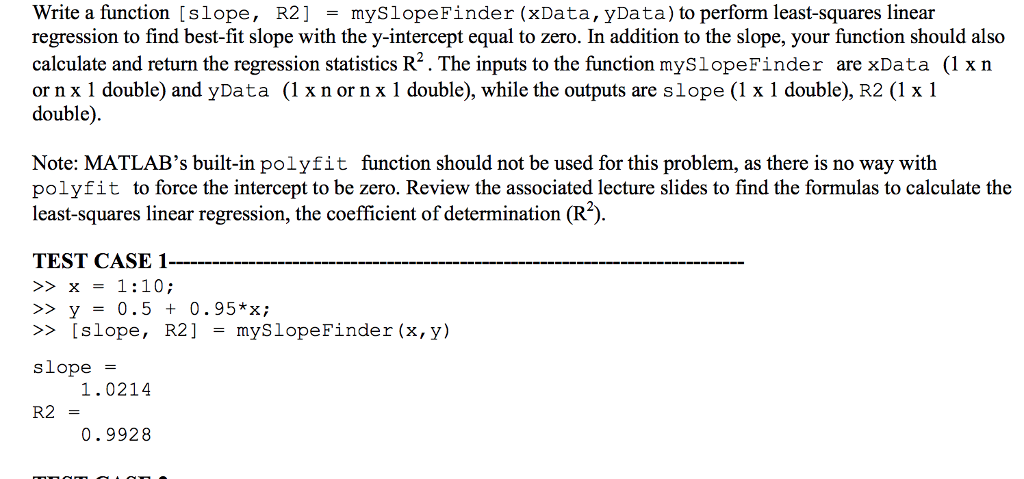
Write a function [slope, R2] = mySlope Finder (XData,yData) to perform least-squares linear regression to find best-fit slope with the y-intercept equal to zero. In addition to the slope, your function should also calculate and return the regression statistics R2. The inputs to the function mySlopeFinder are xData (1 xn or n x 1 double) and yData ( x nor n x 1 double), while the outputs are slope (1 x 1 double), R2 (1 x 1 double). Note: MATLAB's built-in polyfit function should not be used for this problem, as there is no way with polyfit to force the intercept to be zero. Review the associated lecture slides to find the formulas to calculate the least-squares linear regression, the coefficient of determination (R2) TEST CASE 1 >x1:10; >> y = 0.5 + 0.95*x; >> [slope, R2] = myslope Finder (x,y) slope = 1.0214 R2 = 0.9928 Write a function [slope, R2] = mySlope Finder (XData,yData) to perform least-squares linear regression to find best-fit slope with the y-intercept equal to zero. In addition to the slope, your function should also calculate and return the regression statistics R2. The inputs to the function mySlopeFinder are xData (1 xn or n x 1 double) and yData ( x nor n x 1 double), while the outputs are slope (1 x 1 double), R2 (1 x 1 double). Note: MATLAB's built-in polyfit function should not be used for this problem, as there is no way with polyfit to force the intercept to be zero. Review the associated lecture slides to find the formulas to calculate the least-squares linear regression, the coefficient of determination (R2) TEST CASE 1 >x1:10; >> y = 0.5 + 0.95*x; >> [slope, R2] = myslope Finder (x,y) slope = 1.0214 R2 = 0.9928
Step by Step Solution
There are 3 Steps involved in it

Get step-by-step solutions from verified subject matter experts
 Study Help