







Question: Matlab Problem. I need help with knowing how to create the solveall function. Exercise 4 (4 points) Difficulty: Moderate In this exercise, we will be
Matlab Problem. I need help with knowing how to create the solveall function.
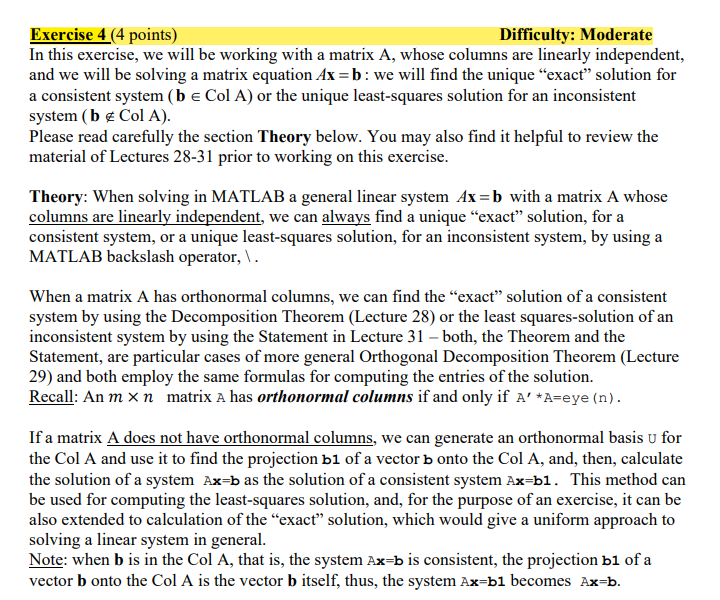
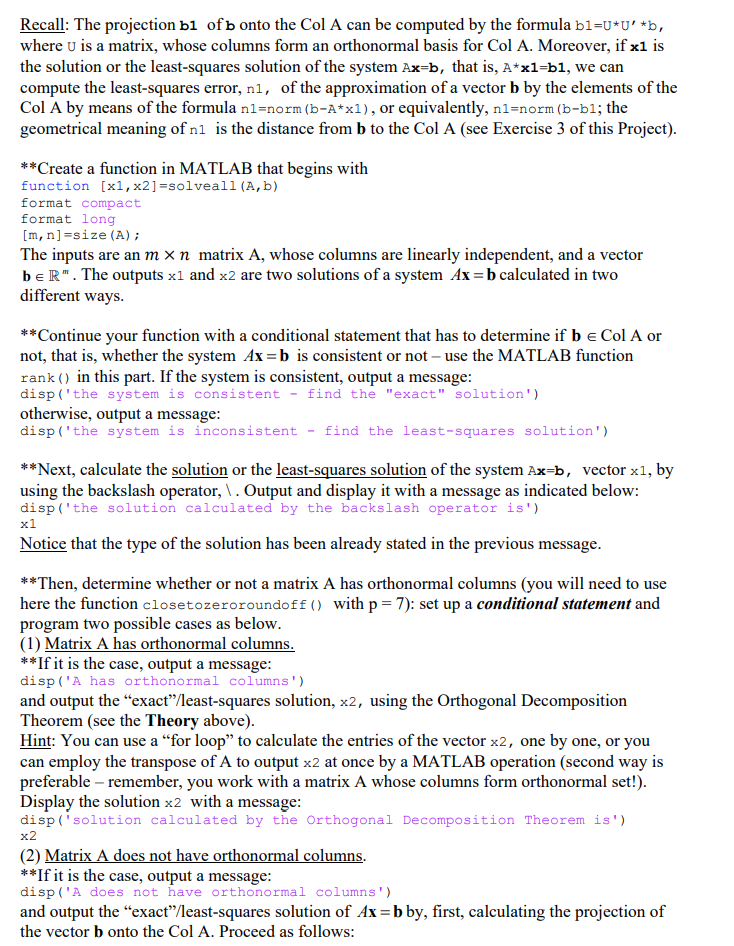
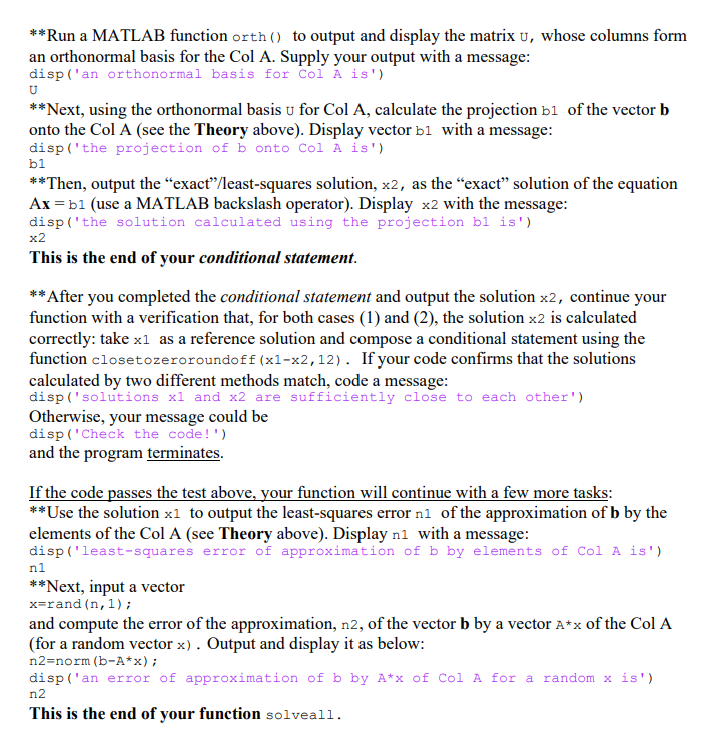
Exercise 4 (4 points) Difficulty: Moderate In this exercise, we will be working with a matrix A, whose columns are linearly independent, and we will be solving a matrix equation Ax=b: we will find the unique exact solution for a consistent system (b e Col A) or the unique least-squares solution for an inconsistent system (b & Col A). Please read carefully the section Theory below. You may also find it helpful to review the material of Lectures 28-31 prior to working on this exercise. Theory: When solving in MATLAB a general linear system Ax=b with a matrix A whose columns are linearly independent, we can always find a unique exact solution, for a consistent system, or a unique least-squares solution, for an inconsistent system, by using a MATLAB backslash operator, \. When a matrix A has orthonormal columns, we can find the exact solution of a consistent system by using the Decomposition Theorem (Lecture 28) or the least squares-solution of an inconsistent system by using the Statement in Lecture 31 both, the Theorem and the Statement, are particular cases of more general Orthogonal Decomposition Theorem (Lecture 29) and both employ the same formulas for computing the entries of the solution. Recall: An mxn matrix A has orthonormal columns if and only if A' *A=eye (n). If a matrix A does not have orthonormal columns, we can generate an orthonormal basis u for the Col A and use it to find the projection b1 of a vector b onto the Col A, and, then, calculate the solution of a system Ax=b as the solution of a consistent system Ax=b1. This method can be used for computing the least-squares solution, and, for the purpose of an exercise, it can be also extended to calculation of the exact solution, which would give a uniform approach to solving a linear system in general. Note: when b is in the Col A, that is, the system Ax=b is consistent, the projection b1 of a vector b onto the Col A is the vector b itself, thus, the system Ax=b1 becomes Ax=b. Recall: The projection b1 of b onto the Col A can be computed by the formula bl=U*U' *b, where u is a matrix, whose columns form an orthonormal basis for Col A. Moreover, if x1 is the solution or the least-squares solution of the system Ax=b, that is, A*xl=b1, we can compute the least-squares error, nl, of the approximation of a vector b by the elements of the Col A by means of the formula nl=norm (b-A*xl), or equivalently, nl-norm (b-bl; the geometrical meaning of ni is the distance from b to the Col A (see Exercise 3 of this project). **Create a function in MATLAB that begins with function [x1, x2]=solveall (A,b) format compact format long [m, n]=size (A); The inputs are an m x n matrix A, whose columns are linearly independent, and a vector beR". The outputs xl and x2 are two solutions of a system Ax=b calculated in two different ways. **Continue your function with a conditional statement that has to determine if b e Col A or not, that is, whether the system Ax=b is consistent or not - use the MATLAB function rank() in this part. If the system is consistent, output a message: disp('the system is consistent - find the "exact" solution') otherwise, output a message: disp('the system is inconsistent - find the least-squares solution') **Next, calculate the solution or the least-squares solution of the system Ax=b, vector x1, by using the backslash operator, \. Output and display it with a message as indicated below: disp('the solution calculated by the backslash operator is') x1 Notice that the type of the solution has been already stated in the previous message. **Then, determine whether or not a matrix A has orthonormal columns (you will need to use here the function closetozeroroundoff () with p= 7): set up a conditional statement and program two possible cases as below. (1) Matrix A has orthonormal columns. **If it is the case, output a message: disp('A has orthonormal columns) and output the exact/least-squares solution, x2, using the Orthogonal Decomposition Theorem (see the Theory above). Hint: You can use a for loop to calculate the entries of the vector x2, one by one, or you can employ the transpose of A to output x2 at once by a MATLAB operation (second way is preferable remember, you work with a matrix A whose columns form orthonormal set!). Display the solution x2 with a message: disp('solution calculated by the Orthogonal Decomposition Theorem is') x2 (2) Matrix A does not have orthonormal columns. **If it is the case, output a message: disp('A does not have orthonormal columns) and output the exact/least-squares solution of Ax=b by, first, calculating the projection of the vector b onto the Col A. Proceed as follows: bi **Run a MATLAB function orth() to output and display the matrix u, whose columns form an orthonormal basis for the Col A. Supply your output with a message: disp('an orthonormal basis for Col A is') U **Next, using the orthonormal basis u for Col A, calculate the projection b1 of the vector b onto the Col A (see the Theory above). Display vector bl with a message: disp('the projection of b onto Col A is') **Then, output the exact/least-squares solution, x2, as the exact solution of the equation Ax=b1 (use a MATLAB backslash operator). Display x2 with the message: disp('the solution calculated using the projection bi is') x2 This is the end of your conditional statement. **After you completed the conditional statement and output the solution x2, continue your function with a verification that, for both cases (1) and (2), the solution x2 is calculated correctly: take xl as a reference solution and compose a conditional statement using the function closetozeroroundoff (x1-x2,12). If your code confirms that the solutions calculated by two different methods match, code a message: disp('solutions xl and x2 are sufficiently close to each other') Otherwise, your message could be disp('Check the code!') and the program terminates. ni If the code passes the test above, your function will continue with a few more tasks: **Use the solution x1 to output the least-squares error ni of the approximation of b by the elements of the Col A (see Theory above). Display ni with a message: disp('least-squares error of approximation of b by elements of Col A is') **Next, input a vector x=rand (n,1); and compute the error of the approximation, n2, of the vector b by a vector A*x of the Col A (for a random vector x). Output and display it as below: n2=norm (b-A*x); disp('an error of approximation of b by A*x of Col A for a random x is') n2 This is the end of your function solveall. Exercise 4 (4 points) Difficulty: Moderate In this exercise, we will be working with a matrix A, whose columns are linearly independent, and we will be solving a matrix equation Ax=b: we will find the unique exact solution for a consistent system (b e Col A) or the unique least-squares solution for an inconsistent system (b & Col A). Please read carefully the section Theory below. You may also find it helpful to review the material of Lectures 28-31 prior to working on this exercise. Theory: When solving in MATLAB a general linear system Ax=b with a matrix A whose columns are linearly independent, we can always find a unique exact solution, for a consistent system, or a unique least-squares solution, for an inconsistent system, by using a MATLAB backslash operator, \. When a matrix A has orthonormal columns, we can find the exact solution of a consistent system by using the Decomposition Theorem (Lecture 28) or the least squares-solution of an inconsistent system by using the Statement in Lecture 31 both, the Theorem and the Statement, are particular cases of more general Orthogonal Decomposition Theorem (Lecture 29) and both employ the same formulas for computing the entries of the solution. Recall: An mxn matrix A has orthonormal columns if and only if A' *A=eye (n). If a matrix A does not have orthonormal columns, we can generate an orthonormal basis u for the Col A and use it to find the projection b1 of a vector b onto the Col A, and, then, calculate the solution of a system Ax=b as the solution of a consistent system Ax=b1. This method can be used for computing the least-squares solution, and, for the purpose of an exercise, it can be also extended to calculation of the exact solution, which would give a uniform approach to solving a linear system in general. Note: when b is in the Col A, that is, the system Ax=b is consistent, the projection b1 of a vector b onto the Col A is the vector b itself, thus, the system Ax=b1 becomes Ax=b. Recall: The projection b1 of b onto the Col A can be computed by the formula bl=U*U' *b, where u is a matrix, whose columns form an orthonormal basis for Col A. Moreover, if x1 is the solution or the least-squares solution of the system Ax=b, that is, A*xl=b1, we can compute the least-squares error, nl, of the approximation of a vector b by the elements of the Col A by means of the formula nl=norm (b-A*xl), or equivalently, nl-norm (b-bl; the geometrical meaning of ni is the distance from b to the Col A (see Exercise 3 of this project). **Create a function in MATLAB that begins with function [x1, x2]=solveall (A,b) format compact format long [m, n]=size (A); The inputs are an m x n matrix A, whose columns are linearly independent, and a vector beR". The outputs xl and x2 are two solutions of a system Ax=b calculated in two different ways. **Continue your function with a conditional statement that has to determine if b e Col A or not, that is, whether the system Ax=b is consistent or not - use the MATLAB function rank() in this part. If the system is consistent, output a message: disp('the system is consistent - find the "exact" solution') otherwise, output a message: disp('the system is inconsistent - find the least-squares solution') **Next, calculate the solution or the least-squares solution of the system Ax=b, vector x1, by using the backslash operator, \. Output and display it with a message as indicated below: disp('the solution calculated by the backslash operator is') x1 Notice that the type of the solution has been already stated in the previous message. **Then, determine whether or not a matrix A has orthonormal columns (you will need to use here the function closetozeroroundoff () with p= 7): set up a conditional statement and program two possible cases as below. (1) Matrix A has orthonormal columns. **If it is the case, output a message: disp('A has orthonormal columns) and output the exact/least-squares solution, x2, using the Orthogonal Decomposition Theorem (see the Theory above). Hint: You can use a for loop to calculate the entries of the vector x2, one by one, or you can employ the transpose of A to output x2 at once by a MATLAB operation (second way is preferable remember, you work with a matrix A whose columns form orthonormal set!). Display the solution x2 with a message: disp('solution calculated by the Orthogonal Decomposition Theorem is') x2 (2) Matrix A does not have orthonormal columns. **If it is the case, output a message: disp('A does not have orthonormal columns) and output the exact/least-squares solution of Ax=b by, first, calculating the projection of the vector b onto the Col A. Proceed as follows: bi **Run a MATLAB function orth() to output and display the matrix u, whose columns form an orthonormal basis for the Col A. Supply your output with a message: disp('an orthonormal basis for Col A is') U **Next, using the orthonormal basis u for Col A, calculate the projection b1 of the vector b onto the Col A (see the Theory above). Display vector bl with a message: disp('the projection of b onto Col A is') **Then, output the exact/least-squares solution, x2, as the exact solution of the equation Ax=b1 (use a MATLAB backslash operator). Display x2 with the message: disp('the solution calculated using the projection bi is') x2 This is the end of your conditional statement. **After you completed the conditional statement and output the solution x2, continue your function with a verification that, for both cases (1) and (2), the solution x2 is calculated correctly: take xl as a reference solution and compose a conditional statement using the function closetozeroroundoff (x1-x2,12). If your code confirms that the solutions calculated by two different methods match, code a message: disp('solutions xl and x2 are sufficiently close to each other') Otherwise, your message could be disp('Check the code!') and the program terminates. ni If the code passes the test above, your function will continue with a few more tasks: **Use the solution x1 to output the least-squares error ni of the approximation of b by the elements of the Col A (see Theory above). Display ni with a message: disp('least-squares error of approximation of b by elements of Col A is') **Next, input a vector x=rand (n,1); and compute the error of the approximation, n2, of the vector b by a vector A*x of the Col A (for a random vector x). Output and display it as below: n2=norm (b-A*x); disp('an error of approximation of b by A*x of Col A for a random x is') n2 This is the end of your function solveall
Step by Step Solution
There are 3 Steps involved in it

Get step-by-step solutions from verified subject matter experts
 Study Help