







Question: Matlab question Problem(1 pointnit als Probisan Excel spreadsheet labeled MedicalData.xlsx in the Lab 8 Module on Canvas. nt. Instructor's Imitials . Instructors i a. Open
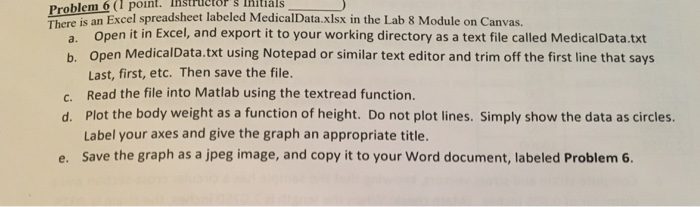
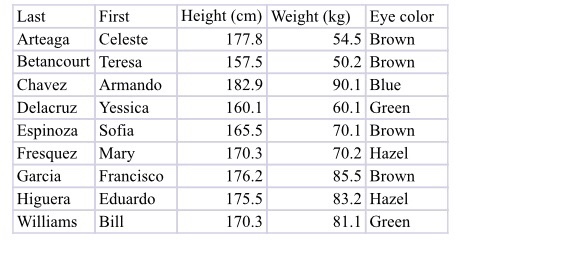
Problem(1 pointnit als Probisan Excel spreadsheet labeled MedicalData.xlsx in the Lab 8 Module on Canvas. nt. Instructor's Imitials . Instructors i a. Open it in Excel, and export it to your working directory as a text file called MedicalData.txt b. Open MedicalData.txt using Notepad or similar text editor and trim off the first line that says Last, first, etc. Then save the file. Read the file into Matlab using the textread function. Plot the body weight as a function of height. Do not plot lines. Simply show the data as circles. Label your axes and give the graph an appropriate title. Save the graph as a jpeg image, and copy it to your Word document, labeled Problem 6. c. d. e
Step by Step Solution
There are 3 Steps involved in it

Get step-by-step solutions from verified subject matter experts
 Study Help