







Question: MATLAB Robotic toolbox Each student will be assigned a computer equipped with a MATLAB robotics toolbox. You have to design the Dobot Magician using the
MATLAB Robotic toolbox
Each student will be assigned a computer equipped with a MATLAB robotics toolbox. You have to
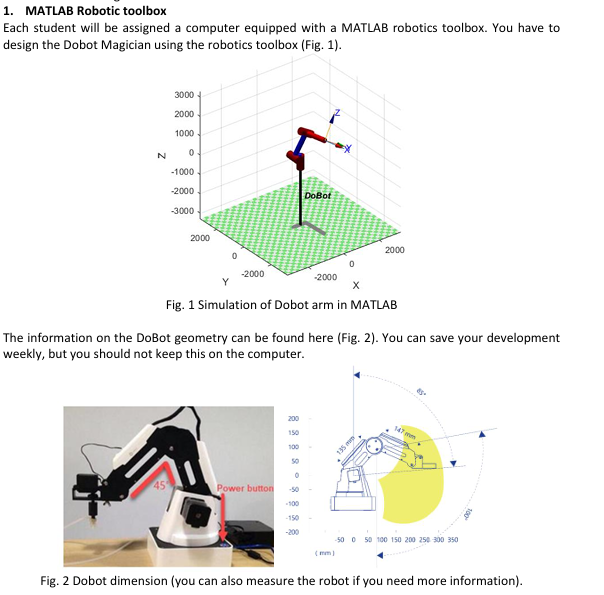
design the Dobot Magician using the robotics toolbox Fig
Fig. Simulation of Dobot arm in MATLAB
The information on the DoBot geometry can be found here FigYou can save your development
weekly, but you should not keep this on the computer.
Fig. Dobot dimension you can also measure the robot if you need more informationForward and Inverse Kinematics and Trajectory planning, you will learn how to develop robotics kinematics and trajectory planning. In the task, you need to use this knowledge to develop the code on MATLAB for the Dobot. You have to first define DH parameters and use this in the robot simulator for DoBot. Use this information to create Kinematics and then Trajectory planning. Provide separate MATLAB code for each: Forward Kinematic Single MATLAB code Inverse Kinematic Single MATLAB code Trajectory Planning Single MATLAB code
MATLAB Robotic toolbox
Each student will be assigned a computer equipped with a MATLAB robotics toolbox. You have to design the Dobot Magician using the robotics toolbox Fig
Fig. Simulation of Dobot arm in MATLAB
The information on the DoBot geometry can be found here Fig You can save your development weekly, but you should not keep this on the computer.
Fig. Dobot dimension you can also measure the robot if you need more information
Step by Step Solution
There are 3 Steps involved in it
1 Expert Approved Answer
Step: 1 Unlock

Question Has Been Solved by an Expert!
Get step-by-step solutions from verified subject matter experts
Step: 2 Unlock
Step: 3 Unlock
 Study Help