







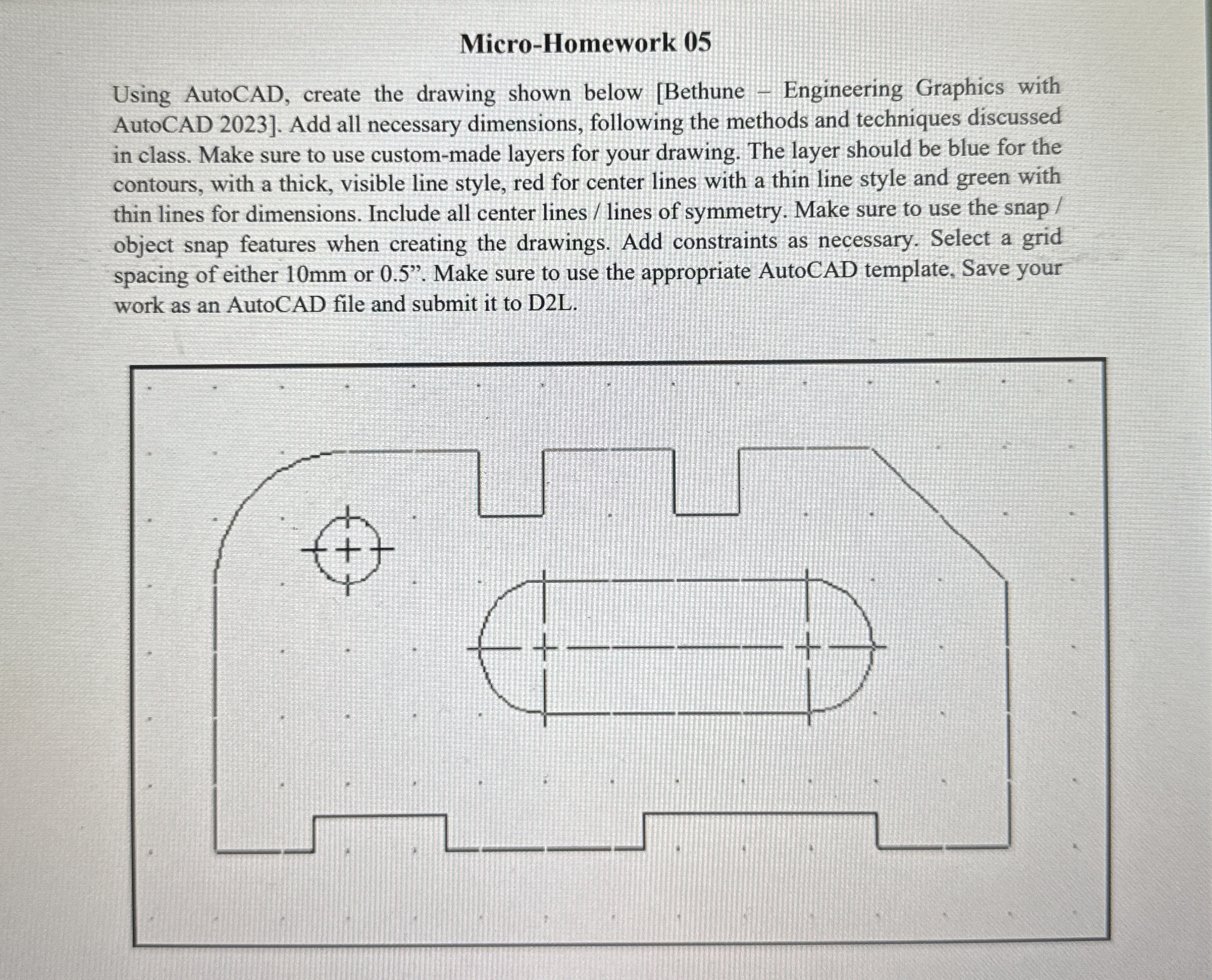
Question: Micro - Homework 0 5 Using AutoCAD, create the drawing shown below [ Bethune - Engineering Graphics with AutoCAD 2 0 2 3 ] .
MicroHomework
Using AutoCAD, create the drawing shown below Bethune Engineering Graphics with
AutoCAD Add all necessary dimensions, following the methods and techniques discussed
in class. Make sure to use custommade layers for your drawing. The layer should be blue for the
contours, with a thick, visible line style, red for center lines with a thin line style and green with
thin lines for dimensions. Include all center lineslines of symmetry. Make sure to use the snap
object snap features when creating the drawings. Add constraints as necessary. Select a grid
spacing of either mm or Make sure to use the appropriate AutoCAD template, Save your
work as an AutoCAD file and submit it to DL
Step by Step Solution
There are 3 Steps involved in it
1 Expert Approved Answer
Step: 1 Unlock

Question Has Been Solved by an Expert!
Get step-by-step solutions from verified subject matter experts
Step: 2 Unlock
Step: 3 Unlock
 Study Help