







Question: Microsoft Excel Pivot Tables are a quick and effective way to obtain various summary measurements about a dataset. It is then possible to use the
Microsoft Excel Pivot Tables are a quick and effective way to obtain various summary measurements about a dataset. It is then possible to use the Pivot Table results to calculate secondary measurements. In this tutorial, you will create a simple Pivot Table of frequency counts, and then use the results to calculate relative and percent frequencies.
The data has been collected in the Microsoft Excel Online file below. Open the spreadsheet and perform the required analysis to answer the questions below.
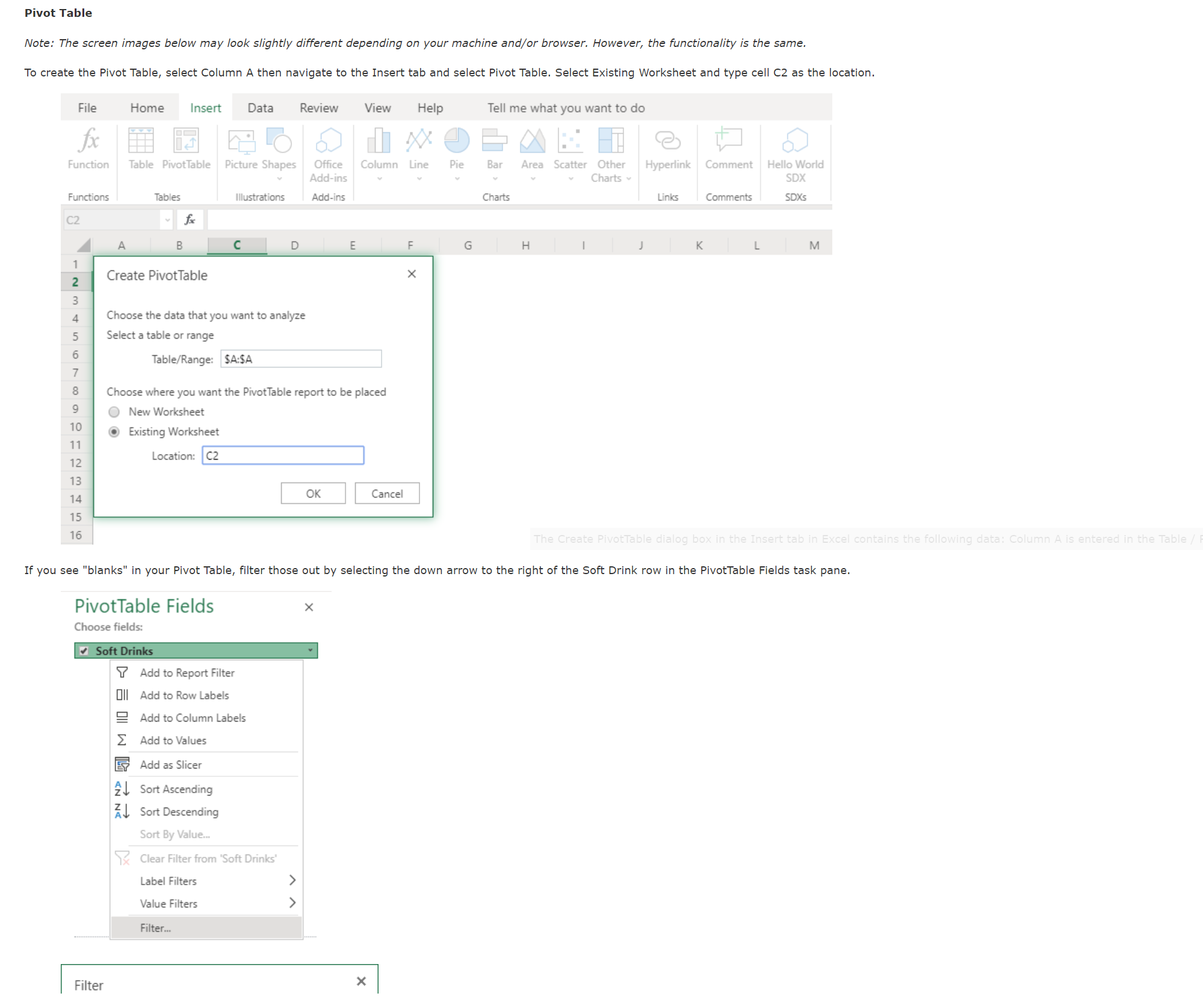
If you see "blanks" in your Pivot Table, filter those out by selecting the down arrow to the right of the Soft Drink row in the PivotTable Fields task pane.
PivotTable Fields
Choose fields:
Soft Drinks
checkmark Add to Report Filter
DIl Add to Row Labels
Add to Column Labels
sum Add to Values
Add as Slicer
mathrmZdownarrow Sort Ascending
mathrmZdownarrow Sort Descending
Sort By Value...
Clear Filter from 'Soft Drinks'
Label Filters
Value Filters
Filter...
Filter Dr Pepper
Mountain Dew
checkmark Pepsi
Sprite
blank
Next, in the Pivot Table task pane, drag Soft Drinks to the Rows box and Values box. Make sure the Values box is set to Count of Soft Drinks. You now have created a Frequency Table.
Drag fields between areas below:
If the Values box is not set to Count, click the down arrow to the right, and select Value Field Settings. There you will see options for analyzing your data and Count is among those options.
In Column F and G create columns for "Relative Frequency" and "Percent Frequency that align with the Pivot Table headers.
In your new "Relative Frequency" and "Percent Frequency columns, proceed with those calculations so down the length of the Pivot Table and enter those values below.
Relative Frequency Percent Frequency CocaCola
Pepsi
Sprite
Mountain Dew
Pepsi
Diet Coke
Pepsi
CocaCola
CocaCola
Dr Pepper
CocaCola
Diet Coke
Sprite
CocaCola
Mountain Dew
Pepsi
Pepsi
Dr Pepper
Pepsi
Diet Coke
CocaCola
Pepsi
Sprite
Sprite
Sprite
Diet Coke
CocaCola
Diet Coke
Pepsi
Pepsi
CocaCola
Diet Coke
Pepsi
CocaCola
Sprite
Pepsi
Mountain Dew
Pepsi
Sprite
Mountain Dew
Sprite
Pepsi
Pepsi
CocaCola
CocaCola
Sprite
CocaCola
Diet Coke
Pepsi
Mountain Dew
Sprite
Diet Coke
Step by Step Solution
There are 3 Steps involved in it
1 Expert Approved Answer
Step: 1 Unlock

Question Has Been Solved by an Expert!
Get step-by-step solutions from verified subject matter experts
Step: 2 Unlock
Step: 3 Unlock
 Study Help