







Question: 1. 2. 3. 4. 5. 6. 7. Competitive Swim Clubs, Inc. is a national chain of swim clubs targeted to youth and adults who
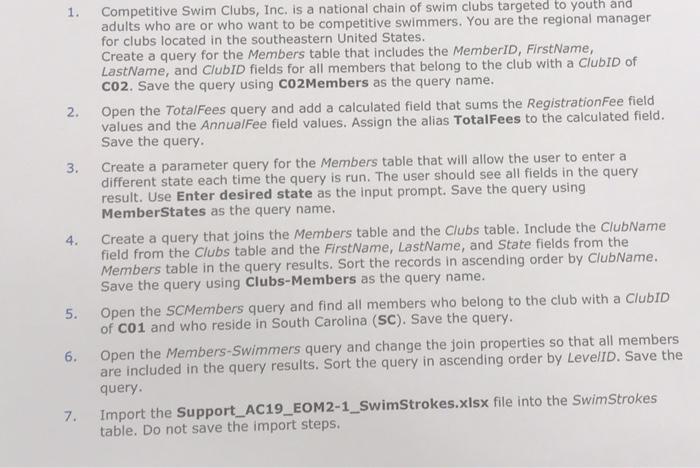
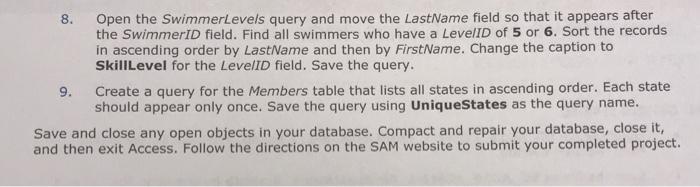
1. 2. 3. 4. 5. 6. 7. Competitive Swim Clubs, Inc. is a national chain of swim clubs targeted to youth and adults who are or who want to be competitive swimmers. You are the regional manager for clubs located in the southeastern United States. Create a query for the Members table that includes the MemberID, FirstName, LastName, and ClubID fields for all members that belong to the club with a ClubID of C02. Save the query using C02Members as the query name. Open the TotalFees query and add a calculated field that sums the RegistrationFee field values and the AnnualFee field values. Assign the alias TotalFees to the calculated field. Save the query. Create a parameter query for the Members table that will allow the user to enter a different state each time the query is run. The user should see all fields in the query result. Use Enter desired state as the input prompt. Save the query using MemberStates as the query name. Create a query that joins the Members table and the Clubs table. Include the ClubName field from the Clubs table and the FirstName, LastName, and State fields from the Members table in the query results. Sort the records in ascending order by ClubName. Save the query using Clubs-Members as the query name. Open the SCMembers query and find all members who belong to the club with a ClubID of C01 and who reside in South Carolina (SC). Save the query. Open the Members-Swimmers query and change the join properties so that all members are included in the query results. Sort the query in ascending order by LevelID. Save the query. Import the Support_AC19_EOM2-1_SwimStrokes.xlsx file into the SwimStrokes table. Do not save the import steps. 8. 9. Open the SwimmerLevels query and move the LastName field so that it appears after the SwimmerID field. Find all swimmers who have a LevelID of 5 or 6. Sort the records in ascending order by LastName and then by FirstName. Change the caption to Skill Level for the LevelID field. Save the query. Create a query for the Members table that lists all states in ascending order. Each state should appear only once. Save the query using UniqueStates as the query name. Save and close any open objects in your database. Compact and repair your database, close it, and then exit Access. Follow the directions on the SAM website to submit your completed project.
Step by Step Solution
There are 3 Steps involved in it
Lets break down each step to help you create the queries in Microsoft Access 1 C02Members Query Open Access and your database Go to the Create tab and ... View full answer

Get step-by-step solutions from verified subject matter experts
 Study Help