







Question: modify the following lookout.c program with the following capabilities from the attached picture. thank you // lookout.c -- print message when file changes #include #include
modify the following lookout.c program with the following capabilities from the attached picture. thank you
// lookout.c -- print message when file changes
#include
#include
#include
#define MFILE 10
void cmp(const char *, time_t);
struct stat sb;
int main(int argc, char **argv)
{
int j;
time_t last_time[MFILE+1];
if (argc
fprintf(stderr, "usage: lookout filename ... ");
exit(1);
}
//int stat(const char *path, struct stat *buf);
if (--argc > MFILE ){
fprintf(stderr, "lookout: too many filenames ");
exit(1);
}
//Initialization
for(j = 1, j
a. Repeat the following steps 100 times x. Wait 1 seconds using "sleep" call xi. Call stat system call to extract the file attributes against "test.txt" xii. If you find any changes in any of the attributes, 1. Print the information on which attribute is changed. Make sure to print the previous value and the new value (i.e., the changed attribute value). There may exist more than 1 attribute values changedif(stat(argv(j), &sb) == -1)
{
fprintf(stderr, "lookout: couldn't stat %s ", argv(j));
exit(1);
}
last_time(j) = sb.st_mtime;
//loop until file changes
for(;;)
{
for(j = 1; j 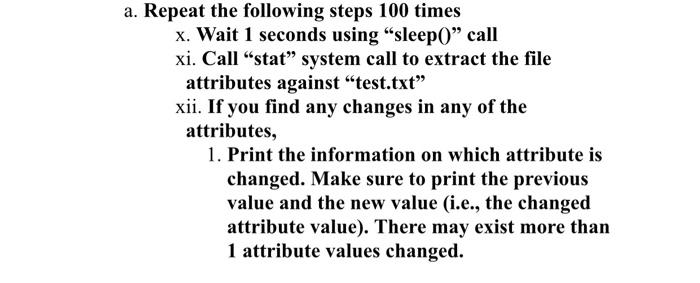
cmp(argv(j), last_time(j));
/*rest for 60 SECONDS "sleep" is a standard UNIX library routine */
sleep(60);
}
}
void cmp(const char *name, time_t last)
{
/*as long as statics about the file can be read check the modification time */
if(stat(name, &sb) == -1 || sb.st_mtime != last)
{
fprintf(stderr, "lookout: %s changed ", name);
exit(0);
}
}
Step by Step Solution
There are 3 Steps involved in it
1 Expert Approved Answer
Step: 1 Unlock

Question Has Been Solved by an Expert!
Get step-by-step solutions from verified subject matter experts
Step: 2 Unlock
Step: 3 Unlock
 Study Help