







Question: Modify the Javascript, CSS, and HTML code below to do the following: 1. Add an event handler for the click event of the Show Sales
Modify the Javascript, CSS, and HTML code below to do the following:
1. Add an event handler for the click event of the Show Sales By Quarter button. This handler should display the results in the text area below the Results heading in this format:
Sales by Quarter Q1: 9965 Q2: 7403
As you code this event handler and the other event handlers for this HW, try to use FOR loops to do as much of the processing as possible.
2. Add an event handler for the click event of the Show Sales By Region button. This handler should display the results as shown above.
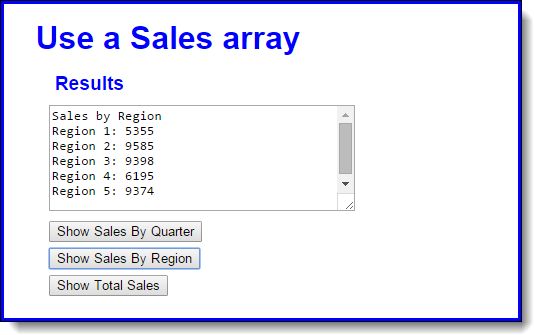
3. Add an event handler for the Show Total Sales button. This handler should display the total sales in a single line like this:
Total sales: 39907
------------------------------------------------HTML
Use a Sales array
Results
----------------------------------------------------------------------------JS
var r1 = [1540, 1130, 1580, 1105];
var r2 = [2010, 1168, 2305, 4102];
var r3 = [2450, 1847, 2710, 2391];
var r4 = [1845, 1491, 1284, 1575];
var r5 = [2120, 1767, 1599, 3888];
var textDisplay;
var $ = function (id) {
return document.getElementById(id);
}
window.onload = function () {
}
---------------------------------------------------------------------------CSS
body {
font-family: Arial, Helvetica, sans-serif;
background-color: white;
margin: 0 auto;
padding: 1em 2em;
width: 450px;
border: 3px solid blue;
}
h1 {
color: blue;
margin-top: 0;
margin-bottom: .5em;
}
h2 {
color: blue;
font-size: 120%;
padding: 0;
margin-bottom: .5em;
margin-left: 1em;
}
label {
float: left;
width: 3em;
text-align: right;
}
input {
margin-left: 1em;
margin-bottom: .5em;
}
textarea {
width: 300px;
height: 100px;
margin-left: 1em;
margin-bottom: .5em;
}
Use a Sales array Results Sales by Region Region 1: 5355 Region 2: 9585 Region 3: 9398 Region 4: 6195 Region 5: 9374 Show Sales By Quarter Show Sales By Region
Step by Step Solution
There are 3 Steps involved in it

Get step-by-step solutions from verified subject matter experts
 Study Help