







Question: Modify the program from Lah I to show the following image. t. = turtle.tartiets t-pansp (3) b. hacknard (160) t. lett (90) t.fonvard (10e) thos
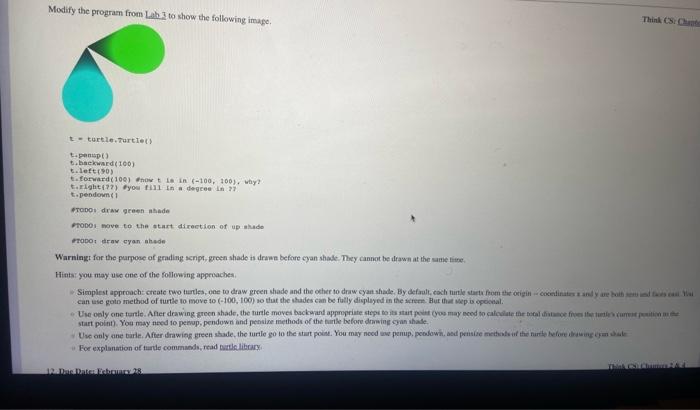
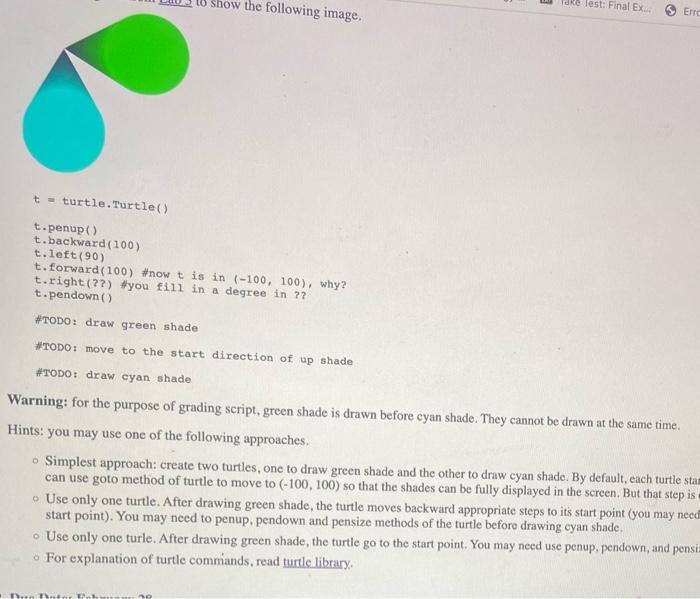
Modify the program from Lah I to show the following image. t. = turtle.tartiets t-pansp (3) b. hacknard (160) t. lett (90) t.fonvard (10e) thos t is in (100,100). way? torighta?2) tyou fi1i in a dogres in 27 t. peadorm 1 eropoy drav green akade rropes nove to the start direction of up alude rado: diray eyan ahede Warningt for the parpose of grading senpt, green shade is drawe before cyan shabe. They cannot be drawn at the sume liene. Hints: you may use one of the following appriaches. can use goto metrod of turte to move to (100,100) so that the shades can be fally divileyed in ite an ferme Bur that mep is epoceal. start point). You may need to peesop, pendown and pensine methods of the Birle before drawing cyan shade. "For explanation of taride comminds, read patle library, t= turtle.Turtle() t. penup () t. backward (100) t. left (90) t. forward (100) \#now t is in (100,100), why? t.right (??) \#you fill in a degree in ?? t.pendown () \#TODO: draw green shade HTODO: move to the start direction of up shade \#TODO: draw cyan shade Warning: for the purpose of grading script, green shade is drawn before cyan shade. They cannot be drawn at the same time. Hints: you may use one of the following approaches. - Simplest approach: create two turtles, one to draw green shade and the other to draw cyan shade. By default, each turtle sta can use goto method of turtle to move to (100,100) so that the shades can be fully displayed in the screen. But that step is - Use only one turtle. After drawing green shade, the turtle moves backward appropriate steps to its start point (you may need start point). You may need to penup, pendown and pensize methods of the turtle before drawing cyan shade. - Use only one turle. After drawing green shade, the turtle go to the start point. You may need use penup, pendown, and pensi For explanation of turtle commands, read turtle library. Modify the program from Lah I to show the following image. t. = turtle.tartiets t-pansp (3) b. hacknard (160) t. lett (90) t.fonvard (10e) thos t is in (100,100). way? torighta?2) tyou fi1i in a dogres in 27 t. peadorm 1 eropoy drav green akade rropes nove to the start direction of up alude rado: diray eyan ahede Warningt for the parpose of grading senpt, green shade is drawe before cyan shabe. They cannot be drawn at the sume liene. Hints: you may use one of the following appriaches. can use goto metrod of turte to move to (100,100) so that the shades can be fally divileyed in ite an ferme Bur that mep is epoceal. start point). You may need to peesop, pendown and pensine methods of the Birle before drawing cyan shade. "For explanation of taride comminds, read patle library, t= turtle.Turtle() t. penup () t. backward (100) t. left (90) t. forward (100) \#now t is in (100,100), why? t.right (??) \#you fill in a degree in ?? t.pendown () \#TODO: draw green shade HTODO: move to the start direction of up shade \#TODO: draw cyan shade Warning: for the purpose of grading script, green shade is drawn before cyan shade. They cannot be drawn at the same time. Hints: you may use one of the following approaches. - Simplest approach: create two turtles, one to draw green shade and the other to draw cyan shade. By default, each turtle sta can use goto method of turtle to move to (100,100) so that the shades can be fully displayed in the screen. But that step is - Use only one turtle. After drawing green shade, the turtle moves backward appropriate steps to its start point (you may need start point). You may need to penup, pendown and pensize methods of the turtle before drawing cyan shade. - Use only one turle. After drawing green shade, the turtle go to the start point. You may need use penup, pendown, and pensi For explanation of turtle commands, read turtle library
Step by Step Solution
There are 3 Steps involved in it

Get step-by-step solutions from verified subject matter experts
 Study Help