







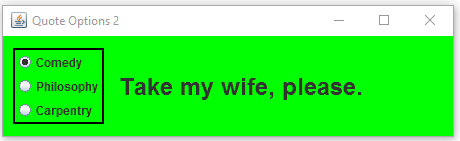
Question: Modify the QuoteOptions program from Chapter 5 to change its visual appearance. Present the radio buttons in a vertical column with a surrounding border to
Modify the QuoteOptions program from Chapter 5 to change its
visual appearance. Present the radio buttons in a vertical column
with a surrounding border to the left of the quote label.
//********************************************************************
// QuoteOptionsPanel.java Author: Lewis/Loftus
//
// Demonstrates the use of radio buttons.
//********************************************************************
import javax.swing.*;
import java.awt.*;
import java.awt.event.*;
public class QuoteOptionsPanel extends JPanel
{
private JLabel quote;
private JRadioButton comedy, philosophy, carpentry;
private String comedyQuote, philosophyQuote, carpentryQuote;
//-----------------------------------------------------------------
// Sets up a panel with a label and a set of radio buttons
// that control its text.
//-----------------------------------------------------------------
public QuoteOptionsPanel()
{
comedyQuote = "Take my wife, please.";
philosophyQuote = "I think, therefore I am.";
carpentryQuote = "Measure twice. Cut once.";
quote.setFont(new Font("Helvetica", Font.BOLD, 24));
comedy = new JRadioButton("Comedy", true);
comedy.setBackground(Color.green);
philosophy = new JRadioButton("Philosophy");
philosophy.setBackground(Color.green);
carpentry = new JRadioButton("Carpentry");
carpentry.setBackground(Color.green);
ButtonGroup group = new ButtonGroup();
group.add(comedy);
group.add(philosophy);
group.add(carpentry);
QuoteListener listener = new QuoteListener();
comedy.addActionListener(listener);
philosophy.addActionListener(listener);
carpentry.addActionListener(listener);
add(quote);
add(comedy);
add(philosophy);
add(carpentry);
setBackground(Color.green);
setPreferredSize(new Dimension(300, 100));
}
//*****************************************************************
// Represents the listener for all radio buttons.
//*****************************************************************
private class QuoteListener implements ActionListener
{
//--------------------------------------------------------------
// Sets the text of the label depending on which radio
// button was pressed.
//--------------------------------------------------------------
public void actionPerformed(ActionEvent event)
{
Object source = event.getSource();
if (source == comedy)
quote.setText(comedyQuote);
else
if (source == philosophy)
quote.setText(philosophyQuote);
else
quote.setText(carpentryQuote);
}
}
}
the end result of modification should be like the image below pleae view in general option
Step by Step Solution
There are 3 Steps involved in it

Get step-by-step solutions from verified subject matter experts
 Study Help