







Question: Quote Options_PP7 12.PNG PP 7.12 Modify the QuoteOptions program from Chapter 5 to change its visual appearance. Present the radio buttons in a vertical column
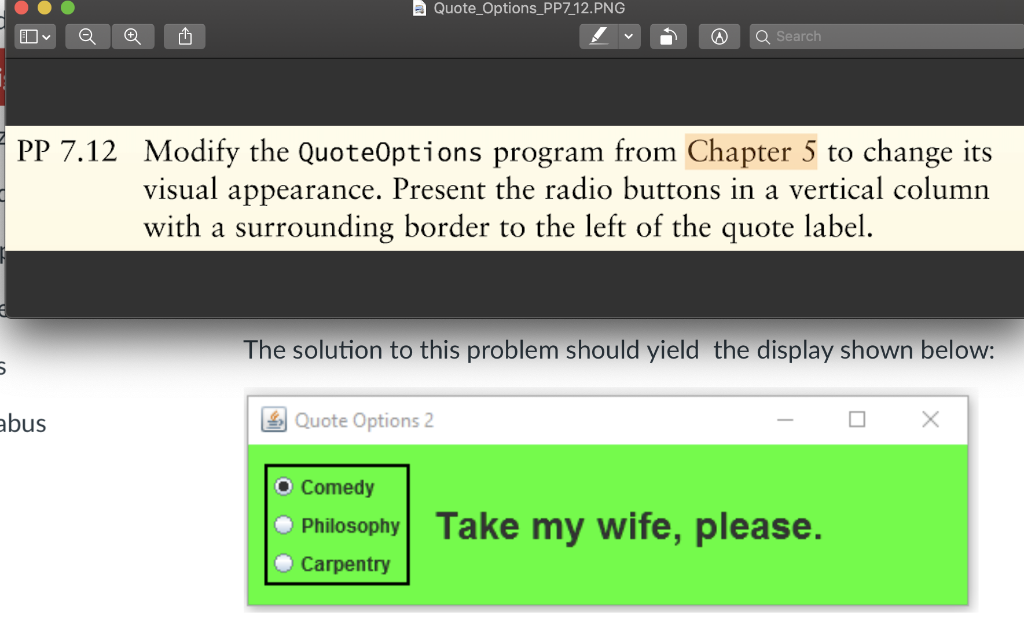
Quote Options_PP7 12.PNG PP 7.12 Modify the QuoteOptions program from Chapter 5 to change its visual appearance. Present the radio buttons in a vertical column with a surrounding border to the left of the quote label. The solution to this problem should yield the display shown below: bus Quote Options 2 O Comedy Philosophy Take my wife, please. Carpentry Quote Options_PP7 12.PNG PP 7.12 Modify the QuoteOptions program from Chapter 5 to change its visual appearance. Present the radio buttons in a vertical column with a surrounding border to the left of the quote label. The solution to this problem should yield the display shown below: bus Quote Options 2 O Comedy Philosophy Take my wife, please. Carpentry
Step by Step Solution
There are 3 Steps involved in it

Get step-by-step solutions from verified subject matter experts
 Study Help