







Question: Modify your code from Project 2 using the concepts you learned from Chapter 8 . Step 1 Open jGRASP and create a new java file.
Modify your code from Project using the concepts you learned from Chapter
Step
Open jGRASP and create a new java file.
Slick FileSave As and save the file in the CSCProject folder created in the GitHub Repository Instruction document
Name the file PolicyHolder.java
Open or return to GitHub Desktop. The program file added to the repository's directory should appear in the Changes column.
Click the button Commit to Project
Create a PolicyHolder class that will represent a person that is associated with an insurance policy.
Move the appropriate fields and methods of the Policy class into the PolicyHolder class Hint: the fields and methods you move into the PolicyHolder class should be directly associated with a policy holder
There should be no duplication of fields or methods in the Policy and PolicyHolder classes.
GitHub Desktop Commit once per source file:
In the Changes window, you should see a list of all of the files you have modified
You will commit changes to each file separately
Deselect all of the check boxes
Check the check box beside the PolicyHolder.java file
Commit your changes to the Project branch with the description "Imported fields and methods from Policy class"
Check the check box beside the Policy.java file
Commit your changes to the Project branch with the description "Moved fields and methods to the PolicyHolder" class
Step
Add a toString method to both the Policy and PolicyHolder classes.
GitHub Desktop Commit once per source file: Commit your changes to each source code file separately to the Project branch with the description "Added toString method"
Step
Add a static field that is used to keep track of the number of Policy objects that have been created.
GitHub Desktop Commit: Commit your changes to the Project branch with the description "Added static field to track number of Policy objects"
Step
Demonstrate proper use of class collaboration in such a way that a Policy has a PolicyHolder.
Step
Minimize the risk of security holes in your program Note: review the "Security Issues with Aggregate Classes" section in Chapter
Step
Alter the Demo class to implicitly call the toString method you created in Step when outputting information about the Policy objects.
Step
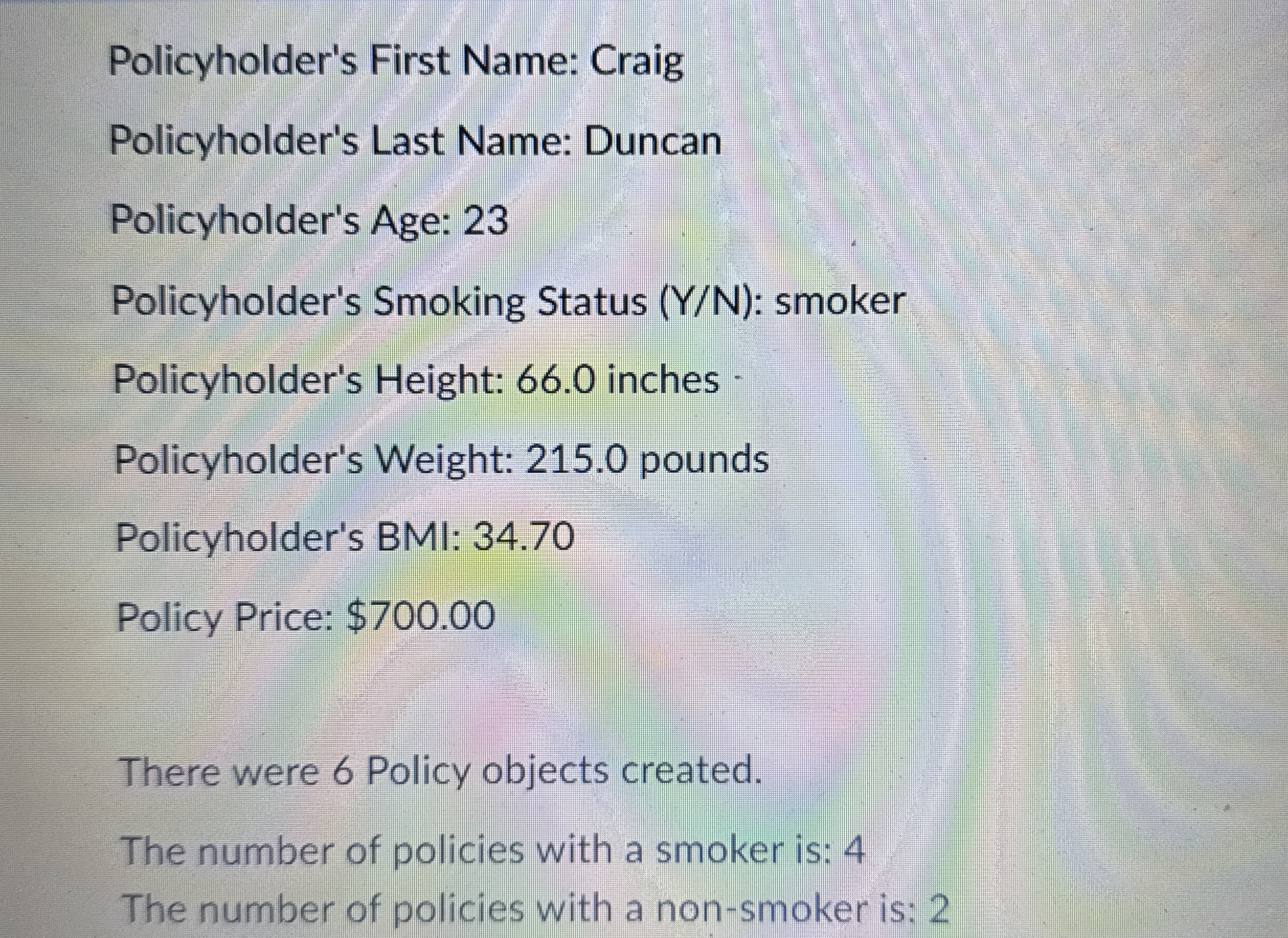
The demo program should display the number of Policy objects that were created, the number of Policyholders that are smokers, and the number of Policyholders that are nonsmokers.
GitHub Desktop Commit: Commit your changes to the Project branch with the description: "Added code to implicitly call toString method and output information about Policy and PolicyHolders".
After committing the last changes to the Project branch, make sure to merge the changes into the main branch and push them to the remote repository follow the same procedure that was explained in Project Submit a screenshot of your remote GitHub repository follow the same procedure that was explained in Project
Sample Output
Policy Number:
Provider Name: State Farm
Policyholder's First Name: Alice
Policyholder's Last Name: Jones
Policyholder's Age:
Policyholder's Smoking Status YN: smoker
Policyholder's Height: inches
Policyholder's Weight: pounds
Policyholder's BMI:
Policy Price: $
Policy Number:
Provider Name: Aetna
Policyholder's First Name: Bob
Policyholder's Last Name: Lee
Policyholder's Age:
Policyholder's Smoking Status : nonsmoker
Policyholder's Height: inches
Policyholder's Weight: pounds
Policyholder's BMI:
Policy Price: $
Policy Number:
Provider Name: Met Life
Policyholder's First Name: Chester
Policyholder's Last Name: Williams
Policyholder's Age:
Policyholder's Smoking Status YN: smoker
Policyholder's Height: inches
Policyholder's Weight: pounds
Policyholder's BMI:
Policy Price: $
Policy Number:
Policy Number:
Provider Name: Global
Policyholder's First Name: Cindy
Policyholder's Last Name: Smith
Policyholder's Age:
Policyholder's Smoking Status YN: nonsmoker
Policyholder's Height: inches
Policyholder's Weight: pounds
Policyholder's BMI:
Policy Price: $
Policy Number:
Provider Name: Reliable
Policyholder's First Name: Jenna
Policyholder's Last Name: Lewis
Policyholder's Age:
Policyholder's Smoking Status YN: smoker
Policyholder's Height: inches
Policyholder's Weight: pounds
Policyholder's BMI:
Policy Price: $
Policy Number:
Provider Name: State Farm
Policyholder's First Name: Craig
Policyholder's Last Name: Duncan
Policyholder's Age:
Policyholder's Smoking Status YN: smoker
Policyholder's Height: inches
Policyholder's Weight: pounds
Policyholder's First Name: Craig
Policyholder's Last Name: Duncan
Policyholder's Age:
Policyholder's Smoking Status YN: smoker
Policyholder's Height:
Step by Step Solution
There are 3 Steps involved in it
1 Expert Approved Answer
Step: 1 Unlock

Question Has Been Solved by an Expert!
Get step-by-step solutions from verified subject matter experts
Step: 2 Unlock
Step: 3 Unlock
 Study Help