







Question: 3. use indentation. Save the java file as Decimal MathUsing Integers.java in your lab4 folder. Compile the program and run it. Make sure that
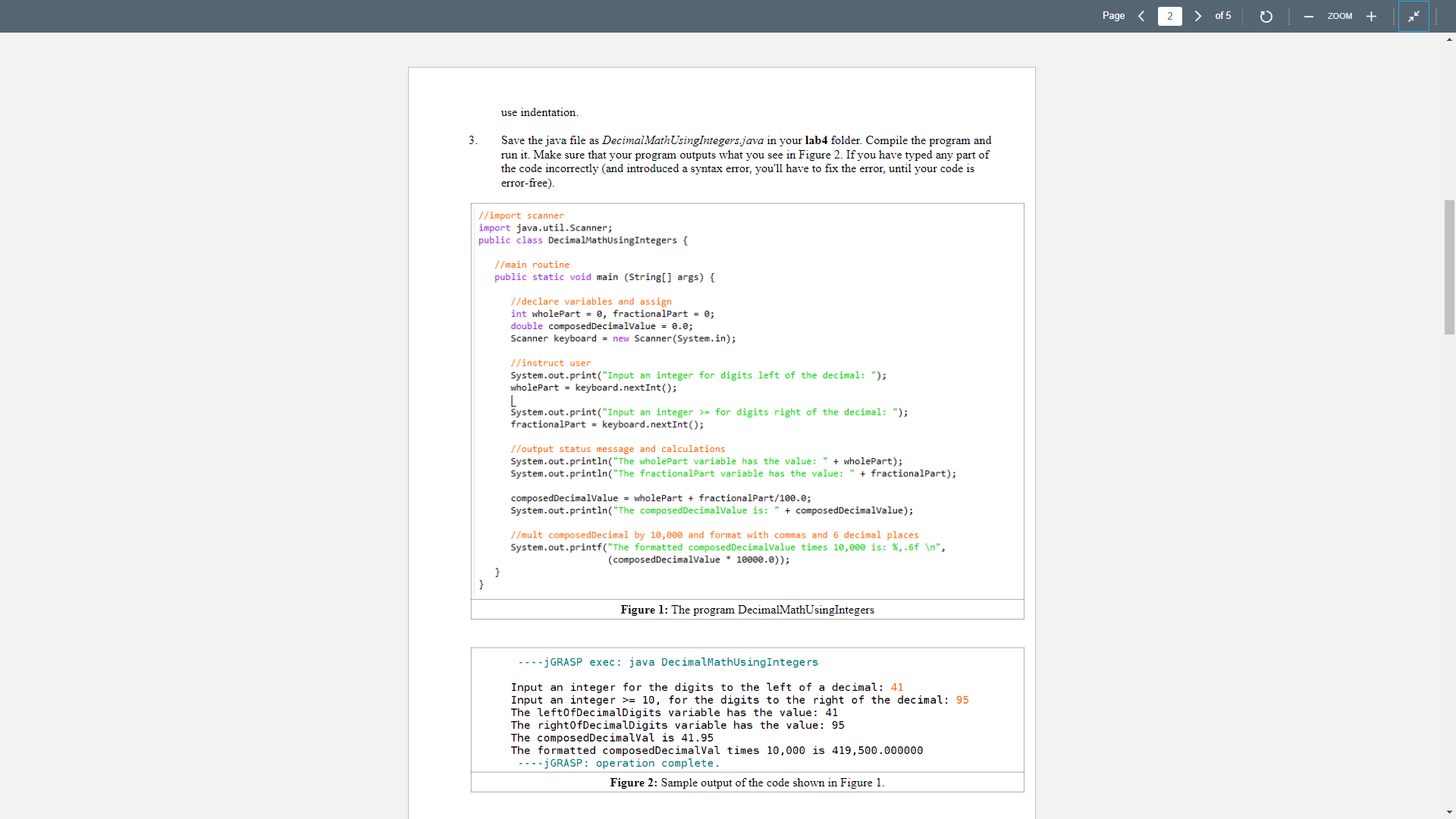
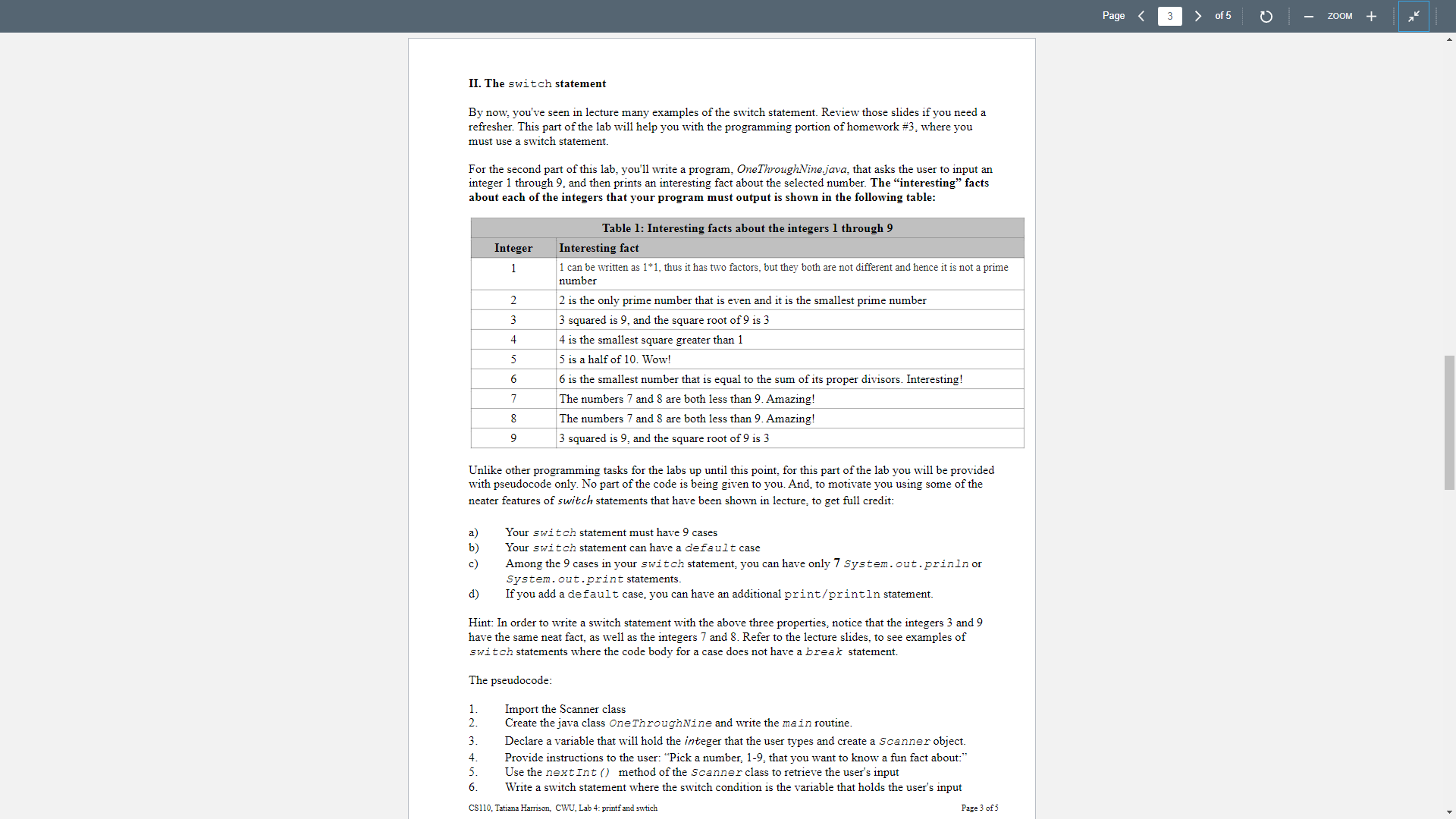
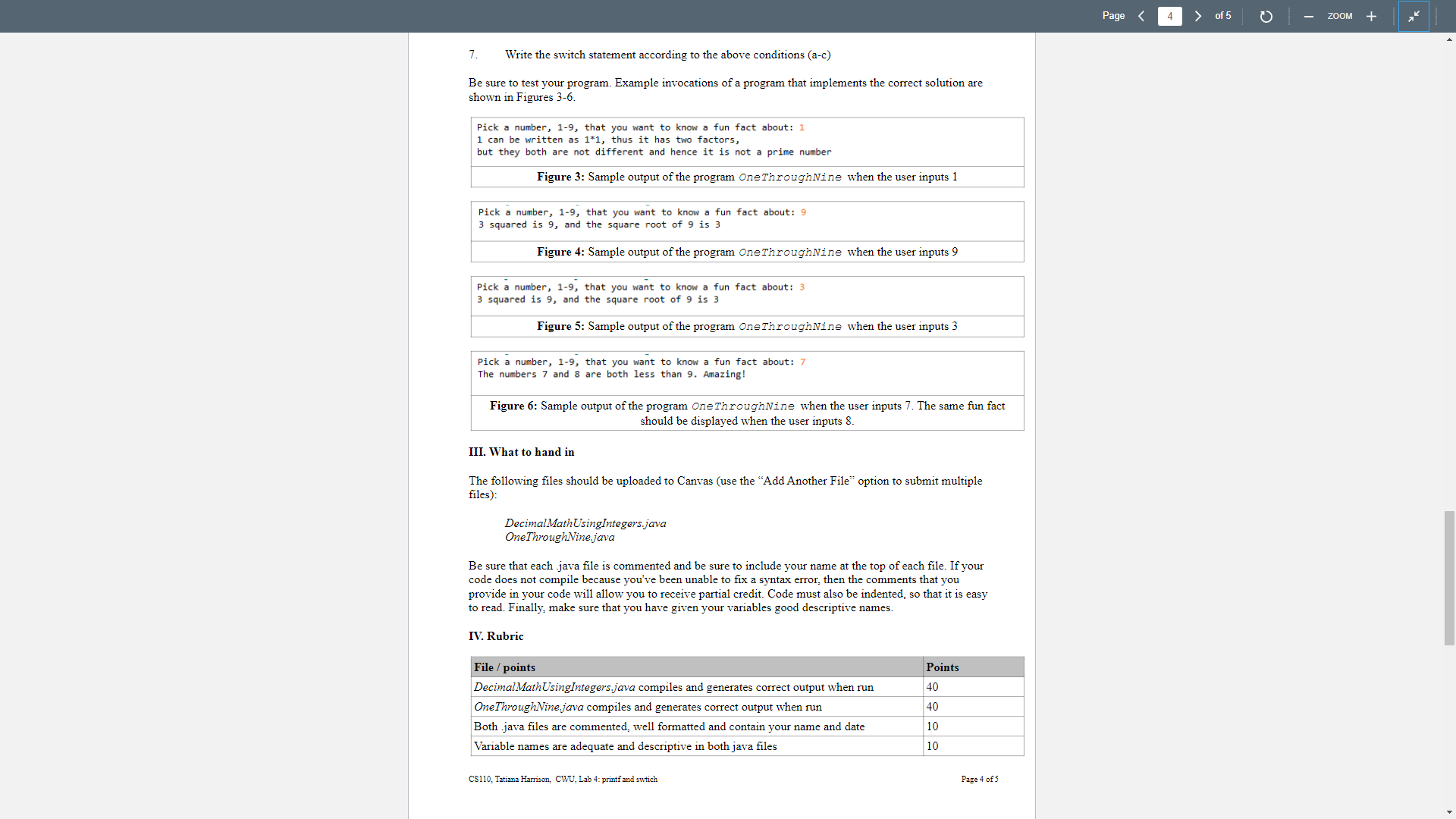
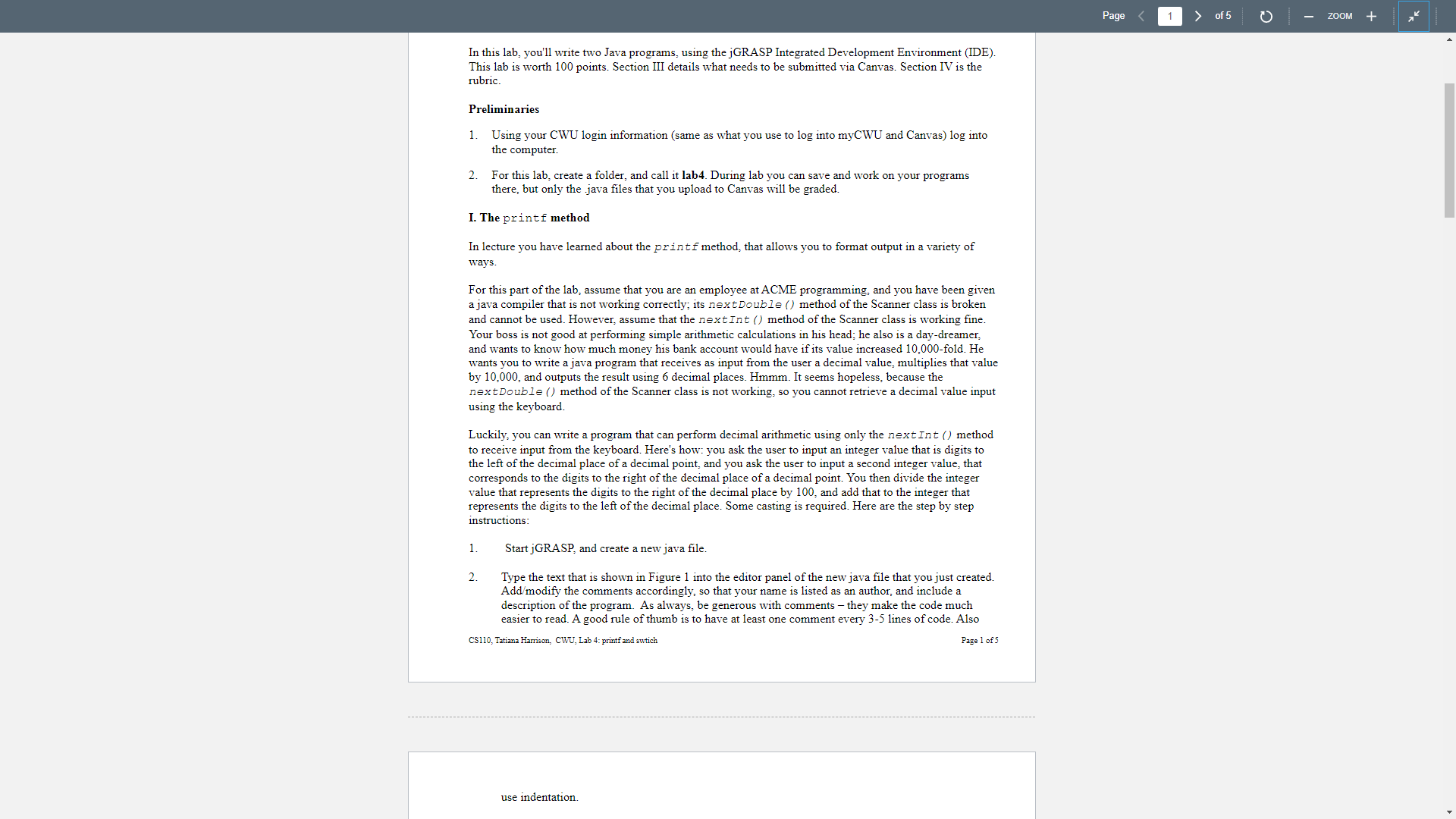
3. use indentation. Save the java file as Decimal MathUsing Integers.java in your lab4 folder. Compile the program and run it. Make sure that your program outputs what you see in Figure 2. If you have typed any part of the code incorrectly (and introduced a syntax error, you'll have to fix the error, until your code is error-free). //import scanner import java.util.Scanner; public class DecimalMathUsing Integers { //main routine public static void main (String[] args) { //declare variables and assign int wholePart=0, fractionalPart = 0; double composed DecimalValue = 0.0; Scanner keyboard = new Scanner(System.in); //instruct user System.out.print("Input an integer for digits left of the decimal: "); whole Part = keyboard.nextInt(); System.out.print("Input an integer> for digits right of the decimal: "); fractional Part keyboard.nextInt(); //output status message and calculations System.out.println("The whole Part variable has the value: + wholePart); System.out.println("The fractional Part variable has the value: " + fractionalPart); composedDecimalValue = whole Part + fractional Part/100.0; System.out.println("The composed DecimalValue is: " + composed DecimalValue); //mult composed Decimal by 10,000 and format with commas and 6 decimal places System.out.printf("The formatted composed DecimalValue times 10,000 is: %, .6f ", (composed DecimalValue * 10000.0)); Figure 1: The program DecimalMathUsing Integers ----j GRASP exec: java Decimal MathUsing Integers Input an integer for the digits to the left of a decimal: 41 Input an integer >= 10, for the digits to the right of the decimal: 95 The leftOfDecimalDigits variable has the value: 41 The rightOfDecimalDigits variable has the value: 95 The composed DecimalVal is 41.95 The formatted composed Decimal Val times 10,000 is 419,500.000000 jGRASP: operation complete. Figure 2: Sample output of the code shown in Figure 1. Page 2 of 5 ZOOM + II. The switch statement By now, you've seen in lecture many examples of the switch statement. Review those slides if you need a refresher. This part of the lab will help you with the programming portion of homework #3, where you must use a switch statement. For the second part of this lab, you'll write a program, OneThroughNine java, that asks the user to input an integer 1 through 9, and then prints an interesting fact about the selected number. The "interesting" facts about each of the integers that your program must output is shown in the following table: Table 1: Interesting facts about the integers 1 through 9 Interesting fact Integer 1 1 can be written as 1*1, thus it has two factors, but they both are not different and hence it is not a prime number 2 2 is the only prime number that is even and it is the smallest prime number 3 3 squared is 9, and the square root of 9 is 3 4 4 is the smallest square greater than 1 5 5 is a half of 10. Wow! 6 6 is the smallest number that is equal to the sum of its proper divisors. Interesting! 7 The numbers 7 and 8 are both less than 9. Amazing! 8 The numbers 7 and 8 are both less than 9. Amazing! 9 3 squared is 9, and the square root of 9 is 3 Unlike other programming tasks for the labs up until this point, for this part of the lab you will be provided with pseudocode only. No part of the code is being given to you. And, to motivate you using some of the neater features of switch statements that have been shown in lecture, to get full credit: a) Your switch statement must have 9 cases b) Your switch statement can have a default case c) d) Among the 9 cases in your switch statement, you can have only 7 System.out.prinln or System.out.print statements. If you add a default case, you can have an additional print/println statement. Hint: In order to write a switch statement with the above three properties, notice that the integers 3 and 9 have the same neat fact, as well as the integers 7 and 8. Refer to the lecture slides, to see examples of switch statements where the code body for a case does not have a break statement. The pseudocode: 1. Import the Scanner class 2. Create the java class One Through Nine and write the main routine. 3. 4. 5. 6. Declare a variable that will hold the integer that the user types and create a Scanner object. Provide instructions to the user: "Pick a number, 1-9, that you want to know a fun fact about:" Use the nextInt() method of the Scanner class to retrieve the user's input Write a switch statement where the switch condition is the variable that holds the user's input CS110, Tatiana Harrison, CWU, Lab 4: printf and swtich Page 3 of 5 Page 3 of 5 ZOOM + 7. Write the switch statement according to the above conditions (a-c) Be sure to test your program. Example invocations of a program that implements the correct solution are shown in Figures 3-6. Pick a number, 1-9, that you want to know a fun fact about: 1 1 can be written as 1*1, thus it has two factors, but they both are not different and hence it is not a prime number Figure 3: Sample output of the program One ThroughNine when the user inputs 1 Pick a number, 1-9, that you want to know a fun fact about: 9 3 squared is 9, and the square root of 9 is 3 Figure 4: Sample output of the program One ThroughNine when the user inputs 9 Pick a number, 1-9, that you want to know a fun fact about: 3 3 squared is 9, and the square root of 9 is 3 Figure 5: Sample output of the program One ThroughNine when the user inputs 3 Pick a number, 1-9, that you want to know a fun fact about: 7 The numbers 7 and 8 are both less than 9. Amazing! Figure 6: Sample output of the program One ThroughNine when the user inputs 7. The same fun fact should be displayed when the user inputs 8. III. What to hand in The following files should be uploaded to Canvas (use the "Add Another File" option to submit multiple files): Decimal MathUsing Integers.java OneThroughNine.java Be sure that each java file is commented and be sure to include your name at the top of each file. If your code does not compile because you've been unable to fix a syntax error, then the comments that you provide in your code will allow you to receive partial credit. Code must also be indented, so that it is easy to read. Finally, make sure that you have given your variables good descriptive names. IV. Rubric File / points Decimal MathUsingIntegers.java compiles and generates correct output when run OneThroughNine.java compiles and generates correct output when run Points 40 40 Both java files are commented, well formatted and contain your name and date Variable names are adequate and descriptive in both java files 10 10 CS110, Tatiana Harrison, CWU, Lab 4: printf and swtich Page 4 of 5 Page < 4 of 5 ZOOM + 1 of 5 In this lab, you'll write two Java programs, using the jGRASP Integrated Development Environment (IDE). This lab is worth 100 points. Section III details what needs to be submitted via Canvas. Section IV is the rubric. Preliminaries 1. Using your CWU login information (same as what you use to log into myCWU and Canvas) log into the computer. 2. For this lab, create a folder, and call it lab4. During lab you can save and work on your programs there, but only the java files that you upload to Canvas will be graded. I. The printf method In lecture you have learned about the printf method, that allows you to format output in a variety of ways. For this part of the lab, assume that you are an employee at ACME programming, and you have been given a java compiler that is not working correctly; its next Double () method of the Scanner class is broken and cannot be used. However, assume that the nextInt() method of the Scanner class is working fine. Your boss is not good at performing simple arithmetic calculations in his head; he also is a day-dreamer, and wants to know how much money his bank account would have if its value increased 10,000-fold. He wants you to write a java program that receives as input from the user a decimal value, multiplies that value by 10,000, and outputs the result using 6 decimal places. Hmmm. It seems hopeless, because the nextDouble () method of the Scanner class is not working, so you cannot retrieve a decimal value input using the keyboard. Luckily, you can write a program that can perform decimal arithmetic using only the nextInt() method to receive input from the keyboard. Here's how: you ask the user to input an integer value that is digits to the left of the decimal place of a decimal point, and you ask the user to input a second integer value, that corresponds to the digits to the right of the decimal place of a decimal point. You then divide the integer value that represents the digits to the right of the decimal place by 100, and add that to the integer that represents the digits to the left of the decimal place. Some casting is required. Here are the step by step instructions: Page 1. Start jGRASP, and create a new java file. 2. Type the text that is shown in Figure 1 into the editor panel of the new java file that you just created. Add/modify the comments accordingly, so that your name is listed as an author, and include a description of the program. As always, be generous with comments - they make the code much easier to read. A good rule of thumb is to have at least one comment every 3-5 lines of code. Also CS110, Tatiana Harrison, CWU, Lab 4: printf and swtich Page 1 of 5 use indentation. ZOOM +
Step by Step Solution
3.40 Rating (153 Votes )
There are 3 Steps involved in it
Heres the code with proper indentation Java import javautilScanner public class DecimalMathUsingIntegers public static void mainString args int wholePart fractionalPart Scanner keyboard new ScannerSys... View full answer

Get step-by-step solutions from verified subject matter experts
 Study Help