







Question: Modify your program so that it displays labels for each of the sliders as well as provides text fields to reflect the values of the
Modify your program so that it displays labels for each of the sliders as well as provides text fields to reflect the values of the sliders.
example: 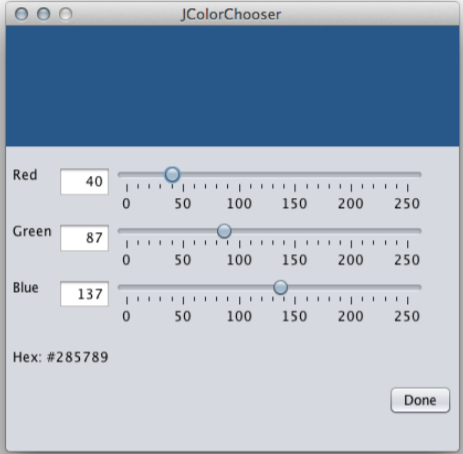
For the text fields, create a subclass of JTextField that restricts input to integers ranging from 0 - 255. Implement behavior so that when the user inputs values, the UI is updated, including the sliders and the color panel.
3. Provide a way for other components to get the current color in JColorChooser for use in their own display. Provide a test class demonstrating this behavior. (Hint: You might consider making the currently displayed color an instance variable and exposing that variable to outside classes.) Something simple is fine:
4. Provide a way for users to close the program when they are done. be careful with leaving the color available for outside components.
5. Modify ColorLabel so that it displays the hexadecimal value of the current color.
package colorchooser;
import java.awt.Color; import javax.swing.JPanel;
public class ColorCanvas extends JPanel implements ColorListener {
@Override public void changeColor(ColorEvent ce) { setBackground(ce.getColor()); } public ColorCanvas(){ super(); setBackground(Color.BLACK); } }
---------------------------------------------------------------
package colorchooser;
import java.awt.Color; import java.util.EventObject;
public class ColorEvent extends EventObject { private Color color; public ColorEvent(Object source, Color color){ super(source); this.color = color; } public Color getColor(){ return color; } }
------------------------------------------------------------------
package colorchooser;
import javax.swing.JLabel;
public class ColorLabel extends JLabel implements ColorListener {
@Override public void changeColor(ColorEvent ce) { setText("Red: " + ce.getColor().getRed() + ", Green: " + ce.getColor().getGreen() + ", Blue: " + ce.getColor().getBlue()); } public ColorLabel(){ super(); setText("Red: 0, Green: 0, Blue: 0"); } }
JColorChooser Red 40 50 100 150 200 250 Green | 87 | ' ? ? ' ' ' ? ' ' ' 50 100 150 200 250 Blue 137II'' 50 100 150 200 250 Hex: #285789 Done JColorChooser Red 40 50 100 150 200 250 Green | 87 | ' ? ? ' ' ' ? ' ' ' 50 100 150 200 250 Blue 137II'' 50 100 150 200 250 Hex: #285789 Done
Step by Step Solution
There are 3 Steps involved in it

Get step-by-step solutions from verified subject matter experts
 Study Help