







Question: must be visual basic code please include any properties that have to be changed. rcises-3.pdf - Adobe Acrobat Reader DC View Window Help Tools Extra
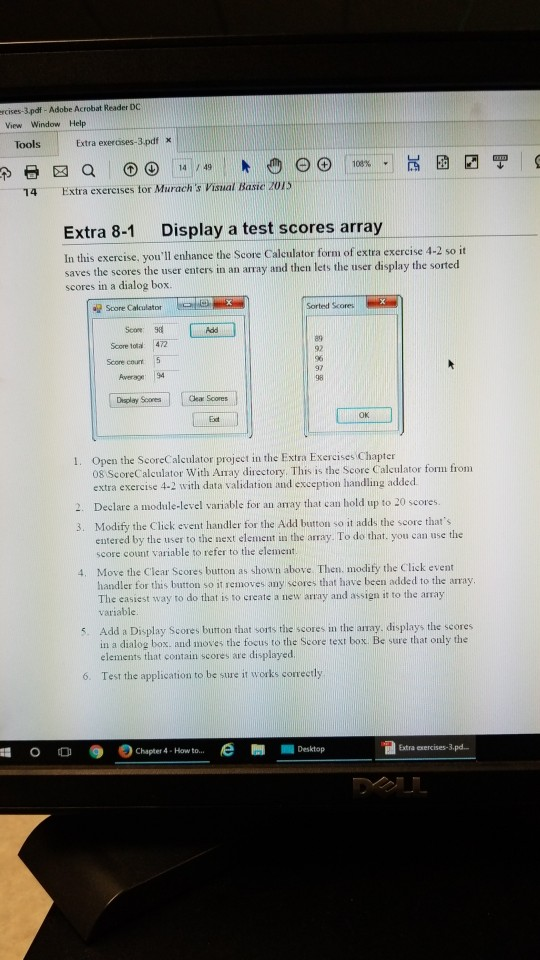
must be visual basic code please include any properties that have to be changed.
rcises-3.pdf - Adobe Acrobat Reader DC View Window Help Tools Extra exerases-3.pdf X 14 Extra exercises tor Murach's Visual Basie 2015 Extra 8-1 Display a test scores array In this exercise, you'll enhance the Score Caleulator form of extra exercise 4-2 so it saves the scores the user enters in an array and then lets the user display the sorted scores in a dialog box. Elle-a Sortedd Scores Score Calculator Scow 98 89 92 96 97 98 Score total: 472 Score count Awerage 94 Display Scores Cear Scores OK Exdt Open the ScoreCalculator project in the Extra Exercises Chapter 08 ScoreCalculator With Amay directory. This is the Score Calculator form from extra exercise 4-2 with data validation and exception handling added. 2. Declare a module-level variable for an aay that can hold up to 20 scores. 3. Modify the Click event handler for the Add button so it adds the score that's entered by the user to the next element in the array. To do that. you can use the score count variable to refer to the element Move the Clear Scores button as shown above Then. modity the Click event handler for this button so it removes any scores that have been added to the array The easiest way to do that is to create a new array and assign it to the array variable 4. 5. Add a Display Scores burton that sorts the scores in the array. displays the scores in a dialog box. and moves the tocus to the Score text box. Be sure that only the elements that contain scores are displayed 6. Test the application to be sure it works correctly 0 0 Chapter 4 . How to e Extra xercises-3.pd.. Desktop
Step by Step Solution
There are 3 Steps involved in it

Get step-by-step solutions from verified subject matter experts
 Study Help