Question: My code: import m250.library.OUPolygon; import java.awt.Color; public class DrawingJG { // Fields for the polygons representing the initials private OUPolygon letterJ; private OUPolygon letterG; //

My code:

import m250.library.OUPolygon; import java.awt.Color;

public class DrawingJG { // Fields for the polygons representing the initials private OUPolygon letterJ; private OUPolygon letterG; // A polygon to represent the space inside the G private OUPolygon spaceInG; /** * Constructor for objects of class DrawingJG */ public DrawingJG() { // Initialize the polygon for letter J letterJ = new OUPolygon( "100,50 100,170 125,175 125,125 225,125 250,100 250,50 225,50 225,100 125,100 125,50", Color.RED ); // Initialize the polygon for letter G letterG = new OUPolygon( "100,275 100,400 125,400 125,300 225,300 225,375 200,375 200,350 175,350 175,400 250,400 250,275", Color.RED ); // Initialize the polygon for the space inside G spaceInG = new OUPolygon( "175,350 200,350 200,375 175,375", Color.WHITE // Matches the canvas background ); // Make all polygons visible letterJ.setVisible(true); letterG.setVisible(true); spaceInG.setVisible(true); } /** * Constructor for object DrawiungJG that determains the polygon colour * based on the hashcode of the users first and last name */ public DrawingJG(String firstName, String lastName) { // Set the name fields this.firstName = firstName; this.lastName = lastName;

// Determine colors based on hash codes of the names Color firstNameColor = new Color(Math.abs(firstName.hashCode()) % 256); Color lastNameColor = new Color(Math.abs(lastName.hashCode()) % 256);

// Initialize the polygons for letters J and G letterJ = new OUPolygon( "100,50 100,170 125,175 125,125 225,125 250,100 250,50 225,50 225,100 125,100 125,50", firstNameColor ); letterG = new OUPolygon( "100,275 100,400 125,400 125,300 225,300 225,375 200,375 200,350 175,350 175,400 250,400 250,275", lastNameColor );

// Initialize the polygon for the space inside G spaceInG = new OUPolygon( "175,350 200,350 200,375 175,375", Color.WHITE // Matches the canvas background );

// Make all polygons visible letterJ.setVisible(true); letterG.setVisible(true); spaceInG.setVisible(true); } /** * An example of a method - replace this comment with your own * * @param y a sample parameter for a method * @return the sum of x and y */ public int sampleMethod(int y) { return y * 2; //Example method; customise as needed } }

Questions
My code: import m250.library.OUPolygon; importMy code: import m250.library.OUPolygon; import
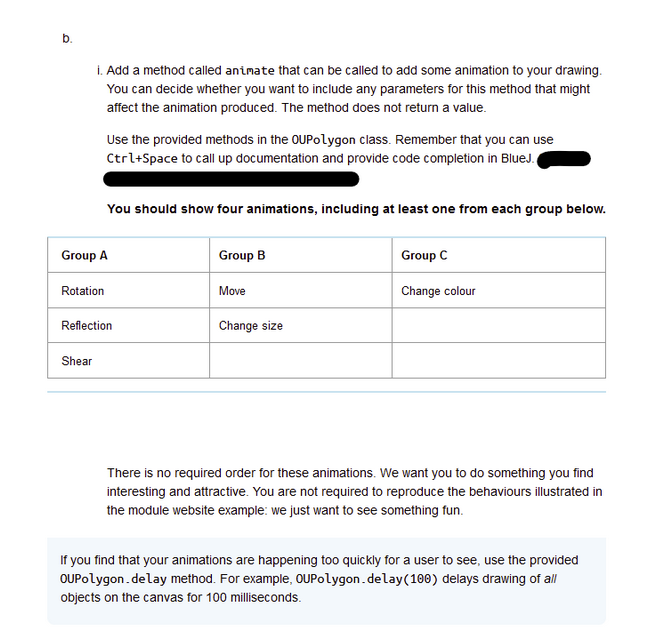
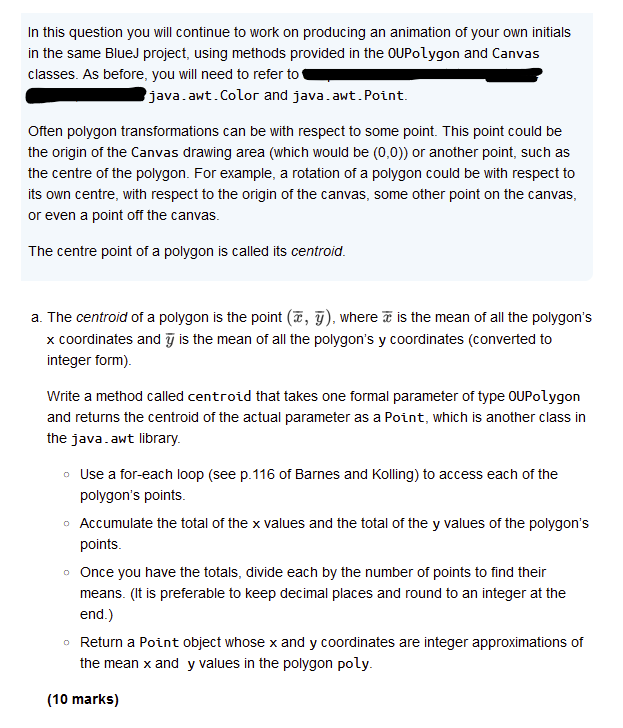
In this question you will continue to work on producing an animation of your own initials in the same Blued project, using methods provided in the OUPolygon and Canvas classes. As before, you will need to refer to llIIEIEIEIEGNGNGEEEE G -2 awt Color and java. awt Point Often polygon transformations can be with respect to some point. This point could be the origin of the Canvas drawing area (which would be (0,0)) or another point, such as the centre of the polygon. For example, a rotation of a polygon could be with respect to its own centre, with respect to the origin of the canvas, some other point on the canvas, or even a point off the canvas. The centre point of a polygon is called its centroid. a. The centroid of a polygon is the point (Z, 7 ), where T is the mean of all the polygon's x coordinates and is the mean of all the polygon's y coordinates (converted to integer form). Write a method called centroid that takes one formal parameter of type OUPolygon and returns the centroid of the actual parameter as a Point, which is another class in the java.awt library. Use a for-each loop (see p.116 of Barnes and Kolling) to access each of the polygon's points. . Accumulate the total of the x values and the total of the y values of the polygon's points. once You have the totals, divide each D'_-f' the number of [}DitS to find their means. {|t s preferat:rle to HE'E[} decimal D|E5|I:ES and round to an integer at the end.) Return a Point object whose x and y coordinates are integer approximations of the mean x and y values in the polygon poly. (10 marks) i. Add a method called animate that can be called to add some animation to your drawing. You can decide whether you want to include any parameters for this method that might affect the animation produced. The method does not return a value. Use the provided methods in the QUPolygon class. Remember that you can use Ctrl+Space to call up documentation and provide code completion in BlueJ - You should show four animations, including at least one from each group below. Group A Group B Group C Fotation | Move | Change colour Reflection | Change size | Shear " There is no required order for these animations. We want you to do something you find interesting and attractive. You are not required to reproduce the behaviours illustrated in the module website example: we just want to see something fun If you find that your animations are happening too quickly for a user to see, use the provided OUPolygon .delay method. For example, OUPolygon _delay(108) delays drawing of all objects on the canvas for 100 milliseconds

Step by Step Solution

There are 3 Steps involved in it

1 Expert Approved Answer
Step: 1 Unlock blur-text-image
Question Has Been Solved by an Expert!

Get step-by-step solutions from verified subject matter experts

Step: 2 Unlock
Step: 3 Unlock

Students Have Also Explored These Related Law Questions!