







Question: My code: %this code calculates tax >> income=input ('Enter income'); print (income) i = float(raw_input('i: ')) i >= 0 t1=2000+0.05*20000 t2= t1+0.08*30000 t3= t2+0.10*40000 while
My code:
%this code calculates tax >> income=input ('Enter income'); print (income) i = float(raw_input('i: ')) i >= 0 t1=2000+0.05*20000 t2= t1+0.08*30000 t3= t2+0.10*40000 while True: if i 10000 and i 30000 and i 60000 and i 100000: tax = (i100000)*(0.15)+t3 return tax if (tax > 0) fprintf('Tax is %f', %tax); else end
Error using checkArgsForHandleToPrint Handle input argument contains nonhandle values.
Error in checkArgsForHandleToPrint
Error in print>LocalCreatePrintJob (line 216) handles = checkArgsForHandleToPrint(0, varargin{:});
Error in print (line 38) [pj, inputargs] = LocalCreatePrintJob(varargin{:});
Can anyone please make a correct code for this problem?
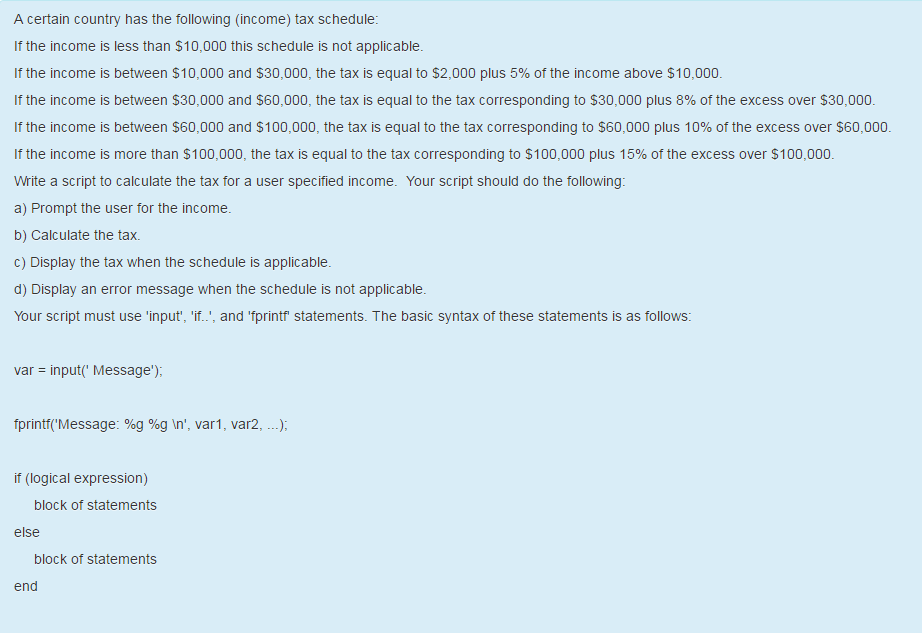
A certain country has the following (income) tax schedule: If the income is less than $10,000 this schedule is not applicable. If the income is between $10,000 and $30,000, the tax is equal to $2,000 plus 5% of the income above $10,000 f the income is between $30,000 and $60,000, the tax is equal to the tax corresponding to $30,000 plus 8% of the excess over $30,000 f the income is between $60,000 and $100 the tax is equal to the tax corresponding to $60,000 plus 10% of the excess over $60,000 f the income is more than $100,000, the tax is equal to the tax corresponding to $100,000 plus 15% of the excess over $100,000 Write a script to calculate the tax for a user specified income. Your script should do the following: a) Prompt the user for the income. b) Calculate the tax. c) Display the tax when the schedule is applicable. d) Display an error message when the schedule is not applicable. Your script must use 'input 'if. and 'fprintf statements. The basic syntax of these statements is as follows var input Message"). fprintf (Message: %g %g Mn', var 1, var2, if (logical expression) block of statements else block of statements end
Step by Step Solution
There are 3 Steps involved in it

Get step-by-step solutions from verified subject matter experts
 Study Help