







Question: I really need help with Tasks 1-3. I have copy and pasted each html file and pacific.css file below. pacific.css: (I started doing this on
I really need help with Tasks 1-3. I have copy and pasted each html file and pacific.css file below.
pacific.css: (I started doing this on my own so it is probably a little wrong)
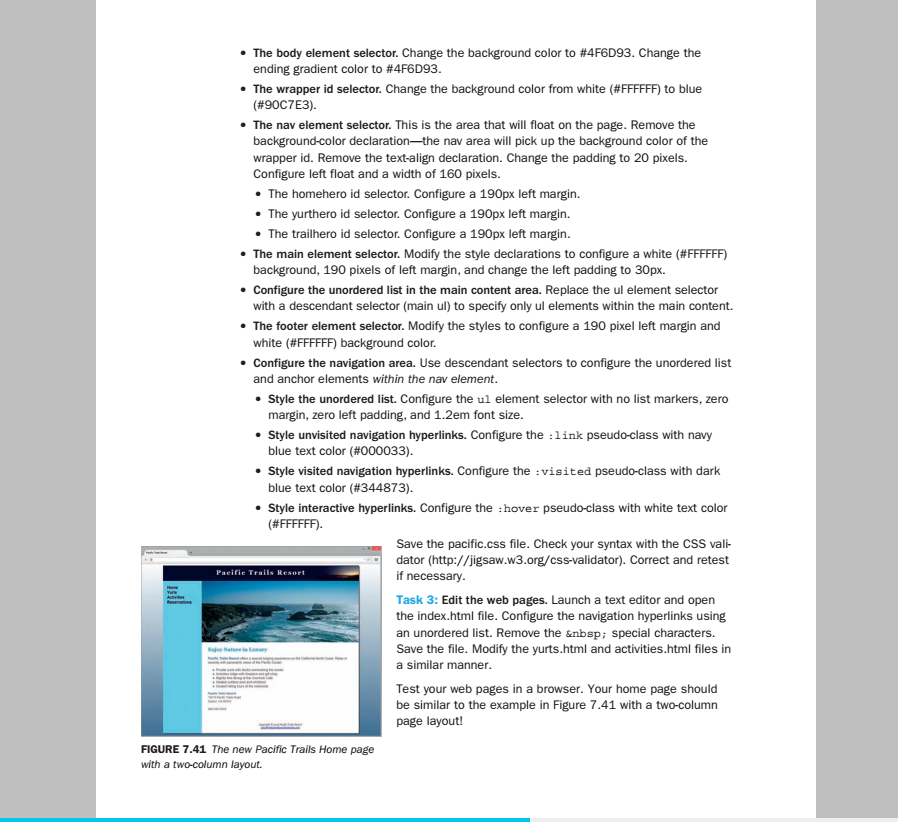
body { background-color:#4F6D93; color:#666666; font-family: Arial, Helvetica, sans-serif; background-image: linear-gradient(to bottom, #ffffff, #4F6D93); background-repeat: no-repeat; }
#wrapper { width: 80%; margin-left: auto; margin-right: auto; background-color: #90C7E3; min-width: 960px; max-width: 2048px; box-shadow: 3px 3px 3px #333333; }
header { background-color: #000033; color:#FFFFFF; background-image: url(sunset.jpg); background-position: right; background-repeat: no-repeat; text-align: center; height: 60px; padding-top: 15px; }
h1 { margin-bottom: 0; margin-top: 0; font-family: Georgia, "Times New Roman", serif; }
nav {font-weight: bold; padding: 10px; float: left; width: 160px; }
nav a { text-decoration: none; }
main { padding: 1px 20px 20px; display:block; }
h2 { color:#3399CC; font-family: Georgia, "Times New Roman", serif; text-shadow: 1px 1px 1px #ccc; }
h3 { color: #000033; font-family: Georgia, "Times New Roman", serif; }
dt {color:#000033; }
.resort {color:#5C7FA3; font-weight: bold; }
#contact { font-size: 90%; }
ul { list-style-image: url(marker.gif); }
footer {font-size: 75%; font-style: italic; font-family: Georgia, "Times New Roman", serif; text-align: center; padding: 20px }
#homehero { background-image: url(coasthero.jpg); height: 300px; background-repeat: no-repeat; background-size: 100% 100% margin-left: 190px; }
#yurthero { background-image: url(yurthero.jpg); height: 300px; background-repeat: no-repeat; background-size: 100% 100%; margin-left: 190px; }
#trailhero { background-image: url(trailhero.jpg); height: 300px; background-repeat: no-repeat; background-size: 100% 100%; margin-left: 190px; }
index:
Pacific Trails Resort
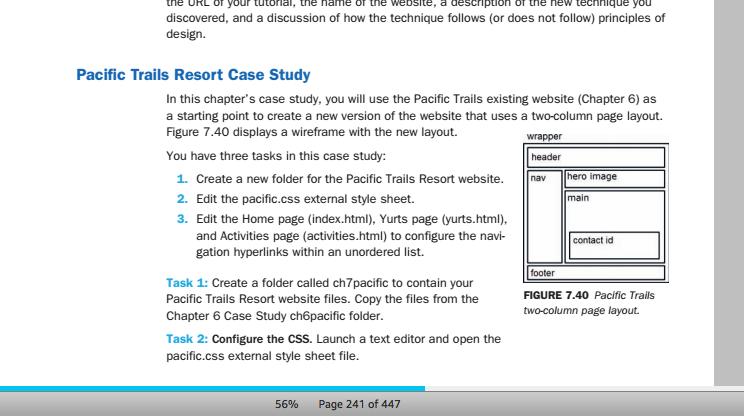
the URL of your tutolal, the hname of the website, a description of the new technlque you discovered, and a discussion of how the technique follows (or does not follow) principles of design Pacific Trails Resort Case Study In this chapter's case study, you will use the Pacific Trails existing website (Chapter 6) as a starting point to create a new version of the website that uses a two-column page layout. Figure 7.40 displays a wireframe with the new layout. You have three tasks in this case study: wrapper header nav- hero image 1. Create a new folder for the Pacific Trails Resort website. 2. Edit the pacific.css external style sheet. 3. Edit the Home page (index.html), Yurts page (yurts.html), main and Activities page (activities.html) to configure the navi- gation hyperlinks within an unordered list. contact id footer FIGURE 7.40 Pacific Trails two-column page layout. Task 1: Create a folder called ch7pacific to contain your Pacific Trails Resort website files. Copy the files from the Chapter 6 Case Study ch6pacific folder. Task 2: Configure the CSS. Launch a text editor and open the pacific.css external style sheet file. 56% Page 241 of 447
Step by Step Solution
There are 3 Steps involved in it

Get step-by-step solutions from verified subject matter experts
 Study Help