







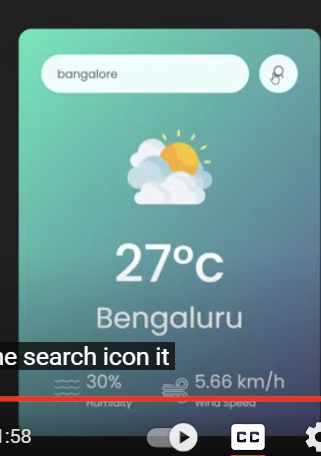
Question: My CSS is bad, I need help to make it look like the pic but i dont know how Here is my code : *
My CSS is bad, I need help to make it look like the pic but i dont know how
Here is my code :
margin: ;
padding: ;
fontfamily: 'Poppins', sansserif; bangalore
Bengaluru
e search icon it
Harmalty
windspaca
: Enter City Name
New York
Humidity
Wind Speed
boxsizing: borderbox;
body
backgroundcolor: #eecc;
card
width: ;
maxwidth: px;
background: lineargradientdeg, #e #ba;
color: #fff;
margin: px auto ;
borderradius: px;
padding: px px;
textalign: center;
search
width: ;
display: flex;
alignitems: center;
justifycontent: spacebetween;
search input
padding: px px;
outline: ;
background: #ebfffc;
color: #;
height: px;
flex: ;
marginright: px;
border: ;
borderradius: px;
fontsize: px;
search button
background: #ebfffc;
border: ;
outline: ;
borderradius: ;
width: px;
height: px;
cursor: pointer;
search button img
width: px;
weathericon
width: px;
margintop: px;
weather h
fontsize: px;
fontweight: ;
weather h
fontsize: px;
fontweight: px;
margintop: px;
details
display: flex;
alignitems: center;
justifycontent: spacebetween;
padding: px;
margintop: px;
col
display: flex;
alignitems: center;
textalign: left;
col img
width: px;
marginright: px;
humidity wind
fontsize: px;
margintop: px;
weather
display: none;
error
textalign: left;
marginleft: px;
fontsize: px;
margintop: px;
display: none;
Step by Step Solution
There are 3 Steps involved in it
1 Expert Approved Answer
Step: 1 Unlock

Question Has Been Solved by an Expert!
Get step-by-step solutions from verified subject matter experts
Step: 2 Unlock
Step: 3 Unlock
 Study Help