







Question: /* ============================================================================ Name : FileWriting_BinaryFile.c Author : Version : Copyright : Description : Writing different type data to binary files with different extension. Some are
/* ============================================================================ Name : FileWriting_BinaryFile.c Author : Version : Copyright : Description : Writing different type data to binary files with different extension. Some are nonsense extension ============================================================================ */ #include#include #include int main(void) { FILE * binFile_charType; binFile_charType = fopen("binFile_charType.bin", "w"); FILE * binFile_intType; binFile_intType = fopen("binFile_intType.exe", "w"); FILE * binFile_shortType; binFile_shortType = fopen("binFile_shortType.what", "w"); FILE * binFile_mixedType; binFile_mixedType = fopen("binFile_mixedType.mix", "w"); //Write char type message to bin file char * msg = "Hello world!"; fwrite(msg, sizeof(char), strlen(msg), binFile_charType); //Write int type values to bin file int intArray[] = {0,1,2,3,4,5}; fwrite(intArray, sizeof(int), 6, binFile_intType); //Write short type values to bin file short shortArray[] = {48,49,50,51,52,53}; fwrite(shortArray, sizeof(short), 6, binFile_shortType); //Write mixed type values to bin file int intVal = 2; float floatVal = 0.0f; double doubleVal = 1.0; char charVal = 'Y'; short shortVal = 10; fwrite(&intVal, sizeof(int), 1, binFile_mixedType); fwrite(&floatVal, sizeof(float), 1, binFile_mixedType); fwrite(&doubleVal, sizeof(double), 1, binFile_mixedType); fwrite(&charVal, sizeof(char), 1, binFile_mixedType); fwrite(&shortVal, sizeof(short), 1, binFile_mixedType); //What would you see in those files if you viewed them in text editor? //close the file streams ---skipping for now. Add later return EXIT_SUCCESS; }
ANSWER THE QUESTIONS!!!!!
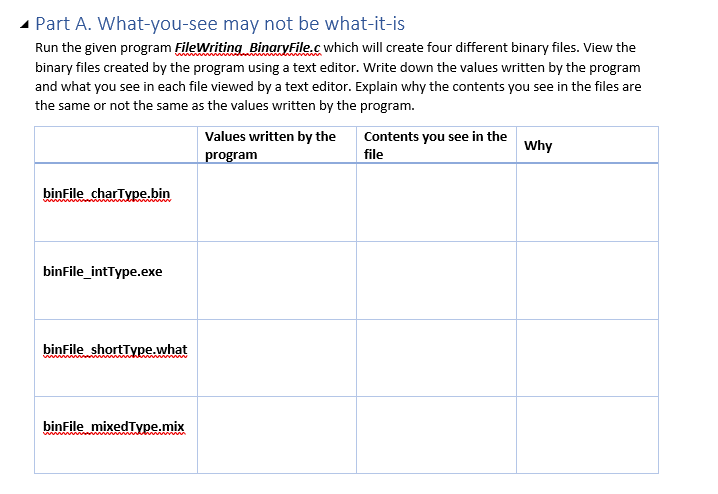
Part A. What-you-see may not be what-it-is Run the given program FileWriting BinaryFile.c which will create four different binary files. View the binary files created by the program using a text editor. Write down the values written by the program and what you see in each file viewed by a text editor. Explain why the contents you see in the files are the same or not the same as the values written by the program. Values written by the Contents you see in the program file Why binFile charType.bin binFile_intType.exe binFile shortType.what binFile mixedType.mix
Step by Step Solution
There are 3 Steps involved in it
1 Expert Approved Answer
Step: 1 Unlock

Question Has Been Solved by an Expert!
Get step-by-step solutions from verified subject matter experts
Step: 2 Unlock
Step: 3 Unlock
 Study Help