







Question: Need help ASAP, thanks Show your calculation EXCEL Lesson 3: Use Formulas and Functions; Edit; Print . Delete all the data and column heading in
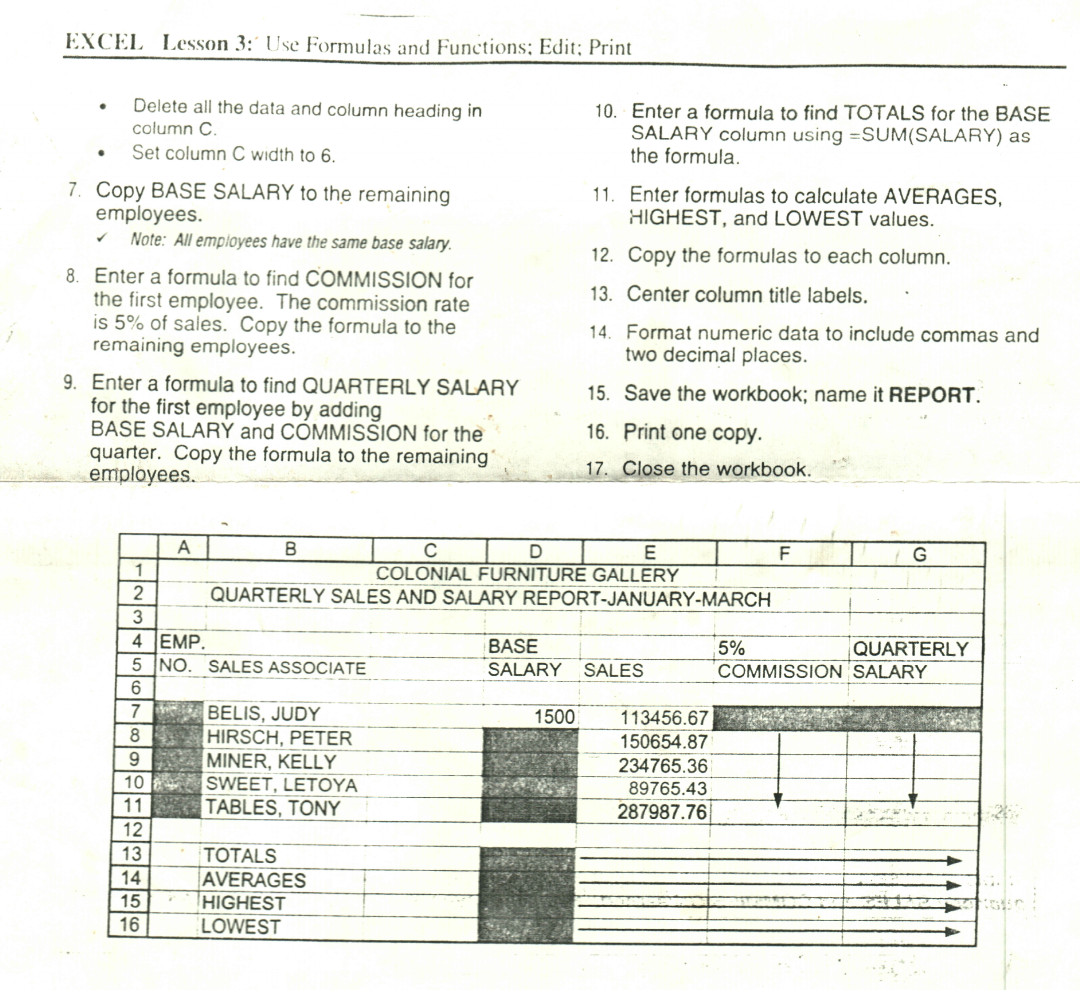
Need help ASAP, thanks
Show your calculation
EXCEL Lesson 3: Use Formulas and Functions; Edit; Print . Delete all the data and column heading in column C Set column C width to 6. 10. Enter a formula to find TOTALS for the BASE SALARY column using =SUM(SALARY) as the formula 11. Enter formulas to calculate AVERAGES, HIGHEST, and LOWEST values. 12. Copy the formulas to each column. 13. Center column title labels. 7. Copy BASE SALARY to the remaining employees. Note: All employees have the same base salary. 8. Enter a formula to find COMMISSION for the first employee. The commission rate is 5% of sales. Copy the formula to the remaining employees. 9. Enter a formula to find QUARTERLY SALARY for the first employee by adding BASE SALARY and COMMISSION for the quarter. Copy the formula to the remaining employees. 14. Format numeric data to include commas and two decimal places. 15. Save the workbook; name it REPORT. 16. Print one copy. 17. Close the workbook. A B D E F G 1 COLONIAL FURNITURE GALLERY 2 QUARTERLY SALES AND SALARY REPORT-JANUARY-MARCH 3 4 EMP. BASE 5% QUARTERLY 5 NO. SALES ASSOCIATE SALARY SALES COMMISSION SALARY 6 7 BELIS, JUDY 1500 113456.67 8 HIRSCH, PETER 150654.87 9 MINER, KELLY 234765.36 10 SWEET, LETOYA 89765.43 11 TABLES, TONY 287987.76 12 13 TOTALS 14 AVERAGES 15 HIGHEST 16 LOWEST
Step by Step Solution
There are 3 Steps involved in it

Get step-by-step solutions from verified subject matter experts
 Study Help