







Question: Need help creating a calculator using javafx. This is what I have and someone teach me how to go on from here, if you want
Need help creating a calculator using javafx. This is what I have and someone teach me how to go on from here, if you want to change it you can:
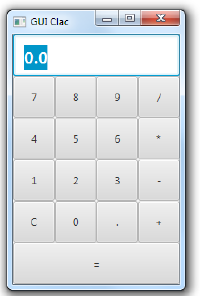
Sample Code and Picture Below:
import javafx.application.Application;
import javafx.scene.Scene;
import javafx.scene.control.Button;
import javafx.scene.control.TextField;
import javafx.scene.layout.BorderPane;
import javafx.scene.layout.GridPane;
import javafx.stage.Stage;
public class UserInterfaceCalculator {
public static void main(String[] args) {
}
public void start(Stage primaryStage) {
GridPane gPaneCenter = new GridPane();
TextField tField = new TextField("0.0");
tField.setMaxWidth(120);
tField.setEditable(false);
Button num0 = new Button("0");
Button num1 = new Button("1");
Button num2 = new Button("2");
Button num3 = new Button("3");
Button num4 = new Button("4");
Button num5 = new Button("5");
Button num6 = new Button("6");
Button num7 = new Button("7");
Button num8 = new Button("8");
Button num9 = new Button("9");
Button add = new Button ("+");
Button subtract = new Button("-");
Button multiply = new Button("*");
Button divide = new Button("/");
Button clear = new Button("AC");
Button decimal = new Button(".");
Button equals = new Button(" = ");
gPaneCenter.add(tField, 0, 0, 4, 1);
gPaneCenter.add(num7, 0, 1);
gPaneCenter.add(num8, 1, 1);
gPaneCenter.add(num9, 2, 1);
gPaneCenter.add(divide, 3, 1);
gPaneCenter.add(num4, 0, 2);
gPaneCenter.add(num5, 1, 2);
}
}
\f
Step by Step Solution
There are 3 Steps involved in it

Get step-by-step solutions from verified subject matter experts
 Study Help